

How Fashion Teams Organize Product Photos, Lookbooks, and Campaign Assets
A fashion collection rarely produces just one set of images. A typical launch may involve product photography for e-commerce, styled photographs for a lookbook, behind-the-scenes footage, promotional videos, social media graphics, and campaign materials prepared for retail partners.
These assets often originate from the same creative production, but they serve different business purposes. A clean front-view photograph helps shoppers evaluate a garment, while an editorial campaign image communicates the mood of a collection. A wholesale lookbook may combine both, adding product references and information relevant to buyers.
The challenge is keeping these materials organized as they move between photographers, designers, merchandisers, marketing teams, and external partners.
Fashion teams organize digital assets most effectively when each file has a clear purpose, product or campaign association, approval status, and designated distribution channel. This requires more than creating folders. It involves a repeatable workflow that keeps creative files connected to the products and commercial activities they support.
Quick Answer: How Do Fashion Teams Organize Digital Assets?
Fashion teams typically organize product photos, lookbooks, and campaign assets through a combination of structured storage, consistent file naming, searchable metadata, version control, and approval workflows.
Product photographs are usually associated with specific styles, colorways, and product views. Lookbooks are organized around collections, editorial layouts, and approved presentation versions. Campaign assets are classified by campaign, creative concept, distribution channel, and usage permissions.
A practical workflow begins when files are received from photographers or designers. The team identifies the assets, connects them to product or campaign information, selects and edits the appropriate files, completes approvals, and makes publication-ready versions accessible to authorized users.
The process may be managed through shared cloud storage or a dedicated Digital Asset Management (DAM) platform, depending on operational complexity.
The most important distinction is between storing a file and making it usable. A photograph is not necessarily ready for marketing simply because it exists in a shared folder. Fashion businesses need to know which version is approved, what it represents, and where it may be published.

Why Fashion Assets Need Different Organizational Approaches
Product photography, lookbooks, and campaign content may share models, garments, photographers, and production budgets. However, the information required to manage each type of asset is not identical.
Product photography is primarily connected to merchandise accuracy. Lookbooks connect garments to collection presentation and styling direction. Campaign assets connect creative materials to marketing activities, audiences, channels, and usage conditions.
Treating all three categories as a single collection of image files can make it difficult to identify which content is suitable for a particular task.
Product Photos: Organized Around Garment Identity
Product photography needs to represent the actual merchandise being offered for sale. For a fashion label, this often means connecting images to style codes, colorways, and specific product views.
A single blouse might have a front view, back view, close-up of the neckline, fabric detail, and model photograph. If the blouse is available in three colors, the brand may need separate photography or appropriate approved imagery for each colorway.
These relationships are important because different images may look similar while representing different commercial products.
A fashion team's product image library should make it possible to identify the relevant garment without relying on visual recognition alone.
Lookbooks: Organized Around Collection Presentation
Lookbooks usually have a broader editorial purpose. Rather than presenting each product independently, they show how garments relate to a collection's silhouette, styling, color direction, or overall aesthetic.
Their organization therefore needs to preserve relationships between selected photographs, outfits, page layouts, collection references, and approved presentation files.
A lookbook may exist as an editable design document, an approved PDF, a web presentation, and a smaller version intended for email distribution. These outputs belong to the same creative project but serve different functions.
The team should distinguish the working design files from approved materials intended for external circulation.
Campaign Assets: Organized Around Marketing Execution
Campaign materials introduce an additional layer of complexity because the same creative concept may be adapted for several channels.
A campaign hero photograph might be used on a website landing page, while alternative crops appear in social media posts, advertisements, email banners, and retail displays.
Campaign organization must therefore consider both the original creative asset and its intended application. The correct file is not necessarily the highest-resolution image or the newest export. It is the version approved for that channel and campaign.
|
Asset category |
Primary organizing reference |
Typical outputs |
Main control requirement |
|
Product photography |
Style, colorway, product view |
E-commerce gallery, marketplace images |
Product accuracy |
|
Lookbooks |
Collection, outfit, layout version |
PDF, digital presentation, print |
Editorial approval |
|
Campaign assets |
Campaign, concept, channel |
Ads, banners, video, social graphics |
Creative approval and usage rights |
|
Brand materials |
Brand identity, asset purpose |
Logos, templates, guidelines |
Current approved version |
These categories should remain connected within the wider asset library. A campaign image showing a particular garment may still need a reference to its product record, even when the image is primarily managed as campaign content.
Building a Folder Structure That Fashion Teams Can Actually Use
A practical folder structure gives creative teams a predictable starting point for locating and storing files. It should be simple enough for employees to understand without extensive training, yet stable enough to support repeated collection launches.
The most useful folder structure is not necessarily the one with the greatest number of categories. Excessive nesting can make files harder to retrieve, particularly when the same asset belongs to more than one project.
Adobe's guidance on organizing digital assets recommends consistent naming, folder structures, and metadata, while also recognizing that tags and collections provide alternative ways to organize and retrieve content.
A Practical Structure for Fashion Brand Assets
A fashion business could begin with four primary content areas:
- Product Photography: Original photographs, selected images, edited masters, and product-specific outputs.
- Lookbooks: Collection layouts, selected editorial photography, working documents, and approved presentations.
- Campaigns: Campaign concepts, production materials, approved creative assets, and channel deliverables.
- Brand Assets: Logos, visual identity guidelines, templates, and other reusable brand resources.
These are illustrative categories rather than a required DAM architecture.
For example, a spring collection may have a product photography workspace containing all the photographs from its e-commerce shoot, while a separate campaign workspace contains the collection's editorial images and advertising materials.
When the brand uses dedicated DAM software, those assets can remain searchable through metadata even if their physical storage locations differ.

Avoid Making Folder Paths Carry Every Attribute
A common organizational temptation is to build a deeply nested path for every possible property: year, season, category, style, color, photographer, location, channel, file type, and approval status.
Such structures become difficult to maintain when the organization changes or a file serves multiple purposes. Moving assets between folders can also create problems if downstream systems depend on particular paths or published URLs.
For businesses with metadata-enabled repositories, folders are better used for stable storage boundaries, while product codes, collection names, campaign associations, and publication statuses can be handled through searchable fields.
For smaller brands that do not yet have advanced metadata features, a more descriptive folder hierarchy may still be appropriate. The important principle is consistency.
How Fashion Teams Organize Product Photography
Product photography generally requires the closest relationship between media assets and structured product information.
Before a photoshoot, merchandising and creative teams should establish which garments will be photographed, which variants require separate images, and what views are needed for each sales channel.
This preparation reduces uncertainty when hundreds of images arrive from a studio or external photographer.
Start With a Product-Based Shot List
A shot list translates the product assortment into photography requirements. It helps photographers capture the necessary views while allowing merchandisers to verify whether the resulting files cover the intended products.
For a hypothetical apparel brand, an approved shot list might contain the following information:
|
Style |
Colorway |
Required images |
|
DR204 |
Black |
Front, back, detail, model |
|
DR204 |
Ivory |
Front, back, detail, model |
|
SH118 |
Blue Stripe |
Front, back, collar detail |
|
JK305 |
Olive |
Front, back, lining detail, model |
This example uses style codes rather than full stock-keeping units. A brand should use its authoritative product identifiers and determine the appropriate relationship between the image and the sellable variation.
The shot list is also useful during quality control. If a garment is missing a required view, the issue can be identified before marketing assets are distributed.
Separate Camera Originals From Edited Masters
Photographers may deliver camera originals, preliminary selections, and retouched files. These should not be treated as interchangeable.
Original files preserve source material for future editing. Selected images identify which photographs the team intends to develop. Edited masters represent completed retouching or color adjustments, while approved deliverables are prepared for specific uses.
A useful operational distinction is:
- Original: The source photograph retained for reference or editing.
- Select: A photograph chosen for further creative work.
- Edited Master: The completed high-quality image after retouching.
- Approved: An image authorized for a defined use.
- Rendition: An output adapted for a particular channel or technical requirement.
Approval and rendition are not mutually exclusive stages. One approved master can generate several approved renditions, while an alternative creative treatment may require additional review.
Adobe's documentation on asset renditions distinguishes pre-generated and dynamically generated versions used for different devices and delivery scenarios.
Use Consistent Product Image Naming
A clear naming convention remains helpful even when files are stored in a dedicated DAM platform. It makes exported files recognizable outside the original system and supports collaboration with external partners.
Consider this illustrative filename:
SS27_DR204_BLK_FRONT_PDP_v03.jpg
The components describe a spring collection reference, garment style, black colorway, front view, product detail page use, and version number.
A different rendition of the same asset might use a channel designation for social media or wholesale distribution.
The exact format should follow the brand's naming standards. Avoid characters that conflict with the selected software, and do not rely on filenames alone to indicate approval or legal usage permissions.
Connect Product Images to Accurate Product Records
A product photograph becomes more useful when the brand can identify which commercial product it represents.
This relationship may be established through product identifiers stored in the DAM or through integration with a Product Information Management system. For a business without PIM software, a controlled product catalog or spreadsheet may serve as an initial reference.
Accuracy becomes especially important when clothing is sold in multiple colorways. Google's Merchant Center image requirements emphasize that submitted product imagery should accurately represent the product and its variations, with primary and additional images serving distinct purposes.
That does not mean every garment size requires separate photographs. The appropriate image-to-variant relationship depends on the actual product differences and channel requirements.

Organizing Lookbooks Without Losing Their Editorial Structure
Lookbook management differs from ordinary product image management because a lookbook is a curated composition rather than simply a collection of independent photographs.
The sequence of outfits, relationships between images, typography, page design, and overall visual rhythm are part of the finished communication. A change to a page can affect the presentation even when none of the source images changes.
Fashion teams therefore need to manage both the underlying photographs and the assembled publication.
Maintain a Collection of Selected Editorial Images
During a fashion shoot, photographers may capture many variations of the same outfit. Creative directors or editors select images based on pose, composition, expression, garment visibility, and consistency with the collection's artistic direction.
The approved selection should remain distinguishable from the broader shoot archive. These images form the basis of the lookbook, but may also be reused in other approved applications.
A useful approach is to create a curated collection referencing the selected assets rather than duplicating physical files into separate folders whenever possible.
This allows different teams to work with the same approved photographs while maintaining the relationship to the original source.
Preserve Editable Files and Final Presentations
Lookbooks often involve several file types. The creative team may work in page-layout software, export a PDF for internal review, produce a finalized version for wholesale buyers, and prepare lower-resolution files for online distribution.
These deliverables should remain connected to the same publication project but clearly identified by format and purpose.
For example, an editable layout file is useful to designers but may not be appropriate for retail partners. An approved PDF is easier to distribute, yet does not replace the working source or the original photography.
When a collection changes after a lookbook has been approved, the team should establish whether the update creates a new revision or a separately approved edition. Simply overwriting a previously shared file may leave external partners uncertain about which version they possess.
Link Editorial Presentation to Product Information
Lookbooks can feature garments photographed in combinations that are not obvious from the product catalog. One photograph might show several pieces, accessories, and styling elements.
Where practical, associating editorial images with the products featured in them can help buyers and internal teams identify the relevant styles. However, this information may require human validation, particularly when garments appear partially obscured or several products look similar.
The goal is to preserve the creative context without sacrificing product traceability.

How Fashion Marketing Teams Organize Campaign Assets
Campaign asset organization begins with understanding that one creative production can result in several distinct deliverables.
A collection campaign might include a hero image, a promotional video, alternative still photographs, social media posts, paid advertisements, email graphics, and material for wholesale or physical retail environments.
These files may communicate the same collection story, but their requirements differ.
A website banner must accommodate its layout and responsive behavior. A social advertisement may need a particular aspect ratio or safe area for platform interface elements. A print advertisement requires its own production specifications, potentially including bleed, output resolution, and color management requirements.
The asset system should maintain the relationship between these versions without assuming that one universal export will work everywhere.
Separate Campaign Masters From Channel Deliverables
Campaign masters are the approved source assets used to create final marketing outputs. They may include high-resolution edited photography, approved video masters, or finalized design compositions.
Channel deliverables are adaptations intended for a specific publication environment.
This separation allows a creative team to modify a crop or output format without unnecessarily changing the approved source content. However, a crop that materially changes the composition, garment visibility, or advertising message may require additional creative approval.
For example, a horizontal campaign image might work well on a website but lose its most important garment details when cropped vertically. A separate composition or photograph may be preferable to automatic resizing.
Use Campaign IDs and Distribution Information
A campaign identifier provides a stable reference connecting related assets, even when they are stored in different folders.
A hypothetical campaign named SUMMER-27-LAUNCH could have approved hero images, paid advertising variants, email banners, and retailer displays linked to that campaign record.
Useful metadata may include the campaign identifier, associated collection, intended channel, creative owner, approval status, market, and applicable usage restrictions.
Not every campaign requires every field. A domestic small-business launch may be managed with relatively simple metadata, while an international campaign involving external licensing may require more detailed controls.
Manage Usage Rights Alongside Creative Approval
Campaign imagery may involve photographers, models, videographers, stylists, agencies, licensed music, and location agreements. Different elements can carry different commercial usage terms.
An image approved by the creative director may still require rights verification before appearing in a paid advertising campaign or being supplied to external retailers.
The IPTC Photo Metadata User Guide explains metadata fields for rights holders, usage terms, and licensing information. These records can help communicate verified permissions, but applicable contracts and laws remain authoritative.
Fashion teams should therefore treat creative approval and usage authorization as related but separate checks.

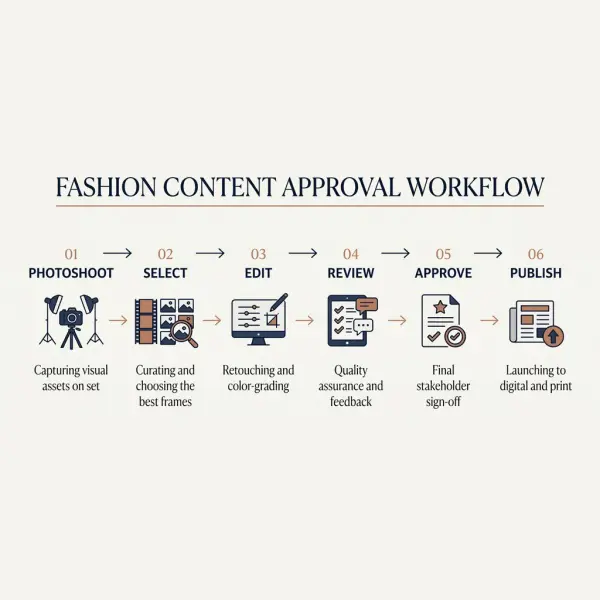
Creating One Workflow From Photoshoot to Publication
The most practical way to organize fashion assets is to establish a workflow that connects production, selection, editing, approval, and distribution.
The process should identify when files enter the repository, who is responsible for validating them, and what conditions must be satisfied before they are made available for public use.
The following model can support product photography, lookbook production, and campaign asset preparation, with adjustments for each content type.
|
Workflow stage |
Typical responsibility |
Expected output |
|
1. Asset intake |
Creative coordinator or asset administrator |
Files received and inventoried |
|
2. Identification |
Merchandising or campaign owner |
Product and campaign references validated |
|
3. Creative selection |
Creative director or editor |
Selected source assets |
|
4. Editing |
Photographer, retoucher, or designer |
Edited master files |
|
5. Review |
Creative and relevant commercial teams |
Feedback and corrections |
|
6. Approval |
Authorized approver |
Approved content and usage scope |
|
7. Distribution |
E-commerce or marketing operations |
Channel-ready deliverables |
|
8. Archive |
Asset owner or administrator |
Retained historical records |
This sequence is a practical framework, not a requirement that every asset move through eight separate software states. Smaller teams may combine responsibilities, while businesses with specialized creative production may need additional review stages.
Make Review Status Visible
Review stages become easier to manage when employees can distinguish files awaiting selection from those awaiting approval and those already released.
A simple status vocabulary might use Draft, In Review, Changes Required, Approved, and Archived.
These statuses should have agreed meanings. Approved should not mean merely that someone liked a photograph. It should identify the authority and scope under which the asset can be distributed.
Adobe documents asset review workflows that support review requests and approval or rejection of media assets. Such capabilities can formalize coordination, although the organization must still define its own approval responsibilities.
Keep Feedback Connected to the Relevant Version
Creative feedback can become confusing when comments are exchanged through several email and messaging threads without reference to a specific asset version.
A retoucher may correct an image based on one discussion while the campaign manager reviews a different file. Even when everyone is acting in good faith, the absence of a shared reference can create unnecessary revisions.
Ideally, feedback should be attached to the asset or to a review record that identifies the exact version. When a team uses simpler tools, it can achieve similar clarity through a controlled review document containing asset IDs, version references, requested changes, and decisions.
The workflow should make the history understandable without requiring employees to reconstruct an entire conversation.
Managing File Versions and Channel-Specific Exports
Fashion assets are often revised for legitimate reasons. A photographer may correct exposure, a retoucher may adjust garment color, or a designer may create alternative campaign crops.
These activities create new files, but not every new file represents a completely new asset.
A practical management system distinguishes between revisions of the same creative work and alternate outputs of an approved work.
For example, a corrected product master may supersede its previous revision. A web-optimized copy of that approved master is instead a rendition. A substantially different campaign treatment may be managed as a related creative variant requiring independent approval.
This distinction allows brands to retain traceability while preventing every export from becoming an unrelated item in the asset library.
Preserve High-Quality Source Material
The source files retained by the business should be sufficient for legitimate future uses, subject to storage costs, contractual restrictions, and retention policies.
Exporting only small web-ready JPEGs may limit a brand's ability to produce high-quality printed materials later. Conversely, distributing very large original files to every sales channel can create unnecessary storage and transfer overhead.
The appropriate solution is often to preserve authorized high-quality masters and provide channel-specific renditions.
The selected file formats, resolution, color profiles, and other technical settings should follow the destination's current requirements. Print and web specifications should not be treated as interchangeable.
Avoid Using File Modification Dates as the Only Version Indicator
A file's modification date can help establish when an asset was changed, but it does not necessarily indicate whether it was approved or which creative treatment is authoritative.
Files may also receive updated timestamps when copied, exported, or transferred between systems.
Where possible, version history should be managed using explicit revision records, approval information, and stable asset identifiers rather than relying solely on the newest timestamp.
This becomes especially relevant when external agencies or retailers retain previously distributed assets.
Practical Example: Organizing Assets for a New Fashion Collection
Consider a hypothetical independent fashion brand preparing a capsule collection with twelve apparel styles, several colorways, an editorial lookbook, and a coordinated digital campaign.
The brand works with an external photographer, freelance retoucher, graphic designer, e-commerce manager, and marketing coordinator.
Without a shared workflow, each participant might organize files according to personal preferences. The photographer could deliver numbered photographs, the retoucher create separate folders by editing date, and the designer maintain another collection of images for the lookbook.
A structured workflow establishes common references before production begins.
During preparation, the merchandiser supplies the authorized product list and required photography views. The creative coordinator assigns a shoot or campaign identifier and prepares the shared workspace.
After the photoshoot, the photographer delivers files into the designated intake area. The creative team selects images, while merchandising validates their product associations. Approved selections move into editing, and the finished masters receive appropriate review.
The e-commerce team then receives images connected to the correct product records. The lookbook designer works with the approved editorial selection, and marketing prepares the campaign's channel-specific versions.
The organization does not necessarily need one software application for every activity. It does need a shared understanding of which files are authoritative and how decisions are recorded.
This example also illustrates the distinction between asset organization and asset governance. Good organization makes files discoverable; governance establishes whether they are correct and authorized.
How Should Fashion Businesses Apply This Approach?
The most effective starting point depends on how the brand currently produces and distributes content.
For a small fashion label, introducing complicated software before standardizing file identification may create unnecessary overhead. Its immediate priority may be ensuring that product images follow one naming convention, that edited masters are retained, and that approval is clearly recorded.
For a growing apparel business, the challenge may involve several teams managing overlapping campaigns and collections. In that situation, searchable metadata, standardized approval responsibilities, and shared access to approved assets become more valuable.
A larger brand operating across regions, retailers, and digital platforms may require automated distribution, controlled external access, rights restrictions, and integration with its product information systems.
Regardless of scale, the following practices are sensible starting points:
- Define the official product and campaign identifiers used in asset records.
- Establish where source files, edited masters, and approved deliverables are maintained.
- Assign responsibility for validating product associations and usage rights.
- Use a consistent review and approval process.
- Review whether employees can reliably retrieve the correct assets for their work.
These practices should be implemented incrementally and tested against real business activities. A pilot involving one collection can reveal naming inconsistencies, unclear responsibilities, and export requirements before the system expands.
The broader infrastructure is explained in digital asset management for fashion brands, while the operational consequences of repeated asset errors are explored inhow poor asset management slows down fashion marketing workflows.
Common Mistakes in Organizing Fashion Creative Assets
Organizing Everything by Photoshoot Date
Date-based folders can be useful for locating source material, but they may not reflect how marketing and merchandising teams search for assets. An e-commerce employee usually needs images of a particular garment rather than every photograph captured on a particular day.
Retaining shoot references is sensible, but product identity and campaign associations should remain searchable independently. This allows the same production to support different commercial activities.
Treating Every Export as a New Master File
Repeatedly exporting images for websites, social media, marketplaces, and wholesale partners can create many similar-looking files. If the relationship between those files is lost, employees may struggle to identify the approved source or determine whether an export is current.
Brands should distinguish original creative assets, edited masters, and distribution renditions. A consistent relationship between them supports reuse without creating unnecessary duplication.
Relying on Informal Approval Messages
A brief message saying that a campaign image looks good may not establish which version was reviewed or which channels are authorized to use it.
This becomes problematic when creative feedback, product validation, and usage rights are handled by different people.
A better approach records the approved asset version, decision-maker, and intended use. The process need not be bureaucratic, but it should leave a reliable reference for the teams responsible for publication.
Mixing Product Information With Unverified Visual Tags
Automated image recognition can help classify photographs by visual appearance. However, a photograph that appears to show a cotton shirt does not prove the garment's actual fiber composition, commercial color name, or approved style identifier.
Technical and product-specific attributes should be obtained from authoritative records rather than inferred from an image alone. This is equally relevant when working with digital material swatches and fabric libraries, where visual appearance does not replace validated textile specifications.
Keeping Expired Campaign Assets in Active Distribution
Historical campaign content may be valuable for archives, creative reference, or internal presentations. It does not follow that the same content remains authorized for every future commercial use.
A photograph may carry time-limited licensing terms or a campaign-specific agreement. If these restrictions are not visible, employees may reuse content without realizing that additional permission is needed.
Fashion brands should separate archival availability from distribution authorization. Assets can remain preserved where appropriate while being excluded from active marketing collections.
What Fashion Teams Should Verify Before Publishing Assets
A file should not be considered publication-ready solely because it has been edited and saved in the correct location.
Before release, the responsible team should verify that the asset accurately represents its intended product or campaign, that the relevant approval has been completed, and that its technical format meets the receiving channel's requirements.
Product images deserve particular attention because they may directly influence customer expectations. Incorrect colorway associations, misleading retouching, or photographs of a different garment can create discrepancies between the listing and the merchandise actually sold.
For campaign and editorial content, rights verification may be equally significant. Photographer permissions, model releases, third-party materials, and licensed creative elements should be checked against applicable agreements.
Technical metadata provides helpful supporting information, but it is not a substitute for those underlying records. Metadata can also be lost or modified during export and distribution, depending on the tools and platforms involved.
A reliable publication process therefore combines three forms of control: content accuracy, creative authorization, and appropriate usage rights. Technical delivery checks complete the process by ensuring the file is suitable for its destination.
Frequently Asked Questions
1. What is the best folder structure for fashion product photography?
A useful product photography folder structure separates working source files from edited masters and approved outputs while keeping product or collection references easy to identify. The exact hierarchy depends on the number of products, variations, and employees involved.
For a small label, folders organized by collection and style may be sufficient. A larger organization may rely more heavily on DAM metadata and stable storage categories. The key is avoiding unnecessary nesting that makes retrieval difficult. Teams should test the structure by asking a merchandiser or marketer to locate a specific garment's approved photographs without assistance.
2. Should fashion brands organize images by SKU or collection?
Fashion brands often benefit from using both product identifiers and collection references, but they serve different purposes. Product identifiers help connect photographs to specific merchandise, while collection information supports broader editorial and commercial organization.
A style may belong to a collection and have several sellable variants. Not every image necessarily needs a separate file for every size, but colorway or design differences may require distinct visual representations. For businesses with metadata-enabled systems, these attributes can be searchable fields rather than separate nested folders. The correct structure depends on the brand's product data model and distribution requirements.
3. How should a fashion team manage different versions of the same campaign image?
The team should retain an identifiable approved source and distinguish revisions from channel-specific adaptations. A corrected retouching version may replace an earlier creative master, while an alternative crop for an advertisement can remain associated with that master as a separate rendition.
Each version should have a clear purpose and, where necessary, its own approval record. This prevents a social media crop from being mistaken for the original image or an obsolete file from being distributed as current. Dedicated DAM platforms can formalize these relationships, but a smaller team can establish the same principle through controlled naming and documented records.
4. Can the same photograph be used for a product page, lookbook, and advertising campaign?
Yes, the same photograph may serve several purposes when it is visually suitable and the relevant rights permit those uses. A model photograph can function as an additional product image, appear in a collection lookbook, and support a campaign.
However, the requirements are not identical. A product listing needs an accurate representation of the item, while an advertisement may allow more expressive composition. Licensing terms can also differ by channel, region, and duration. The team should assess each use rather than assuming that approval for one purpose authorizes every other application. Maintaining a shared asset reference helps preserve that distinction.
5. How do fashion teams prevent unapproved images from being published?
Fashion teams can reduce accidental publication by separating working assets from approved distribution materials and assigning explicit approval responsibilities. A controlled workflow should indicate which version was reviewed, who authorized it, and where it may be used.
Dedicated DAM platforms may enforce these distinctions through roles, approval statuses, and controlled sharing. Smaller businesses may use separate approved folders and documented release procedures. Neither approach works reliably if employees bypass the process or approval information is outdated. The essential safeguard is to make the authorized version unambiguous at the point where content is selected for publication.
6. When should fashion brands move from shared folders to dedicated DAM software?
A dedicated DAM platform becomes worth evaluating when shared storage no longer provides adequate search, version control, approval coordination, rights visibility, or controlled distribution.
The decision should be based on operational needs rather than asset volume alone. A brand managing relatively few campaigns may still need sophisticated licensing controls, while a company with many straightforward product images may operate effectively through simpler systems. Before investing, businesses should document recurring problems and test whether a DAM platform addresses them. Migration costs, metadata maintenance, training, and integration requirements should be included in the evaluation.





Comments 0
Leave a CommentSend Comment
Anda harus Login terlebih dahulu untuk dapat memberikan komentar.