

How Online Showrooms Support Wholesale and Collection Presentation
Quick Answer
Online showrooms support fashion wholesale by connecting collection presentation with the information and actions buyers need to evaluate a range. A brand can combine campaign imagery, styled looks, product pages, digital line sheets, wholesale prices, delivery windows, and—where the platform allows—assortment or ordering tools in one controlled environment.
Their practical value extends across the sell-in cycle. Before an appointment, buyers can preview the collection and identify relevant categories. During the meeting, sales teams can move from a collection story to specific styles, variants, and commercial terms without switching between disconnected files. Afterwards, buyers can revisit selections, share them internally, refine quantities, or complete an order.
This only works when the showroom reflects the real collection. Incomplete style data, mixed price lists, weak navigation, outdated availability, and visually impressive pages with no clear next step can slow the buyer down. The most effective online showrooms are therefore not just marketing displays. They are maintained wholesale working environments, aligned with merchandising logic, account rules, sales follow-up, and order operations.
Where Does an Online Showroom Fit in Fashion Wholesale?
An online showroom is a buyer-facing digital environment that presents a fashion collection in order to support wholesale discovery, evaluation, assortment building, and, in some systems, order placement. It sits between brand storytelling and commercial execution. Campaign content gives the collection meaning; line-sheet data makes individual styles buyable; account rules determine what a particular buyer can see and do.
For a full explanation of the underlying technology and how it differs from lookbooks, line sheets, B2B stores, and 3D environments, read digital showrooms explained for fashion brands and buyers. This article focuses on what happens after the basic environment exists: how fashion teams use it to merchandise a collection and move wholesale conversations forward.
Wholesale is not a single moment in which a buyer looks at garments and immediately confirms quantities. It is a sequence of commercial judgments. The buyer has to understand the range, identify products relevant to the retailer, assess pricing and margin, place deliveries into a seasonal plan, balance color and category, compare the proposed buy with inventory and budget, then obtain any required internal approval. An online showroom can support that sequence by making the right information available at each stage.
The system does not remove the need for samples, appointments, negotiation, or buyer experience. It gives those activities a more consistent information layer.

How Online Showrooms Organize a Collection for Buyers
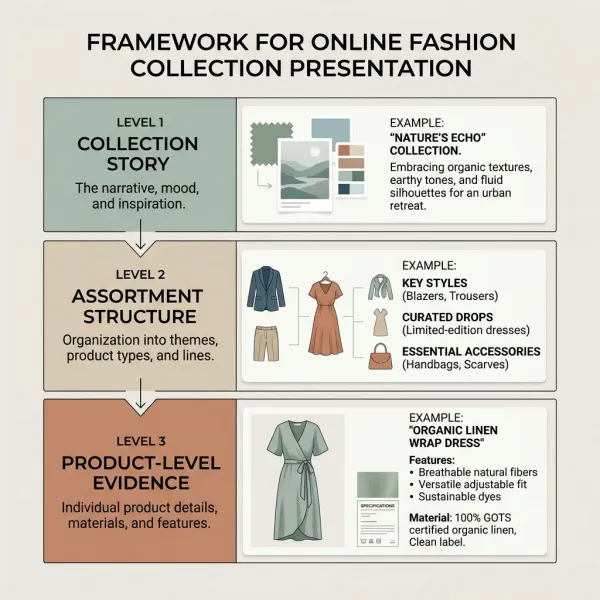
An online showroom supports collection presentation by giving the range a deliberate hierarchy. A buyer should be able to understand the collection at three levels: the overall proposition, the structure of the range, and the commercial details of each product. If any level is missing, the presentation becomes harder to act on.
The collection-level story
At collection level, the showroom explains what is new and why the range belongs together. This may involve a season concept, fabrication direction, color story, key silhouettes, campaign images, or a short designer message. The purpose is orientation, not decoration. A retailer needs enough context to see how the collection may be introduced to customers and how it relates to the brand's existing identity.
The story should remain concise. Buyers rarely need to scroll through a long brand manifesto before reaching the product. A strong opening page can establish the concept, identify the season or delivery, and make clear where the commercial range begins.
The assortment-level structure
The showroom then needs to translate the collection into a browsable assortment. Depending on the category and sales model, useful groupings might include delivery drop, product category, gender or department, fabrication, capsule, price band, core versus fashion product, or a curated account edit.
This is where merchandising judgment matters. The internal product taxonomy used by a design or enterprise resource planning team may not reflect how a buyer shops. A womenswear buyer might first want to separate knitwear, dresses, tailoring, and outerwear, then filter by delivery and wholesale price. A footwear buyer may prioritize style family, construction, color, and size run. The navigation should mirror the buying task rather than expose the company's internal database structure unchanged.
The product-level evidence
At product level, the buyer needs enough evidence to assess both desirability and commercial suitability. Clear imagery, detail views, and video can help communicate silhouette, construction, surface, or movement. Those assets should sit beside verified style codes, variants, composition, prices, delivery information, and order rules.
The role of each media type should be clear:
- campaign imagery establishes styling and brand context;
- outfit or look imagery shows how products work together;
- clean product views support comparison;
- detail images clarify texture, trims, finishing, and construction;
- video can show drape, movement, scale, or use;
- a digital line sheet provides concise commercial reference.
NuORDER's official documentation describes virtual showrooms that bring together media such as shoppable hotspots, 360-degree imagery, and video, while JOOR describes digital line sheets as product views containing imagery, pricing, and availability that connect with wholesale order tools. See NuORDER's virtual showroom documentation and JOOR's digital line sheet overview. These examples show what particular platforms support; brands should verify the exact capabilities of any system they are considering.

How Does an Online Showroom Support the Wholesale Sell-In Cycle?
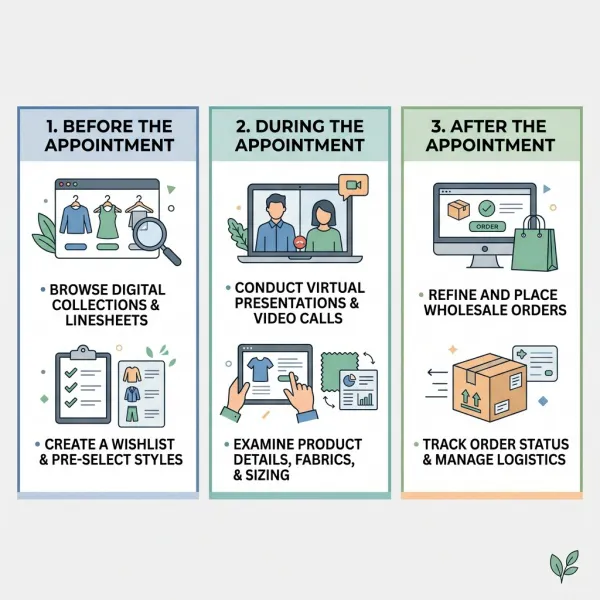
The showroom is most useful when it is treated as a continuous wholesale workspace rather than a link sent once at launch. Different parts of the environment become relevant before, during, and after a buyer appointment.
|
Sell-in stage |
Brand activity |
Buyer activity |
Showroom contribution |
|
Preparation |
Finalize range, product records, media, prices, delivery, and account access |
Review season priorities, budget, inventory, and category needs |
Provides a controlled preview and consistent reference point |
|
Appointment |
Present the collection and curate products for the account |
Ask questions, compare options, and build an initial edit |
Connects storytelling with product facts and live selection |
|
Assortment refinement |
Respond to questions, revise the edit, and confirm terms |
Balance category, color, price, delivery, and quantity |
Preserves selections and supports structured comparison |
|
Order submission |
Validate availability, minimums, terms, and commercial approval |
Submit a draft or confirmed purchase order, depending on the workflow |
Reduces re-entry when ordering is integrated |
|
Follow-up |
Confirm changes, cancellations, allocations, and delivery updates |
Revisit the order and communicate adjustments |
Maintains a shared record when platform functions support it |
The table describes a possible workflow, not a universal one. Some showrooms stop at presentation and send the order to a separate system. Others connect line sheets directly to a working order. The brand must make the handoff visible so that buyers understand whether saving a style, adding it to a basket, and submitting an order have different commercial meanings.
Before the appointment: preparation becomes more focused
A showroom can give buyers a structured preview rather than an unfiltered data dump. The sales team may send the complete collection to one account, a category-specific edit to another, and a market-appropriate selection to a third. Buyers can arrive with questions and early preferences, allowing the live discussion to focus on fit, commercial relevance, and gaps in the assortment.
Preview access should not become an excuse to skip preparation. Sales representatives still need to know the retailer's customer, price architecture, current brand performance, store format, climate, delivery requirements, and open-to-buy position where that information is available to them. The digital edit is more persuasive when it reflects account knowledge.
During the appointment: the story connects to the buy
During a live or remote appointment, the showroom lets the salesperson move from a collection theme to a look, then to an individual product and its commercial details. That continuity helps avoid the familiar meeting problem of discussing one style while searching for its price, delivery window, or alternative color in another file.
The buyer can also shape the conversation. If a planned hero dress falls outside the retailer's price architecture, the salesperson can move to a related silhouette or fabric rather than continue through a fixed presentation deck. Where the platform supports working selections, both parties can see the emerging assortment and identify imbalance—too many similar colors, insufficient opening price points, or a delivery concentrated too heavily in one period.
After the appointment: the showroom preserves context
Buyer decisions often continue after the meeting. A merchant may need to discuss the edit with planning, e-commerce, regional teams, or senior management. Persistent access allows those colleagues to revisit the relevant products without relying only on meeting notes or downloaded screenshots.
The sales team can then follow up against a specific selection rather than asking the buyer to reconstruct it. If a style changes, the brand should make the revision visible and communicate it directly; silently editing a product record can create uncertainty about what the buyer originally reviewed.
How Buyer-Specific Curation Improves Collection Relevance
Buyer-specific curation improves relevance by limiting the presentation to products and terms that make sense for a particular account. It should help a buyer reach the right products faster, not conceal the logic of the wider collection.
A global range may contain styles that are unsuitable for certain climates, territories, store tiers, price positions, delivery calendars, or licensing arrangements. Wholesale terms may also vary by currency, location, customer group, or agreed price list. Some B2B systems support catalog or customer assignment for this reason. Shopify's official B2B documentation, for example, explains that catalogs can determine which products and prices assigned business customers can access, while NuORDER documents customer groups that can control visibility for products, promotions, order rules, line sheets, and page content. See Shopify's B2B catalog and pricing documentation and NuORDER's customer and user group documentation.
Useful curation may reflect:
- the retailer's department and customer profile;
- agreed territory, currency, and price list;
- store count, store tier, or e-commerce role;
- climate and delivery timing;
- historical category performance;
- target margin and retail price architecture;
- product exclusivity or distribution restrictions;
- a specific meeting objective, such as newness, replenishment, or category expansion.
Curation can go too far. If the sales team shows only products it assumes the buyer will accept, it may remove useful discovery and reinforce last season's pattern. A practical approach is to distinguish the recommended edit from the broader eligible range. The buyer gets direction without losing agency.
How Online Showrooms Help Build a More Balanced Assortment
An online showroom can support assortment building by making products easier to compare across the dimensions buyers already use: category, color, price, delivery, size range, and commercial role. The technology does not decide what the retailer should buy unless a separate planning or recommendation system is involved. It organizes the evidence around the decision.
Consider a buyer preparing an autumn delivery. Selecting individual products one by one may create an attractive list but a weak assortment: too much outerwear, few coordinating tops, repeated dark colors, and no accessible opening price. A structured digital selection can make those gaps more visible, particularly when the system summarizes units, value, category, or delivery.
The brand can improve the process by giving products clear roles. These might include proven core, seasonal update, image-building statement, coordinated add-on, or entry-price option. The labels should describe the collection strategy, not promise sales performance. Buyers will still judge the roles against their own customer data and inventory position.
Good assortment support also recognizes channel differences. A department store, independent boutique, marketplace seller, and brand franchisee may need different breadth, depth, imagery, and delivery logic. The same digital collection should not force all accounts into the same buy.

What Changes for Fashion Sales and Merchandising Teams?
Online showrooms bring sales presentation closer to product data management. The creative team can no longer be the only owner of what appears online, because product availability, prices, delivery, and account permissions carry commercial consequences. At the same time, sales operations cannot publish a dry product database and expect buyers to understand the collection.
A workable ownership model often separates responsibilities while keeping one release process:
- Design or product development verifies product intent, materials, and sample status.
- Merchandising defines collection hierarchy, key stories, product roles, delivery logic, and range edits.
- Creative or content teams produce and approve campaign, look, product, detail, and video assets.
- Sales operations controls price lists, currencies, terms, minimums, buyer groups, and order rules.
- Account managers curate presentations, guide meetings, record buyer questions, and follow up.
- Technology or data owners manage imports, integrations, permissions, monitoring, and exceptions.
Smaller businesses may assign several responsibilities to one person. That is workable if the approvals remain explicit. The risk is not limited headcount; it is uncertainty about who can change a price, remove a style, publish an unapproved sample, or grant access to a confidential collection.
The showroom also creates a useful feedback channel. Repeated buyer questions about an unclear fit, missing image, delivery term, or color name may reveal a content or data problem. Interest signals can guide sales follow-up, but they should not be treated as confirmed demand. A viewed page or saved favorite is weaker evidence than an approved purchase order.
A Practical Online Showroom Publishing Workflow
Fashion brands can reduce last-minute errors by treating the showroom like a seasonal publication with commercial controls. The process should begin before campaign assets are complete, because data, access, and ordering rules usually need more coordination than expected.
1. Lock the commercial range
Confirm which styles, variants, samples, and delivery drops are approved for sell-in. Clearly mark provisional products. If the brand sells before final production confirmation, buyers should understand what remains subject to change.
2. Validate the product record
Check style codes, names, categories, colorways, sizes, composition, wholesale prices, suggested retail prices where supplied, minimums, delivery windows, and availability status. Use automated validation where possible, followed by review of commercial exceptions.
3. Map the collection narrative
Choose the few stories that help buyers understand the range. Connect each story to products. Avoid isolated editorial pages that lead nowhere, and avoid presenting every product as a hero.
4. Build buyer pathways
Organize primary navigation and filters around real buyer questions. Create account or market edits only after the eligible range, pricing, and permissions are confirmed.
5. Test the intended actions
Review the showroom as different users. Can a buyer find a product, understand its terms, save it, return later, share it appropriately, and move to the next step? If ordering is enabled, test minimums, quantities, discounts, delivery, confirmation, export, and error handling.
6. Release and communicate
Tell buyers what is available, what action they can take, and whom to contact. Sales teams should use a consistent access route instead of continuing to circulate contradictory legacy documents.
7. Maintain changes visibly
Assign a process for cancellations, price corrections, delivery changes, replacement images, and availability updates. Material changes affecting a buyer's working selection should trigger direct communication, not rely on the buyer noticing a revised page.
Common Mistakes That Weaken Wholesale Presentation
Reproducing the internal product database
Brands sometimes upload every field and category exactly as stored internally. The result may be technically complete but difficult to shop. Convert internal structure into buyer-facing language while preserving stable identifiers behind the scenes.
Leading with too much campaign content
A long visual introduction can delay access to the range. This often happens when the showroom is treated as a brand website rather than a working wholesale environment. Use storytelling to orient the buyer, then provide a clear route to products and terms.
Creating one presentation for every account
A single global view is easy to administer but may expose irrelevant products, the wrong prices, unsuitable delivery, or restricted distribution. Establish a common collection foundation, then apply controlled market and account variations where they are commercially required.
Hiding weak data behind strong imagery
Beautiful visuals do not compensate for missing style codes, inconsistent color names, or unclear delivery. The operational consequence is manual clarification, slower decisions, and a greater chance that an order is entered incorrectly. Product-data completeness should be a publication gate.
Treating a saved selection as a confirmed order
Platforms use terms such as favorite, custom list, cart, working order, draft, and submitted order differently. Sales teams must understand the status model and explain it to buyers. Inventory and revenue planning should rely on defined commercial commitments, not ambiguous engagement signals.
Ending the process when the link is sent
Digital access does not remove follow-up. Buyers may need a guided tour, sample review, revised edit, margin clarification, or internal approval support. The showroom makes follow-up more specific; it does not make it unnecessary.
What Online Showrooms Cannot Resolve on Their Own
Online showrooms cannot correct a collection with weak product-market fit, an unrealistic price architecture, or unreliable delivery. They can make those problems more visible, but presentation technology does not remove the underlying commercial constraint.
They also cannot fully communicate tactile and physical qualities. Fabric hand, true color under different lighting, fit, weight, recovery, finishing, and construction may require samples or in-person examination. Video and detailed photography can help buyers decide which samples deserve closer review; they should not be described as perfect substitutes.
Finally, a showroom cannot create alignment between departments by itself. If merchandising, sales, finance, and operations disagree about the approved range or commercial terms, the platform may publish the conflict more efficiently. Governance has to come first.
The live interaction around these tools deserves separate analysis. See why digital sales tools are changing fashion buyer meetings for the implications for appointment structure, sales roles, and hybrid buyer engagement.

Frequently Asked Questions
Can an online showroom replace a wholesale line sheet?
It can incorporate or connect to a digital line sheet, but the two serve different primary purposes. The showroom gives the collection narrative, visual context, navigation, and buyer pathway. The line sheet provides a concise commercial view of products, variants, prices, delivery, and ordering information. A buyer may explore through the showroom and then use the line sheet for rapid comparison or order preparation. Removing the line-sheet function entirely can make a visually rich presentation harder to use, especially for experienced buyers who need to scan many styles quickly.
Should buyers see the full collection or a curated edit?
Often they should see both, provided access rules allow it. A recommended edit helps the buyer understand what the sales team believes is most relevant to the account, while an eligible broader range preserves discovery and buyer control. Some accounts may require a restricted assortment because of territory, distribution, price list, climate, or product rights. Brands should document why products are excluded and avoid using curation merely to repeat last season's choices. The best structure makes the recommendation clear without making the rest of the valid collection impossible to explore.
When should a brand open showroom access to buyers?
Access should open when the displayed range and commercial information are reliable enough for the action buyers are invited to take. A preview may reasonably contain provisional products if they are clearly marked and cannot be mistakenly ordered. A transactional release needs stricter validation of prices, variants, delivery, minimums, permissions, and order rules. Timing should also support the retailer's planning calendar, not only the brand's campaign launch. Give account managers enough time to test buyer views and prepare relevant edits before invitations are sent.
How can a showroom support remote wholesale appointments?
It gives both parties a shared collection reference during the call. The salesperson can guide the buyer from a collection story to individual styles, while the buyer reviews imagery, product facts, alternatives, and a developing selection. The meeting still needs facilitation: agree on objectives, avoid racing through every page, record unresolved questions, and confirm what each saved or submitted action means. Where fabric, fit, or construction is central, arrange samples before or after the call. The showroom supports the conversation; screen sharing alone does not make an appointment effective.
What product information matters most for wholesale buyers?
The priority depends on category and account, but buyers generally need stable style identification, available variants, clear imagery, material or construction information, wholesale price, relevant suggested retail price, delivery window, size range, order minimums, and availability or status. Margin, territory, payment, or shipping information may also matter, though some terms belong at account or order level rather than on every product page. The most important standard is consistency: values must agree with the line sheet, price list, order, and downstream operational system.
Can online showrooms reduce physical sample use?
They may reduce unnecessary sample movement when buyers use digital content to screen the full range and request only a focused set for tactile or fit evaluation. The outcome depends on category, image quality, buyer confidence, sample policy, and how much product judgment can reasonably occur on screen. Brands should not claim environmental benefit without measuring the actual change in sample production, shipping, returns, energy, and digital operations. A smaller, more purposeful sample set is a practical objective; “sample-free” wholesale is not suitable for every product.
How should sales teams follow up after showroom activity?
Follow-up should be based on the buyer's stage and explicit actions, not generic engagement alerts. A buyer who previewed one page may need orientation; one who saved a balanced edit may be ready for commercial discussion; one who submitted a draft may need validation of quantities, terms, and delivery. Sales representatives should reference the relevant products, answer open questions, and agree on the next decision. Behavioral data can prioritize attention, but it should not be treated as proof of purchase intent or used in a way that conflicts with privacy obligations.
Conclusion
Online showrooms support fashion wholesale when they connect three things that are often separated: the collection story, the buyer's assortment task, and the brand's commercial process. They allow a range to remain accessible before and after an appointment, while giving sales teams a shared environment for curation, explanation, and follow-up.
Their effectiveness depends less on visual novelty than on merchandising clarity. Buyers need to understand the collection, reach the right products, trust the prices and delivery information, compare options, and know what happens after they save or submit a selection. That requires coordinated work across product, creative, merchandising, sales operations, account management, and technology.
Used well, the showroom does not flatten the collection into a database or turn wholesale into anonymous checkout. It gives human selling a better-organized foundation. The brand can tell a coherent story, the buyer can build a commercially relevant range, and both sides can carry the decision forward without repeatedly reconstructing the same information from emails and files.





Comments 0
Leave a CommentSend Comment
Anda harus Login terlebih dahulu untuk dapat memberikan komentar.