

Why Digital Sales Tools Are Changing Fashion Buyer Meetings
Quick Answer
Digital sales tools are changing fashion buyer meetings by shifting them from one-time collection presentations into connected decision-making sessions. Buyers can review products before an appointment, sales representatives can present account-relevant assortments during it, and both sides can continue working from saved selections, line sheets, product data, or order drafts afterwards.
The change is practical rather than purely virtual. In-person showroom appointments and trade shows remain useful for examining samples, judging fabric and fit, negotiating, and building relationships. Digital showrooms, mobile order tools, video conferencing, assortment workspaces, and account-based B2B portals add structure around those interactions. They can reduce time spent searching across files or re-entering notes, provided the underlying product, pricing, delivery, and customer data are accurate.
This also changes the sales role. A representative is less valuable as someone who merely reveals a collection slide by slide and more valuable as a prepared commercial guide who interprets the range for a specific retailer. Technology supports that work; it does not replace buyer judgment, product knowledge, or human trust.
What Is Actually Changing in a Fashion Buyer Meeting?
A digitally enabled fashion buyer meeting is a wholesale appointment in which online collection content, product data, collaboration tools, or order systems support the buyer and seller before, during, or after their live interaction. The meeting may happen in a physical showroom, at a trade show, through video, or in a hybrid format. What defines it is not the location but the continuity of the buying workflow.
Traditional appointments often concentrated most of the work into a scheduled slot. The brand presented samples and line sheets; the buyer took notes; selections or quantities were then reconstructed through paper forms, spreadsheets, email, or a later order-entry process. Many brands still use some of these methods, and they can remain workable at small scale. Digital tools change the structure by allowing information and selections to persist across the appointment boundary.
The buyer can arrive having previewed a range. During the session, the sales representative can move between physical samples and verified product records. After the meeting, the buyer can revisit the relevant edit instead of relying only on photographs and handwritten notes. The appointment becomes one important stage in a longer decision process rather than the only place where the collection can be understood.
JOOR describes hybrid fashion selling as a combination of in-person activity—such as trade shows or showroom appointments—and online tools including virtual showrooms and digital line sheets. See the JOOR overview of hybrid selling in fashion. This is a useful industry definition, although the degree of adoption and the exact workflow vary by brand, retailer, market, and platform.

Why Are Digital Tools Reshaping the Appointment?
The central reason is that fashion buying requires more information and more internal coordination than a single presentation can comfortably hold. A buyer may need to compare products by category, color, delivery, price, margin, size range, and store relevance while staying within budget and inventory constraints. The sales team must also account for territory, customer-specific prices, availability, minimums, and the status of products that may still change.
Digital tools can place these elements closer to the conversation. Their value is not that they make every decision automatic. It is that they reduce the gap between seeing a product, understanding its commercial conditions, recording interest, and moving to the next action.
Buyers can prepare before the meeting
Previews allow buyers to identify relevant categories, unfamiliar products, missing information, or obvious price conflicts before the scheduled conversation. The live appointment can then spend less time on basic orientation and more time on the retailer's customer, assortment gaps, alternatives, quantities, and delivery balance.
Pre-access should be purposeful. Sending an unrestricted portal with hundreds of styles and no guidance can transfer the brand's preparation work to the buyer. A short agenda, a recommended edit, and a clear indication of what is new give the preview a job.
The presentation becomes more responsive
A fixed deck follows the brand's planned sequence. A searchable digital range allows the salesperson to respond when a buyer wants to see every item in a fabrication, an alternative at a lower price, another delivery, or all available colors of a selected shape. That flexibility makes the appointment more collaborative, provided the representative understands the collection well enough to navigate without losing the story.
Selections can be recorded while context is fresh
Mobile line sheets, working orders, digital notes, scanners, and assortment tools can capture decisions as they happen. At a trade show, this may reduce dependence on paper order forms that have to be deciphered and re-entered later. JOOR's official trade show app page, for example, describes mobile access to line sheets and digital order capture during in-person events, including an offline workflow that syncs when connectivity returns. See the JOOR trade show order management app overview. These are specific platform functions, so other products should be tested separately.

The meeting can continue asynchronously
Most wholesale decisions are not completed in the room. Buyers may need to consult planning, e-commerce, regional, or senior teams. Persistent digital access lets them review the agreed edit, compare alternatives, and return with focused questions. The sales representative can follow up on a shared selection instead of rebuilding the conversation from memory.
Four Meeting Formats Now Operate Side by Side
Digital selling does not produce one standard replacement for the physical showroom. It expands the formats that brands and buyers can use, sometimes within the same season.
|
Meeting format |
Best suited to |
Role of digital tools |
Main risk |
|
Physical, digitally assisted |
Sample review, tactile categories, relationship building, detailed negotiation |
Product lookup, line sheets, alternatives, order capture, and follow-up |
Screens distract from samples or conversation |
|
Fully remote |
International accounts, early screening, follow-up, or travel constraints |
Video meeting, digital showroom, shared selection, notes, and order draft |
Difficult tactile evaluation and screen fatigue |
|
Hybrid participation |
Buyer or brand teams split across locations |
Shared product environment keeps remote and in-room participants aligned |
Remote participants become secondary observers |
|
Asynchronous review with scheduled follow-up |
Time-zone differences, internal retail review, repeat or lower-complexity buying |
Controlled collection access, comments, saved edit, and later discussion |
Context is lost when there is no guided interpretation |
The strongest format depends on the buying task. A buyer reviewing a new tailoring line may need to handle garments and inspect construction. A replenishment discussion for proven carryover styles may require little physical presentation. A large retail account may use a live appointment for selection, then complete financial and regional review asynchronously.
The choice should also reflect account value, collection complexity, travel cost, sales capacity, time zones, buyer preference, connectivity, and the maturity of product data. Remote should not be treated as a lower-service option by default, and physical should not be maintained merely because it is familiar.
How Digital Tools Change the Meeting Agenda
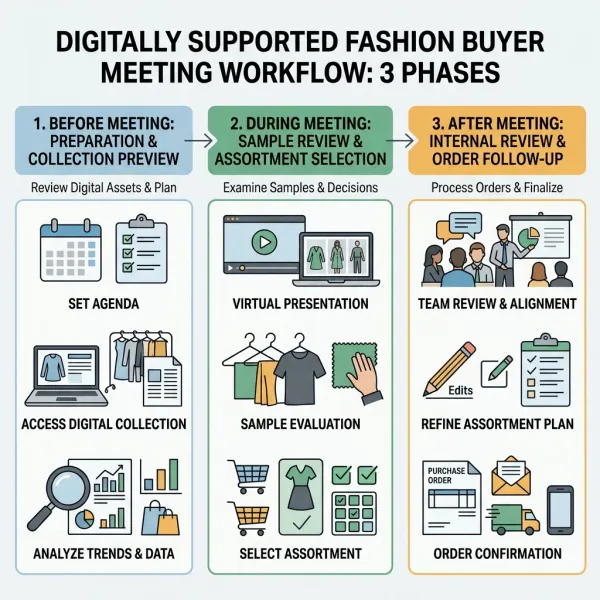
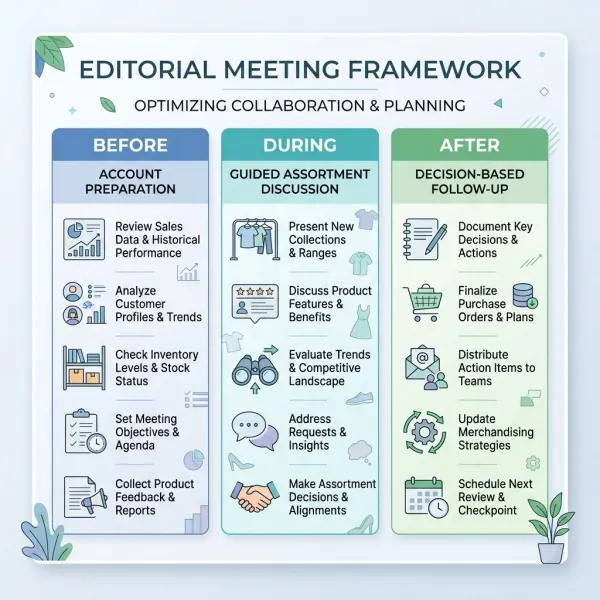
The most noticeable change is sequencing. When collection information is available before and after the call, the live agenda can be built around decisions that benefit from conversation.
Before: align on the account and objective
The sales team should confirm who will attend, what categories are relevant, which price list and currency apply, whether samples are available, and what decision the meeting is expected to advance. Buyers should receive a tested link, a concise collection edit, and any preparation request early enough to be useful.
The team can review past orders, current account status, known assortment gaps, and unresolved service issues. Behavioral signals from a preview may inform preparation, but they should not be overinterpreted. A buyer may open a product for many reasons, and platform activity does not explain intent on its own.
During: guide a commercial conversation
The meeting should begin with the account objective and the collection's most relevant proposition, not a platform tutorial. The salesperson can introduce the range, examine samples or media, invite buyer reactions, explore alternatives, and build a working selection. Product data should answer questions without dominating the interaction.
A useful agenda might move through:
- account priorities and changes since the previous season;
- concise collection direction and key deliveries;
- category-by-category product review;
- development of a proposed assortment;
- price, margin, quantity, and delivery checks;
- unresolved sample, product, or commercial questions;
- confirmation of selection status and next steps.
The final point is easily overlooked. A favorite list, cart, working order, draft, and submitted purchase order may represent different levels of commitment. Both parties should leave knowing what has—and has not—been agreed.
After: follow up against decisions
Follow-up should distinguish confirmed actions from open questions. Send or maintain access to the relevant edit, identify changes since the meeting, respond to sample or delivery questions, and specify the deadline for order confirmation. If several people from the retailer are involved, the shared environment should help them see the same approved information.
For the deeper operational connection between collection hierarchy, line sheets, buyer-specific curation, and order handoff, read how online showrooms support wholesale and collection presentation.
The Sales Representative's Role Becomes More Consultative
Digital access reduces the value of simply controlling when a buyer can see the collection. It increases the value of interpretation. A capable representative must connect product, retailer, customer, and commercial context—then use the tool without making the tool the center of the meeting.
This consultative role has several dimensions:
- Account preparation: understanding the retailer's customer, channel, price architecture, store or market differences, and previous business with the brand.
- Collection interpretation: explaining why products belong in the range and which roles they may play in an assortment.
- Responsive curation: adapting the proposed edit when the buyer identifies a constraint or opportunity.
- Commercial guidance: clarifying prices, delivery, minimums, terms, order status, and realistic alternatives.
- Data stewardship: recognizing when product or account information appears wrong rather than repeating it uncritically.
- Decision follow-up: turning notes and selections into owned actions with deadlines.
This does not mean every salesperson becomes a retail planner. The buyer remains responsible for the retailer's assortment and budget. The representative's job is to make the brand's proposition legible and commercially workable without overstating certainty about sell-through.
Training therefore needs to cover more than platform navigation. Sales teams should practice transitions between physical samples and digital content, how to recover when connectivity fails, how to explain selection status, how to handle account-specific access, and when to stop screen sharing so the buyer can examine a product or discuss a concern directly.
The Buyer's Work Also Becomes More Continuous
Digital tools give buyers greater flexibility, but they can also increase the amount of material available for review. Access to more products, images, dashboards, and saved lists is not automatically a simpler experience. Retail buying teams still need a disciplined method for deciding what deserves attention.
Before the appointment, a buyer may compare the brand's preview with sales history, current inventory, planned category spend, retail price targets, and known customer needs. During the meeting, the buyer can ask for alternatives and record an initial edit. Afterwards, that edit may be tested against open-to-buy, store clusters, channel needs, regional input, or senior approval.
This makes internal sharing important. A product page forwarded without the original collection, account price, delivery, or selection context can create a parallel version of the decision. Buyer tools should preserve enough context for colleagues to understand why a product is being considered and what still needs approval.
The change is not simply that buyers “shop online.” Wholesale buying remains a portfolio decision. Digital tools make individual products accessible, but the buyer must still build a range that works together financially, visually, and operationally.

Which Digital Sales Tools Matter During Buyer Meetings?
Different tools solve different appointment problems. Brands should assemble a workflow around buyer tasks instead of buying overlapping systems without clear ownership.
|
Tool |
Meeting job |
What must be verified |
|
Digital showroom |
Introduce the collection and provide persistent access |
Buyer relevance, navigation, permissions, data currency, and loading performance |
|
Digital line sheet |
Support rapid product and commercial comparison |
Style codes, variants, prices, delivery, minimums, and consistent updates |
|
Mobile order capture |
Record selections and quantities in showrooms or at events |
Offline behavior, sync, duplicate handling, approval status, and downstream export |
|
Video conferencing |
Connect participants across locations |
Audio quality, camera plan, screen-sharing method, accessibility, and sample visibility |
|
Assortment or whiteboard tool |
Arrange selections and expose category, color, or delivery gaps |
Version control, collaborative access, calculations, and export |
|
B2B ordering portal |
Convert an approved selection into a draft, order, or reorder |
Account prices, inventory, terms, workflow status, and integration |
|
Customer relationship management system |
Record contacts, actions, and follow-up ownership |
Data quality, permissions, activity definitions, and team adoption |
Some platforms combine several functions. NuORDER's official virtual showroom material, for example, describes shoppable hotspots, 360-degree imagery, and video as supported presentation media. See NuORDER's virtual showroom overview. A broad feature set can reduce switching, but only if teams know which record is authoritative for product, buyer, inventory, and order information.
At trade shows and temporary showrooms, resilience matters. The team should test devices, charging, account access, offline capability, scanners where used, and the recovery process after synchronization. A digital order that silently failed to sync is not an efficiency gain.
How Activity Data Should—and Should Not—Guide the Conversation
Digital sales tools may record visits, product views, saved items, searches, shared content, carts, drafts, or submitted orders. These signals can help a representative prioritize follow-up or identify content that confuses buyers. They are not direct measures of purchase intention unless the action has a defined commercial status.
A product viewed repeatedly may be attractive, difficult to understand, or simply open in a shared browser tab. A saved item may be a serious candidate, a reference for comparison, or an internal “do not buy” discussion. The sales team should use activity to ask better questions, not to claim knowledge it does not have.
Practical interpretation separates the signals:
- Content engagement indicates that material was accessed.
- Selection behavior indicates that a buyer recorded interest or comparison.
- Commercial progression indicates movement into a defined draft, approval, or submitted order stage.
- Confirmed business depends on the brand's accepted order and operational process.
Brands should also verify what data they collect, why it is needed, who can access it, how long it is retained, and what privacy or contractual obligations apply in the relevant jurisdictions. The presence of an analytics dashboard does not make every available metric appropriate or useful.
How Fashion Brands Can Redesign Buyer Meetings Practically
A redesign should start with one recurring point of friction. Trying to digitize every part of the appointment at once can burden the sales team and obscure whether the change helps buyers.
1. Map the current meeting
Document preparation, presentation, note-taking, selection, ordering, follow-up, and data re-entry. Identify where information is missing, duplicated, delayed, or misunderstood.
2. Define the intended decision
Be specific about whether the appointment is for discovery, seasonal sell-in, assortment refinement, order confirmation, replenishment, or relationship review. Different objectives require different tools and participants.
3. Build a minimum digital meeting kit
For many brands, the useful foundation is a tested buyer link, accurate line sheet, account-appropriate prices, clear product imagery, shared selection method, video-meeting fallback, and documented follow-up route. Advanced analytics or 3D assets can wait until a defined need emerges.
4. Establish one status language
Define what favorite, shortlist, proposed assortment, working order, draft, submitted order, accepted order, and confirmed delivery mean in the company's workflow. Use only the terms that are necessary and visible to the relevant users.
5. Train with realistic scenarios
Practice a late price correction, missing sample, buyer joining remotely, low connectivity, order minimum conflict, unavailable color, and unsuccessful sync. Training should test judgment and recovery, not only the happy path.
6. Pilot with selected accounts
Choose buyers willing to give specific feedback. Compare preparation time, appointment focus, selection accuracy, follow-up speed, order errors, and buyer effort with a relevant baseline. Do not judge the pilot only by meeting length; a shorter appointment is not better if the buyer needs more clarification afterwards.
7. Refine the format by account
Keep the common data and order foundation, but adjust the balance of preview, live guidance, samples, remote participation, and asynchronous work. Standardization should protect accuracy without forcing every retailer into an identical conversation.
Common Mistakes in Digitally Supported Buyer Meetings
Turning the appointment into a software demonstration
This occurs when the team is proud of the platform but unclear about the commercial objective. Buyers spend time watching navigation rather than discussing products. Open with the account and range; explain features only when they help the next decision.
Screen sharing for the entire meeting
Continuous screen sharing can make remote participants passive and physical samples secondary. Switch deliberately among conversation, product view, sample close-up, and assortment summary. If a fabric or construction point matters, pause and show it properly.
Sending too much material before the appointment
A full collection without priorities may look like preparation but create buyer work. Send an account-relevant starting point, a concise explanation of newness, and clear questions or decisions for the meeting.
Allowing digital notes to replace confirmation
Notes and saved lists capture context but may not represent agreement. End with a verbal and written check of products, quantities or status, open questions, responsibilities, and deadlines.
Using engagement data as pressure
Telling a buyer that the brand saw every product they viewed may feel intrusive and still reveal little about intent. Use analytics internally to improve preparation and ask relevant questions, within applicable privacy and contractual boundaries.
Ignoring the failure path
Weak connectivity, an expired login, missing permissions, low battery, or sync conflict can disrupt a high-value appointment. Keep approved offline or fallback materials and define how selections will be reconciled later without creating duplicate orders.
What Digital Sales Tools Do Not Change
They do not change the buyer's accountability for a commercially sound assortment. Better access to products does not remove budget, inventory, margin, delivery, customer, or store constraints.
They do not eliminate the value of physical product judgment. Fabric hand, fit, weight, color under different light, construction, and finishing may require samples. Video and detailed imagery help decide what deserves closer attention; they are not perfect sensory substitutes.
They also do not create trust automatically. Accurate information, honest discussion of risks, reliable delivery, service recovery, and consistent follow-through remain central to a wholesale relationship. A sophisticated portal paired with late corrections and unclear ownership may reduce confidence rather than strengthen it.
For readers who need the underlying platform distinctions before redesigning appointments, see the foundational guide to digital showrooms.

Frequently Asked Questions
Are physical fashion buyer meetings becoming obsolete?
No. Physical meetings remain valuable when buyers need to handle samples, assess fit or construction, meet the brand team, negotiate, or understand a collection through live styling. Digital tools change how those appointments are prepared, documented, and continued. Some routine reorders, early screenings, and follow-ups may be handled remotely or asynchronously, while complex seasonal buys still benefit from direct interaction. The appropriate format depends on category, account importance, travel, timing, buyer preference, and the quality of the digital and physical materials available.
What should a brand send before a digital buyer meeting?
Send a tested access link, a concise account-relevant collection edit, the correct price list and currency, clear delivery context, and a short agenda stating the meeting objective. Include instructions only for actions the buyer genuinely needs, such as saving favorites or adding questions. Avoid flooding the buyer with every campaign asset, spreadsheet, and product file. If samples will be discussed remotely, confirm what the buyer has received and label each item consistently with the digital record. Access permissions should be tested from the buyer's perspective before the invitation goes out.
How long should a remote fashion buying appointment be?
There is no universal ideal length. It depends on collection size, account knowledge, meeting objective, sample availability, number of participants, and how much the buyer reviewed beforehand. A focused replenishment conversation may be short, while a new seasonal range requires more time or several sessions. Plan breaks for long remote reviews and separate collection introduction from detailed assortment or financial work when useful. Measure success by decision quality, unresolved questions, and buyer effort—not by finishing quickly or copying the duration of a physical appointment.
Can sales representatives rely on buyer activity data before a meeting?
They can use it as a preparation signal, not as a definitive statement of intent. Product views, searches, downloads, favorites, and drafts have different meanings, and the platform may not reveal why the buyer took an action. A representative can use the information to prepare relevant alternatives or ask a focused question, then let the buyer explain the context. Brands should define which events are reliable, ensure the data is current, and follow applicable privacy, contractual, and access requirements. Confirmed commercial stages deserve more weight than general browsing behavior.
How can a brand run a buyer meeting when internet access is unreliable?
Prepare a tested fallback: downloaded line sheets, approved product images, a local order or note template, charged devices, and clear identifiers that allow later reconciliation. If the chosen application supports offline work, test exactly which functions remain available and how synchronization handles duplicates, conflicts, or account changes. Tell the buyer when information may not be live, particularly inventory or availability. After connectivity returns, one owner should reconcile the offline record with the authoritative system and confirm the resulting selection or order in writing.
What makes a hybrid buyer meeting effective?
An effective hybrid meeting gives remote and in-room participants equal access to the conversation, product information, and decision record. Assign someone to monitor remote questions, use a camera plan that can show samples clearly, and avoid side conversations that online participants cannot hear. Everyone should work from the same product identifiers and selection status. Test audio, links, permissions, and sample visibility beforehand. Hybrid becomes ineffective when the remote attendee is treated as an observer while the real negotiation happens off microphone around a physical rail.
How should brands measure whether digital meeting tools are helping?
Use measures tied to the problem being solved. These may include preparation time, percentage of complete product records, buyer access success, time spent on commercial discussion, selection or order-entry errors, unresolved questions, follow-up time, duplicate work, sync failures, buyer feedback, and progression to defined order stages. Compare with an appropriate baseline and segment results by account or meeting type. Revenue alone is difficult to attribute because collection strength, price, retailer demand, inventory, and delivery also affect orders. Engagement alone is equally insufficient because activity is not necessarily commitment.
Conclusion
Digital sales tools are changing fashion buyer meetings by extending the work beyond the appointment itself. Collection previews improve preparation, searchable product information makes the discussion more responsive, digital selections preserve context, and connected follow-up can reduce the need to reconstruct decisions from scattered notes and files.
The strongest change is not the move from physical to virtual. It is the move from an isolated presentation toward a continuous buyer workflow that may combine in-person, remote, mobile, and asynchronous activity. Physical samples and face-to-face discussion remain important where tactile judgment, trust, and negotiation shape the buy.
This makes human capability more, not less, visible. Sales representatives need account knowledge, collection fluency, commercial judgment, data awareness, and meeting discipline. Buyers still have to balance product appeal with margin, budget, inventory, delivery, and customer relevance. Digital tools earn their place when they make those judgments clearer and easier to carry forward—not when they merely add another screen to the room.





Comments 0
Leave a CommentSend Comment
Anda harus Login terlebih dahulu untuk dapat memberikan komentar.