

Manual Marker vs Digital Marker: What Fashion Teams Should Know
Manual marker making and digital marker making solve the same production problem: arranging garment pattern pieces within a defined fabric width so they can be cut correctly while using material effectively. The difference lies in how the layout is created, revised, stored, evaluated, and connected with the rest of the cutting-room workflow.
In traditional manual marker making, physical pattern pieces are positioned on marker paper or directly over the cutting surface and arranged by an experienced marker maker. Digital marker making moves those pieces into a computer-aided design (CAD) environment, where operators can position them interactively, use automated nesting, or combine both approaches.
That shift affects much more than drawing speed. Digital systems can make it easier to compare alternative layouts, maintain pattern versions, reuse marker data, standardize placement rules, calculate utilization, generate production reports, and transfer cutting information to other systems. Current apparel-production platforms increasingly extend this integration from marker creation into cut planning, fabric allocation, spreading, and automated cutting.
Manual methods still have practical value, particularly in environments where production volumes are small, digital infrastructure is limited, or skilled operators can create simple markers without justifying a larger software workflow. The right choice therefore depends on production complexity, volume, labor capability, material cost, lead-time requirements, and how closely marker making needs to connect with the rest of manufacturing.
Quick Answer: What Is the Difference Between Manual and Digital Marker Making?
Manual marker making uses physical garment patterns that are arranged and traced by hand on marker paper or fabric. Its performance depends heavily on the operator's spatial judgment, experience, available working space, and the time allowed to refine the layout.
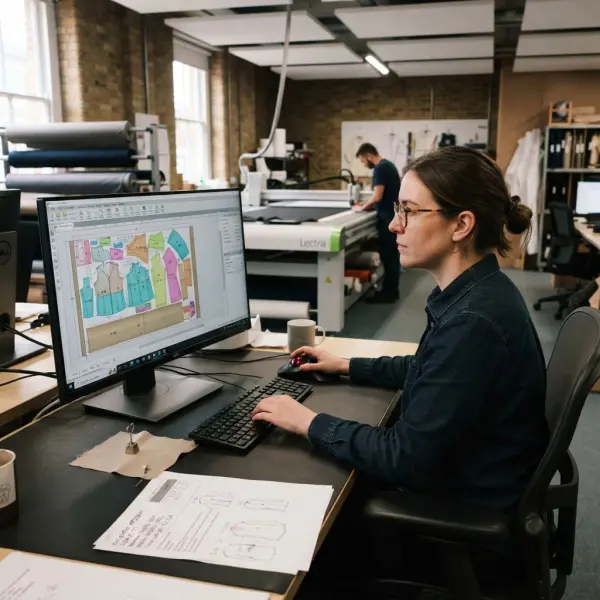
Digital marker making uses digitized garment patterns inside CAD software. The marker maker can move pieces interactively on-screen, apply placement constraints, calculate marker utilization, save alternative layouts, and, depending on the system, run automatic nesting algorithms that search for compact arrangements. Systems such as Tukatech SMARTmark and current Lectra cutting-room solutions can automate nesting and connect marker data with downstream production processes.
Digital does not mean that human judgment disappears. Operators still need correct pattern files, fabric width, size ratios, direction rules, plaid or stripe requirements, and other production constraints. Automation makes placement and comparison more computationally efficient; it does not make incorrect production data correct.
For most scaled apparel operations, the strongest advantage of digital marker making is therefore not simply that it replaces paper. It makes marker planning more repeatable, measurable, editable, and easier to connect with production data.
What Is Manual Marker Making?
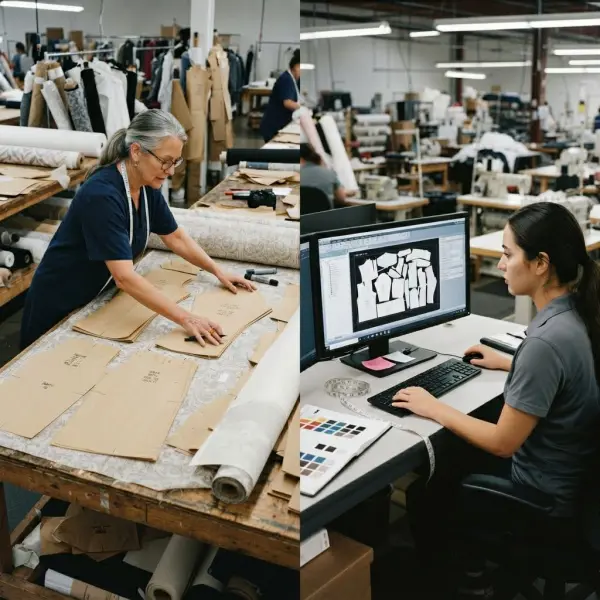
Manual marker making is the traditional process of positioning physical garment pattern pieces within the available fabric width and tracing their final arrangement onto marker paper or, in some production situations, directly onto the material or top layer.
Government training material from India's Bharat Skills describes manual and computerized approaches as the two broad methods used for apparel marker making, with manual work relying on patterns prepared and arranged by the operator. Bharat Skills Dress Making training material
The method resembles a physical packing puzzle. Large pieces such as garment fronts, backs, trouser legs, or skirt panels are usually positioned first or in combination with smaller components, while collars, cuffs, facings, pockets, waistbands, and other smaller pieces may be used to occupy available gaps.
A skilled marker maker develops a strong visual understanding of how those shapes interact. The work involves repeatedly moving pieces while respecting grainlines, fabric direction, garment sizes, and other production restrictions.
That expertise can be highly valuable. The limitation is that a person can physically evaluate only a finite number of arrangements in the available time. As marker length, size assortment, and component count increase, the search problem becomes progressively harder to manage manually.
Manual does not mean technically careless
It would be inaccurate to treat manual marker making as inherently crude.
An experienced operator can produce technically valid and efficient layouts, particularly for familiar styles or relatively short markers. Human operators can also apply practical knowledge that is difficult to reduce to a simple percentage, such as recognizing awkward cutting situations or adapting a marker to workshop realities.
The key limitation is not that humans cannot create good markers. It is that the process is difficult to scale, repeat, compare, and document at the same speed as a well-implemented digital workflow.
What Is Digital Marker Making?
Digital marker making uses computerized garment patterns and a virtual marker workspace to arrange pieces according to production requirements.
The pattern files normally come from a CAD pattern-development and grading system or are digitized from physical patterns. The operator defines parameters such as marker width, sizes, quantities, and relevant placement constraints, then builds the marker on-screen.
Digital marker systems can support two related but distinct workflows.
Interactive digital marker making allows an operator to position and adjust pieces manually on the computer screen. The marker maker still makes placement decisions, but the work takes place within a digital environment.
Automatic nesting allows software algorithms to calculate pattern-piece placement according to defined rules and optimization objectives.
This distinction matters because "digital marker" and "automatic marker" are not exact synonyms. A factory can digitize its marker workflow while still relying heavily on operator-controlled placement. Automation represents an additional layer.
Tukatech's current SMARTmark system, for example, provides automated marker nesting, matching and grouping functions, plaid and stripe matching, yield reports, and centralized marker queues. Tukatech SMARTmark automatic marker making
Lectra's current Valia Fashion platform goes further by linking order preparation, material information, cut planning, automated nesting, production execution, and cutting-room performance data. Lectra Valia Fashion cutting-room workflow

Manual Marker vs Digital Marker: Key Differences
The clearest difference is not simply paper versus computer. Digital marker making changes the number of layout alternatives that can be evaluated, how easily revisions can be made, and how marker information can move through production.
|
Factor |
Manual Marker Making |
Digital Marker Making |
|
Pattern format |
Physical full-size or reduced patterns |
Digitized CAD pattern files |
|
Piece placement |
Physically arranged by operator |
Interactive on-screen placement and/or automatic nesting |
|
Dependence on operator skill |
Very high |
Still important, but software can automate repetitive placement work |
|
Revision speed |
Pieces may need to be rearranged and retraced |
Layouts can usually be edited and recalculated digitally |
|
Alternative-marker testing |
Limited by operator time and physical handling |
Multiple alternatives can be tested more systematically |
|
Efficiency calculation |
May require manual measurement/calculation |
Usually calculated automatically by the software |
|
Pattern/version storage |
Physical storage and manual identification |
Digital libraries and file-based version control are possible |
|
Reproduction |
Requires marker copying, plotting, or retracing processes |
Digital file can be reused, plotted, or transferred depending on the system |
|
Integration with cut planning |
Limited |
Can be integrated with orders, fabric data, spreading, and cutting |
|
Scalability |
Becomes difficult as marker volume and complexity increase |
Better suited to repeated, high-volume, or multi-style workflows |
|
Initial technology requirement |
Low |
Requires compatible software, hardware, training, and data management |
|
Automation potential |
Very limited |
Can include automated nesting and connected production workflows |
The comparison should not be interpreted as a claim that every digital system automatically produces a better marker than every experienced human. Software configuration, algorithm capability, pattern quality, and operator knowledge still matter.
What digitalization changes most reliably is the production environment around the marker: calculations become easier to repeat, layouts can be stored and compared, and the marker can become part of a wider digital manufacturing system.
Which Method Is Faster?
For complex or repeated production work, digital marker making can substantially reduce the amount of manual handling required to create and revise markers. Automated nesting can also process layouts without an operator physically moving every pattern piece.
The advantage becomes more significant when a factory processes many markers rather than one simple layout.
Lectra describes automated nesting systems that can create optimized markers from production constraints and send them directly into cutting workflows. Its Gerber AccuPlan system can also automate processes from cut planning and fabric allocation through marker generation and automated nesting. Gerber AccuPlan cut and marker planning
Customer implementations provide useful illustrations, although they should not be treated as universal performance benchmarks. Workwear Outfitters reported improved marker-processing speed after introducing connected nesting and cutting technology, while Song Hong Garment adopted automated cloud nesting partly to handle hundreds of markers across a large manufacturing operation.
For a small workshop creating one short marker, that scale advantage may be irrelevant. Setting up the digital style, checking files, and managing software may offer less practical benefit if the marker can be arranged once by an experienced operator and never reused.
The relevant metric is therefore not simply "minutes per marker." Fashion teams should consider total marker workload, revision frequency, number of styles, number of size combinations, and how rapidly orders change.
Which Method Produces Better Marker Efficiency?
There is no technically defensible rule that every digital marker will always outperform every manual marker. A highly experienced marker maker may produce an excellent layout, while poorly configured software can generate a technically valid but unremarkable result.
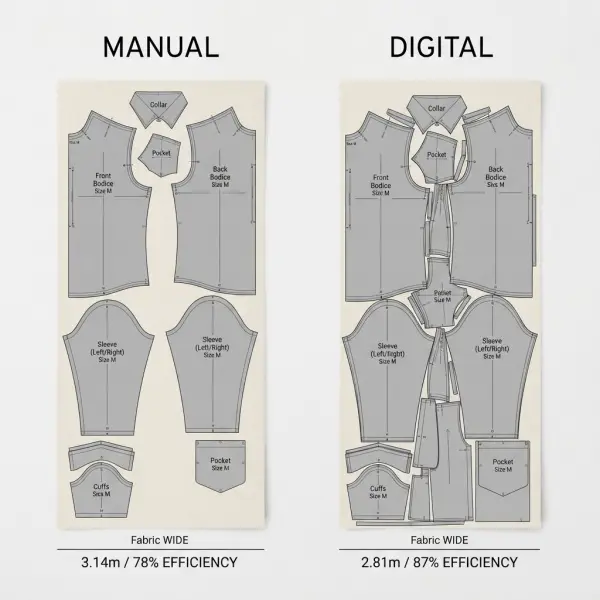
Digital systems nevertheless have a structural advantage in optimization: software can evaluate placement alternatives algorithmically without physically moving every pattern component one at a time.
This matters because apparel nesting is a complex two-dimensional packing problem. As the number of pattern pieces and constraints grows, the possible combinations become difficult for a human to explore exhaustively.
Automatic nesting systems are specifically designed to address this problem. Tukatech describes SMARTmark as an automatic nesting system that processes markers for fabric utilization, including the ability to run centralized marker queues. Lectra similarly uses automated nesting simulations within its current cutting-room systems to evaluate different marker scenarios.
But the resulting marker still operates within fabric and garment rules.
A human or algorithm cannot legitimately improve efficiency by ignoring grain direction, turning a one-way print upside down, or disrupting plaid matching. When production constraints differ, raw efficiency percentages should not be compared without context.
The relationship between layout efficiency and material use is explored more deeply in how marker efficiency reduces fabric waste in garment manufacturing. The important distinction here is that digital tools expand the optimization capability; they do not change the technical definition of a valid marker.
Digital Marker Making Improves Repeatability
One of the less visible advantages of digital marker making is repeatability.
In manual work, the marker itself may be the main record of how pieces were arranged. Recreating a previous solution can involve retrieving physical paper, copying a marker, or reconstructing a layout.
Digital marker files can instead be stored, identified, duplicated, modified, and linked with style or order data. A repeat production order does not necessarily require the marker team to solve the entire layout problem again.
This becomes particularly useful when a factory manages many customers or recurring styles. The team can retrieve an earlier marker, confirm that the pattern revision and fabric conditions are still valid, then modify the existing digital layout if quantities or sizes have changed.
Repeatability also reduces organizational dependence on individual memory.
A skilled manual marker maker may remember that a particular trouser configuration works well on a certain width. In a digital system, that knowledge can become part of the stored production record rather than remaining only with the individual who created it.
The advantage should not be overstated: digital files can still be poorly named, duplicated, overwritten, or used incorrectly. Good data governance remains necessary. Digitalization makes structured control possible; it does not create it automatically.
Digital Marker Making Makes Scenario Testing More Practical
Marker planning often involves trade-offs rather than one obvious layout.
A production team may need to compare:
- two available fabric widths;
- different size combinations;
- alternative marker lengths;
- separate versus mixed-size markers;
- one-way versus permitted two-way placement;
- several cut-order configurations.
Testing these combinations manually can require substantial physical rearrangement.
Digital systems make it easier to create, save, and compare alternative scenarios. More advanced systems can automate parts of that process.
Lectra's current Valia Fashion platform, for example, describes automated nesting simulations that test different marker scenarios using production data. Tukatech's TUKAcutPlan similarly combines order quantities, cutting-room restrictions, material selection, and automated nesting as part of production planning. Tukatech TUKAcutPlan
This capability becomes commercially valuable when fabric is expensive or the production order is large. A seemingly small difference in consumption per garment may justify spending more computational or operator time on the marker.
For very small orders, the economics can reverse. There may be little reason to test numerous scenarios if the absolute material saving is minor.
Digital Workflows Improve the Connection Between Marker Making and Cutting
A major difference emerges when marker making is no longer treated as an isolated CAD-room activity.
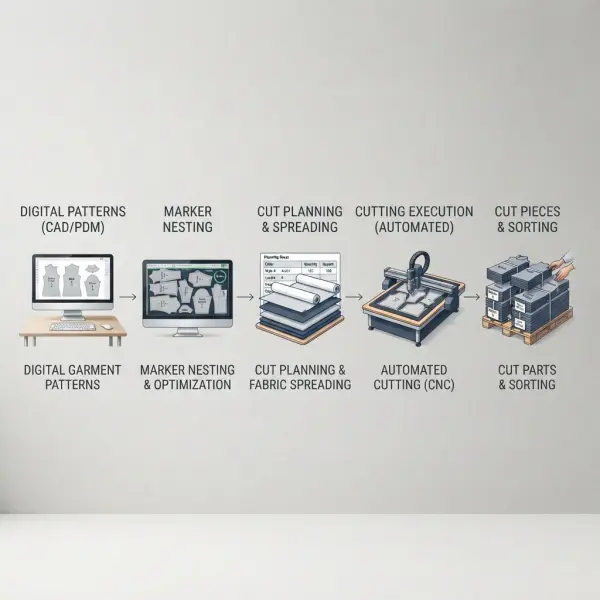
In connected manufacturing environments, marker data can flow into cut planning, fabric allocation, spreading, and automated cutting. This reduces the number of times production information must be manually re-entered.
Gerber AccuPlan, for example, is designed to connect cut planning with fabric-roll availability, marker generation, automated nesting, and production tracking. Current Lectra systems similarly describe workflows where order and material constraints are consolidated before markers are generated and transmitted to cutting equipment.
The benefit is not simply speed. Re-entering information manually creates another opportunity for size quantities, marker identity, fabric width, or order data to be entered incorrectly.
That does not mean integration eliminates production errors. Incorrect upstream data can move through an integrated system very efficiently. Validation remains essential.
Where Manual Marker Making Still Makes Sense
The existence of sophisticated CAD systems does not make manual marker making irrational in every setting.
A small workshop may produce short runs, prototypes, bespoke garments, or highly variable one-off products. If the team already owns physical patterns and the marker is simple, arranging them manually may require less infrastructure than implementing a complete digital CAD process.
Manual work may also remain practical when:
- production volumes are low;
- the marker is short and structurally simple;
- styles rarely repeat;
- CAD software or compatible hardware is unavailable;
- electricity or connectivity is unreliable;
- a workshop is still transitioning from physical to digital patterns;
- investment in software and training would not yet produce sufficient operational value.
These conditions describe practical constraints, not technical superiority.
As order volume rises, the cost of repeated manual work becomes more important. A factory creating dozens or hundreds of markers must consider not only the time required for one marker but also staffing, physical marker storage, revisions, repeated calculations, and production coordination.
The business decision should therefore consider total workflow cost rather than software cost alone.
The Investment Question: Digital Is Not Free
Digital marker making introduces costs that manual workflows may not require.
Depending on the implementation, a business may need CAD software licenses or subscriptions, workstations, plotters, digitization tools, networking, file storage, technical support, training, and integration with other production systems.
The scale of investment varies widely. A standalone marker workstation and a connected automated cutting room are completely different capital and operational commitments.
This is where simple statements such as "digital is cheaper" become misleading.
Digital systems may reduce labor per marker, improve material utilization, reduce revision time, or support higher throughput, but those gains need to outweigh the implementation and operating costs for the specific business.
The calculation becomes more favorable when marker volume is high, material is expensive, production is repeated, lead times are tight, or the software connects multiple production functions.
A small manufacturer should not adopt an elaborate cutting-room platform merely because large exporters use one. The better question is which digital capability solves an existing operational bottleneck.
What Happens to Operator Skill in a Digital Workflow?
Digital marker making changes operator skill rather than eliminating it.
Manual marker makers rely heavily on spatial judgment and physical manipulation of pattern shapes. Digital operators still need spatial reasoning, but they also work with file management, software commands, digital constraints, marker specifications, production data, and automated-nesting outputs.
When automatic nesting is available, the operator's role increasingly moves from physically searching for every placement toward defining the problem correctly and evaluating the solution.
That means knowing whether:
- the correct pattern revision was loaded;
- all pieces are present;
- size quantities match the cut order;
- usable fabric width is correct;
- rotation and flipping permissions are valid;
- nap or grain restrictions are applied;
- stripe or plaid matching is maintained;
- the resulting marker can actually be executed in production.
Automation therefore reduces some repetitive tasks while increasing the importance of production-data literacy.
Lectra's current cutting-room platform explicitly frames automation as a way to move operators away from repetitive data-entry, order-preparation, and nesting work toward more value-added activities. That is a useful way to understand the transition: expertise shifts from moving every shape manually toward supervising a larger technical system.
Automatic Nesting Is Powerful, but It Is Not Autonomous Manufacturing
One of the common misconceptions around digital marker making is that the operator can load patterns, press a button, and assume that whatever appears is production-ready.
Automatic nesting algorithms work from the parameters they are given.
If a one-way fabric is incorrectly configured as non-directional, the algorithm may find a mathematically compact arrangement that should never be cut. If the wrong pattern revision is loaded, the software may optimize obsolete garment components perfectly.
Automatic marker making is therefore a classic case of automation amplifying input quality.
Good data allows the system to process legitimate alternatives rapidly. Bad data allows it to process the wrong problem rapidly.
Human verification remains especially important for directional materials, complex prints, engineered placement, asymmetric pieces, and styles where visual matching influences finished-garment quality.
This is also why comparing a human marker maker with an algorithm as though they were two isolated competitors misses the operational reality. In a mature digital workflow, the operator defines constraints, reviews exceptions, manages data, and uses software as an optimization tool.
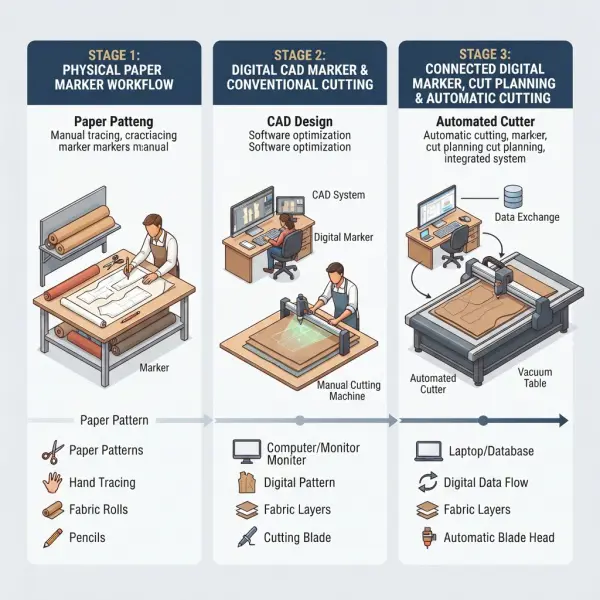
Manual-to-Digital Transition Does Not Have to Happen All at Once
Fashion manufacturers often treat digitalization as though the only choices are fully manual production or a fully automated cutting room. In practice, transition can be incremental.
A business might first digitize production patterns and create markers on-screen while continuing to use conventional cutting equipment. Later, automated nesting can be introduced. Cut planning, fabric-roll management, spreading, or automated cutting can be integrated when scale justifies the additional investment.
This staged approach can reduce implementation risk because teams learn to manage reliable digital pattern and marker data before depending on deeper automation.
Optitex customer documentation provides an example of digital patterns being complemented by digital Marker software with automated nesting before production pieces proceed to manufacturing. Current apparel systems from Lectra and Tukatech similarly show modular relationships between pattern making, marker making, planning, and cutting rather than treating every function as one inseparable tool.
For smaller factories, that modularity matters. The strongest first investment may simply be the stage creating the most recurring bottleneck.
How Should Fashion Teams Choose Between Manual and Digital Marker Making?
The decision should start with production requirements rather than technology enthusiasm.
For a small fashion brand outsourcing its garments, buying marker software may make little sense because the supplier already performs the cutting work. Understanding digital marker capability is still useful, however, because it helps the brand review fabric consumption, supplier efficiency, and production data more intelligently.
For manufacturers, several questions provide a better decision framework.
How many markers are being created?
Low marker volume reduces the financial value of automation. High marker volume strengthens the case for digital storage, rapid revisions, automated nesting, and marker queues.
How expensive is the fabric?
The more costly the material, the more valuable small consumption improvements can become. Expensive technical textiles, wool, specialty fabrics, and large-volume programs can justify more optimization effort than low-cost material used in tiny quantities.
How complex are the styles?
Multiple sizes, numerous pattern pieces, asymmetric garments, plaid matching, placement prints, and directional materials increase the number of constraints the marker team must manage.
Digital systems can make those constraints easier to encode and repeat, although difficult materials still require technical judgment.
How frequently do orders change?
A manufacturer handling frequent quantity revisions, short lead times, and many styles benefits more from editable digital data than a workshop producing a small number of stable products.
Does the marker need to connect with other systems?
If fabric estimation, ERP orders, cut planning, roll allocation, spreading, and automated cutting already use digital data, manual marker making becomes an isolated step that may require repeated information transfer.
A connected digital marker workflow can reduce that fragmentation.
Can the organization maintain the digital system?
Software is useful only when people can operate and maintain the workflow. Training, file discipline, technical support, pattern-data standards, and process ownership should be considered before deployment.
The strongest digital system installed into weak production governance can still generate confusion.
Practical Decision Framework
For many fashion teams, the choice can be framed more realistically this way:
|
Production situation |
More practical starting point |
Why |
|
Bespoke or very small workshop |
Manual or basic digital |
Marker volume may not justify complex automation |
|
Small manufacturer with repeat styles |
Digital interactive marker making |
Easier storage, editing, measurement, and reuse |
|
Medium-volume factory with many sizes/styles |
Digital plus automatic nesting |
More alternatives can be processed consistently |
|
High-volume export manufacturer |
Integrated digital marker and cut planning |
Scale increases the value of speed, repeatability, and material control |
|
Expensive-material production |
Strong digital optimization may be valuable |
Small consumption improvements can have meaningful financial impact |
|
Factory with automated cutting |
Digital marker workflow is generally operationally aligned |
Marker data can connect directly with downstream cutting systems |
These are decision tendencies rather than universal rules.
A small workshop with specialized digital capability may automate early. A large factory may retain some manual intervention for exceptional products. The appropriate workflow depends on the actual production model.
Common Mistakes When Comparing Manual and Digital Marker Making
Assuming digital automatically means higher quality
Digital tools can improve repeatability, measurement, and optimization, but they cannot repair a technically incorrect garment pattern. A digitally nested marker containing wrong pieces remains wrong. Pattern validation and production rules still come first.
Comparing only software cost with manual labor cost
This ignores material consumption, revision time, marker throughput, physical storage, training, production delays, and downstream integration. A proper comparison should consider the total cost of the marker-making workflow rather than one visible expense.
Believing automation eliminates experienced operators
Automation changes the work. Someone still needs to configure restrictions, validate pattern data, interpret exceptional materials, investigate poor markers, and approve production output. Removing expertise too quickly can make a new digital system less reliable rather than more productive.
Measuring success only through marker efficiency
An efficient marker that contains an incorrect size ratio, violates nap direction, or creates cutting problems is not a successful marker. Production accuracy, recut rate, processing time, and actual fabric consumption should accompany the efficiency metric.
Digitizing an unstable process
If pattern revisions are uncontrolled, fabric-width data is unreliable, and cut orders frequently contain errors, moving the same workflow into software will not solve the underlying management problem. Digital transformation works better when core production data is standardized first.
Buying more automation than the production model requires
Advanced automation can be valuable, but not every workshop needs centralized marker queues, real-time production dashboards, or integrated automated cutting. Technology should solve a measurable operational problem rather than become an objective by itself.
What Should Brands Verify When Their Factory Uses Digital Markers?
Brands outsourcing production do not usually need to dictate which marker software a manufacturer should use. They do, however, benefit from understanding what the digital marker represents.
A useful review focuses on production data:
- Is the marker based on the approved production pattern?
- What usable fabric width was assumed?
- Which garment sizes and quantities are included?
- What marker efficiency was achieved?
- Are directional or motif-matching restrictions correctly applied?
- What fabric consumption does the marker predict?
- Does actual consumption remain reasonably aligned with the plan?
- If consumption changes, what marker or production variable changed?
This shifts the supplier conversation away from vague claims that a marker is "optimized."
The objective is not for brand managers to operate CAD software. It is for them to understand the production assumptions behind fabric cost.
The broader mechanics of digital markers are covered in CAD marker making explained for apparel production.
Important Technical Caveats
Manual versus digital should not be treated as a binary comparison of bad versus good, old versus modern, or inefficient versus efficient.
Both methods can create technically valid production markers.
Performance depends on operator expertise, software capability, marker complexity, production data, and the amount of time available for optimization. Vendor case studies reporting savings or productivity gains can illustrate what particular manufacturers achieved, but those results should not be generalized into guaranteed savings for every factory.
Digital marker making also covers a wide spectrum. A technician manually arranging pieces on-screen is already working digitally, even without automatic nesting. At the other end of the spectrum, modern systems can connect order planning, automated nesting, fabric-roll information, production monitoring, and cutting equipment. Calling both workflows simply "computerized marker making" can hide a substantial difference in automation maturity.
Finally, not every production operation needs the most advanced system available. Return on investment depends on marker volume, labor structure, fabric value, order complexity, existing equipment, and the ability of the organization to use the system effectively.
FAQ About Manual and Digital Marker Making
Is manual marker making still used in garment manufacturing?
Yes. Manual methods can remain practical in smaller workshops, low-volume production, training environments, or businesses that have not digitized their pattern and cutting workflows. Physical pattern pieces can be arranged directly on paper or fabric by an experienced operator. As marker volume and complexity increase, however, digital systems offer stronger advantages in editing, storage, calculation, repeated use, and integration with production planning.
Is digital marker making the same as automatic nesting?
No. Digital marker making describes the broader use of computerized pattern files and marker software. An operator can still arrange those pieces manually on-screen. Automatic nesting is a specific software function that calculates pattern placement according to defined constraints. Many professional CAD systems support both operator-controlled placement and automated optimization, so a factory may use different methods for different markers.
Can an experienced manual marker maker outperform automatic nesting?
It is possible for a skilled operator to produce an excellent marker, particularly for familiar or relatively simple layouts. Automated systems have the advantage of testing placement combinations computationally and doing so repeatedly, but results still depend on the algorithm and settings. The meaningful comparison is not human versus machine in isolation; it is which workflow produces a technically correct marker with acceptable material utilization, processing time, and consistency.
Does a small fashion brand need marker-making software?
Usually not if production and cutting are fully outsourced. The manufacturer or cutting contractor may already operate the required marker system. A small brand gains more value from understanding marker width, efficiency, consumption, pattern revision, and production restrictions so it can evaluate supplier costing. Brands performing their own pattern development and cutting may have a stronger case for investing in CAD tools.
Can digital marker making work with manual fabric cutting?
Yes. Digital marker making does not require an automated cutter. A marker can be created in CAD and then plotted or otherwise used to guide a conventional cutting process, depending on the factory's system. This creates a useful intermediate stage for manufacturers that want digital pattern and marker control without replacing the entire cutting room at once.
What is the biggest advantage of digital marker making?
For scaled production, the most significant advantage is usually the combination of repeatability, faster revision, automated calculation, layout optimization, and digital integration—not one feature in isolation. A marker can be stored, revised, compared, linked with order data, and potentially transferred into cut-planning and cutting systems. The practical value grows as marker volume and production complexity increase.
What is the biggest risk when moving from manual to digital markers?
A common risk is assuming software will compensate for weak production data or insufficient training. Incorrect fabric width, wrong pattern revisions, missing directional restrictions, or inaccurate size quantities can all produce incorrect digital markers. A successful transition therefore requires both technical implementation and disciplined pattern, material, and order data management.
Should factories remove manual marker-making skills after adopting automation?
Not necessarily. Understanding marker geometry and production constraints remains valuable even when software performs most nesting. Operators need enough technical knowledge to recognize unrealistic output, diagnose unusual material conditions, handle exceptions, and verify automated decisions. Automation is strongest when it extends production expertise rather than replacing understanding of the underlying process.
Conclusion
Manual and digital marker making begin with the same objective: place the correct garment pieces within the available fabric width while respecting production rules and controlling material use.
What changes with digitalization is the operating model.
Physical manipulation becomes screen-based placement. Marker calculations become automatic. Layouts can be stored and revised. Alternative scenarios become easier to test. Automatic nesting can evaluate combinations that would be impractical to explore manually, and marker information can increasingly connect with fabric planning, spreading, and cutting.
Those capabilities make digital marker making increasingly valuable as production volume, material cost, product complexity, and lead-time pressure rise.
Manual workflows still have a rational place where volumes are low and operational requirements are simple. The mistake is not using manual methods; it is continuing to depend on them after production complexity has reached the point where repeated physical work, slow revisions, inconsistent records, or limited optimization are creating measurable cost.
For fashion teams, the decision should therefore be based on scale and workflow economics rather than the assumption that newer technology is automatically better.
A digital marker system earns its value when it helps a business create correct markers more consistently, evaluate alternatives more effectively, connect production information more reliably, and ultimately control the relationship between patterns, fabric, time, and cutting capacity.





Comments 0
Leave a CommentSend Comment
Anda harus Login terlebih dahulu untuk dapat memberikan komentar.