

How Pattern Software Helps Reduce Errors in Garment Development
Quick Answer
Pattern software helps reduce garment-development errors by making pattern geometry measurable, repeatable, traceable, and easier to verify before fabric is cut. Apparel CAD systems can support seam-length checking, pattern walking, grading review, seam-allowance updates, linked pattern components, measurement charts, version-controlled files, and clearer transfer of production information.
These functions are especially useful for detecting mismatched seams, forgotten component updates, inconsistent grading, incorrect allowances, missing notches, outdated pattern versions, and discrepancies between pattern measurements and garment specifications. Some systems can also connect 2D patterns with 3D garment simulation, marker planning, plotting, and automated cutting.
The software does not prevent every mistake. It cannot decide whether a silhouette suits the intended customer, whether the block reflects the target body population, or whether a fabric will behave exactly as expected. Incorrect data can still be entered, automated, copied, and distributed.
The most reliable approach combines digital checking tools with trained patternmakers, controlled approvals, material testing, physical or virtual fit evaluation, supplier verification, and clear ownership of the master pattern. Pattern software reduces errors most effectively when it strengthens an already disciplined garment-development process.

Why Do Pattern Errors Occur During Garment Development?
Pattern errors rarely come from one dramatic failure. They usually develop through small inconsistencies that accumulate as a style moves from sketch to pattern, sample, fitting, grading, marker, and bulk production.
A neckline is revised, but the facing is not updated. A side seam is lengthened, but the corresponding back seam remains unchanged. The base size is corrected, yet one graded size still carries the old rule. A supplier imports a file in the wrong unit. A production team cuts from a version labeled “final” even though a later correction exists elsewhere.
Each mistake may appear minor in isolation. Once repeated across several sizes or hundreds of garments, however, the business consequence can include sample delays, additional pattern work, wasted fabric, sewing difficulty, inconsistent fit, rejected production, late delivery, or markdown risk.
The most common error sources can be grouped into six areas:
- inaccurate or incomplete product inputs;
- incorrect pattern geometry;
- inconsistent related components;
- unsuitable grading;
- poor revision and file control;
- incorrect production-data transfer.
Pattern software can provide checks and automation across these areas, but it works only with the information and rules supplied by the team.
What Does Error Reduction Mean in Pattern Making?
Error reduction means preventing, detecting, correcting, or containing pattern-related discrepancies before they affect later development or production stages.
Not every pattern change is an error. A sample may require revision because the designer changes the silhouette, the fabric behaves differently from the original assumption, or the fit team decides that the garment needs more ease. Those are development decisions.
A pattern error is more specific. It occurs when the pattern does not accurately reflect the approved design, measurement specification, construction method, grading logic, material requirement, or production instruction.
Examples include:
|
Error type |
Typical example |
Likely consequence |
|
Geometry error |
An unintended corner, distorted curve, or misplaced point |
Poor shape, sewing difficulty, or visual imbalance |
|
Seam mismatch |
Front and back seams that should match have different lengths |
Puckering, stretching, trimming, or operator rework |
|
Component inconsistency |
Collar changed but collar stand not updated |
Assembly failure or incorrect finished appearance |
|
Measurement discrepancy |
Pattern measurement conflicts with approved specification |
Incorrect garment dimensions |
|
Grading error |
A point has the wrong rule or no rule |
Distorted fit in one or more sizes |
|
Seam-allowance error |
Allowance is missing or unsuitable for the operation |
Cutting or sewing inconsistency |
|
Annotation error |
Missing notch, grainline, label, or placement mark |
Incorrect assembly or cutting orientation |
|
Version error |
Factory uses an obsolete file |
Production does not match the approved sample |
|
Conversion error |
Units, curves, layers, or labels change during transfer |
Pattern must be corrected or recreated |
|
Material-assumption error |
Pattern does not account for stretch or shrinkage |
Finished fit differs from approved intent |
Pattern software is strongest against errors that can be expressed as geometry, measurements, relationships, rules, attributes, or file status. It is less capable of identifying subjective problems such as whether a design feels too conservative, whether the proportion suits the brand, or whether the garment delivers the intended emotional response.
Readers who need a broader introduction to the technology can review digital pattern making for apparel production.
How Does Pattern Software Detect Seam-Length Problems?
Seam-length checking is one of the clearest examples of software-assisted error detection.
Garment pieces frequently contain edges that must sew together: front and back side seams, shoulder seams, collar and neckline, sleeve cap and armhole, waistband and trouser waist, facing and garment edge, or lining and shell components.
Some seam-length differences are intentional. A sleeve cap may contain controlled ease. A gathered panel is expected to be longer than the section receiving it. Elastic, binding, or rib may be intentionally shorter than the opening to which it is attached.
The error occurs when the difference is unintended or does not match the required construction ratio.
Gerber AccuMark includes a check function designed to compare seam lengths and curves so that patternmakers can verify whether pieces will sew together correctly. CLO similarly provides a sewing-length check that identifies significant differences between assigned sewing lines and can highlight discrepancies above a defined tolerance.
A digital seam check can help identify:
- one seam changed without its matching seam;
- notches no longer aligned after a revision;
- a curve edited on the cut line instead of the sewing line;
- a waistband that no longer matches the waist seam;
- a collar that does not fit the neckline;
- inconsistent seam relationships across graded sizes.
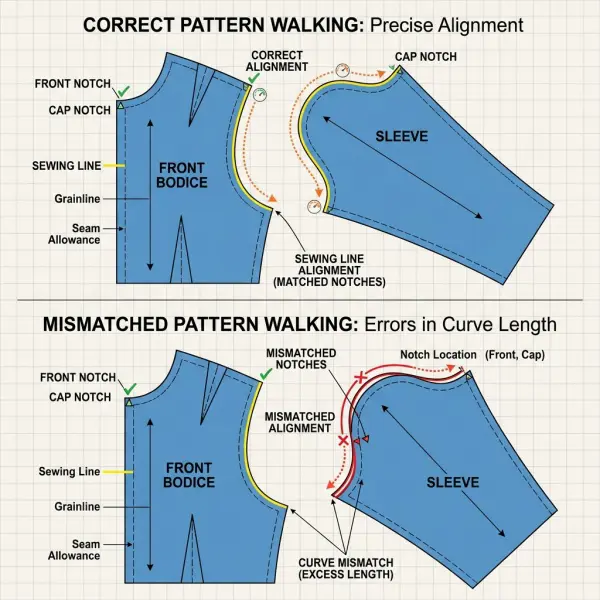
The official Gerber seam and curve verification guidance describes checking the relationship by walking pattern pieces. This reproduces an established manual patternmaking practice in a measurable digital environment.

A matching measurement is not always a correct seam
Software may show that two lines have equal lengths, but the pieces can still be difficult to sew if their curves, notch positions, direction, or distribution are unsuitable.
For example, a sharply curved neckline facing may have the same total seam length as the neckline but still distort if the curvature does not correspond correctly. Likewise, sleeve-cap ease must be distributed intentionally rather than treated as one undifferentiated length difference.
The patternmaker must interpret the result. Software can report the relationship; it cannot always decide whether that relationship is technically appropriate.
How Does Software Prevent Related Pattern Pieces From Becoming Inconsistent?
Garments are built from connected components. Changing one piece often creates a chain of required updates.
A jacket neckline may connect to the collar, facing, lining, fusible, topstitching guide, and placement marks. A pocket revision can affect the pocket bag, welt, flap, reinforcement, lining opening, and drill positions. A trouser-rise adjustment may influence the fly, waistband, pocket opening, lining, and balance between front and back pieces.
Manual workflows rely heavily on the patternmaker remembering and identifying every affected piece. Digital systems can reduce that dependency through copying, derived geometry, linked elements, grouped components, or parametric relationships, depending on the platform.
Current Modaris documentation describes creating new patterns from existing blocks or variants, modifying style lines, grading, adding production information, and maintaining libraries of graded base patterns. Its more advanced configurations include parametric capabilities intended to update connected pattern relationships more systematically.
The operational value is not that the software understands the entire garment automatically. It is that certain relationships can be built into the pattern data instead of being reconstructed manually after every change.
Linked editing reduces omission risk
Suppose a brand changes the front neckline depth of a blouse after the first fitting. In a weak process, the patternmaker updates the front bodice but forgets the facing until the sample room discovers the mismatch.
In a stronger digital setup, the facing may be derived from or linked to the approved neckline geometry. The related component can then be regenerated or flagged for updating.
This type of automation is particularly valuable for:
- facings and linings;
- mirrored or paired pieces;
- interlinings and reinforcements;
- seam allowances;
- cuffs and sleeve openings;
- collars and necklines;
- waistbands and waist seams;
- pockets and placement guides;
- repeated style components.
Linked editing still needs supervision. An automatically updated facing may retain the correct neckline shape but require a different outer width, roll behavior, interfacing boundary, or construction treatment after the design change.
How Does Pattern Software Improve Measurement Control?
Pattern measurements connect the geometry of the pattern with the garment specification. Software can calculate distances, circumferences, curve lengths, and selected points of measurement directly from pattern data.
This reduces manual transcription and makes it easier to compare the pattern with the approved measurement chart.
A measurement-control workflow may check:
- chest, waist, hip, and hem circumference;
- body and sleeve length;
- shoulder width and slope;
- armhole and sleeve-cap relationship;
- front and back rise;
- collar and neckline dimensions;
- pocket position;
- pleat, gather, and dart intake;
- symmetry between left and right components;
- measurement changes across sizes.
Some apparel CAD systems save or associate measurement charts with pattern models. Gerber’s current release documentation notes that measurement charts can be stored within the model structure rather than as a separate external file, which can improve continuity between pattern geometry and measurement records.
That association can reduce the risk that the team checks a new pattern against an old spreadsheet. It does not guarantee that every point of measurement has been defined correctly.
Body measurements, pattern measurements, and finished-garment measurements must remain distinct
A body measurement describes the wearer. A pattern measurement describes the relevant line or distance on the flat pattern. A finished-garment measurement describes the completed product after sewing, pressing, finishing, and material response.
These values may be related but are not interchangeable.
ISO 8559-1:2017 provides standardized anthropometric definitions that can support physical and digital body-measurement databases and was confirmed as current in 2026. ISO 8559-2:2025 establishes garment size-designation dimensions based on body measurements. Neither standard automatically determines a brand’s finished-garment dimensions, ease, style, or construction allowances.
The ISO 8559-1 body-measurement framework can support consistent measurement terminology. Fashion teams must still decide how those body dimensions translate into blocks, grade rules, garment ease, and fit standards.
A software measurement can be numerically exact while still being based on an inappropriate measurement definition. The team therefore needs a controlled point-of-measurement manual, not just a collection of numbers.
How Does Software Reduce Grading Errors?
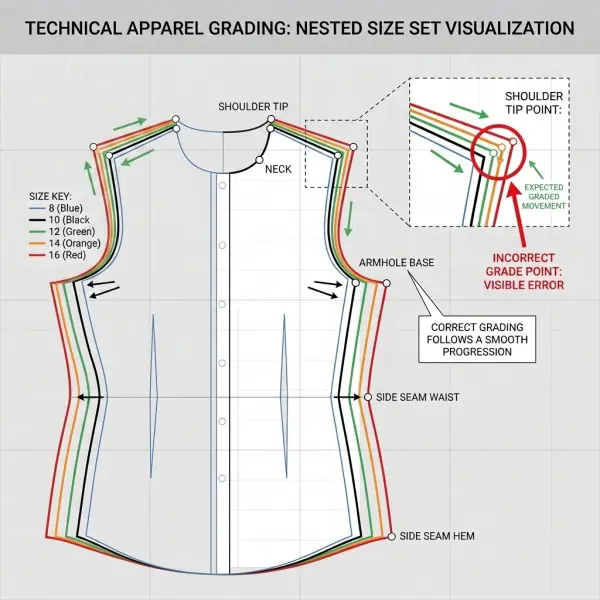
Digital grading applies defined horizontal and vertical movements to selected grade points across a size range. It can display nested sizes, store grade-rule libraries, and reveal how each point changes from the base size.
This reduces repetitive drawing and makes inconsistent point movement easier to spot. Gerber documentation describes grade rules as X and Y values assigned to rule numbers and applied to pattern points. CLO’s grading tools similarly allow users to define grade points and apply grading values to 2D patterns.
Pattern software can help detect or prevent several grading problems:
- a missing grade rule;
- a rule assigned to the wrong point;
- a point moving in the wrong direction;
- a notch that does not follow its seam;
- a seam allowance that grades differently from the sewing line;
- a pocket or trim placement that stays fixed when it should move;
- distorted corners in the smallest or largest sizes;
- inconsistent seam relationships between sizes.
Modern systems may also provide functions for maintaining seam grading or restacking nested sizes for easier visual verification. AccuMark’s current release documentation, for example, includes grade-nest display controls, while its pattern tools can adjust seam grading to keep seam relationships aligned after changes.
Automated grading can scale an error quickly
Grading automation reduces repetitive execution, not the need to validate the grading strategy.
If the base pattern is wrong, the complete size range begins from the wrong foundation. If the assigned rule is inappropriate, the software can reproduce the error consistently across every size.
This makes grading review essential at three levels:
- Point level: Is each grade point moving correctly?
- Piece level: Does the complete piece maintain an appropriate shape?
- Garment level: Do connected pieces, measurements, placements, and proportions remain coherent?
The smallest and largest sizes deserve particular attention because proportional distortion may be less visible near the base size.
A size nest that looks evenly spaced is not proof of good fit. Fit validation may require measurements, virtual review, physical samples, or fitting on representative bodies, depending on the product and business risk.
How Are Seam-Allowance Errors Reduced?
Seam allowances are production attributes, not decorative outlines. Their width and shape must correspond with the sewing operation, material, machinery, trimming method, edge finish, and factory convention.
Common seam-allowance errors include:
- allowance omitted from one piece;
- different widths on two corresponding seams;
- incorrect allowance around a corner;
- outdated allowance after the sewing line changes;
- excess bulk at intersecting seams;
- insufficient allowance for a required operation;
- allowances grading incorrectly across sizes;
- confusion between cut lines and sewing lines.
Pattern software can add, edit, display, measure, or update seam allowances more systematically than repeatedly drawing them by hand. AccuMark documentation describes updating seam allowances after pattern changes and adjusting seam grading so seam lines remain parallel through the graded range.
This reduces one frequent source of error: altering the finished sewing line while leaving the old cut line in place.
Standardized allowances should not become inflexible defaults
A pattern room may create a library of standard seam allowances for overlocked seams, hems, bindings, enclosed seams, or automated operations. That can improve consistency.
The library must still allow product-specific decisions. A lightweight silk blouse, waterproof shell, tailored jacket, activewear legging, denim jean, and children’s T-shirt do not necessarily require the same allowance strategy.
The team should verify:
- sewing machine and stitch type;
- fabric thickness and stability;
- edge-finishing method;
- pressing and trimming requirements;
- turn-of-cloth;
- seam-taping or sealing needs;
- automation requirements;
- factory tolerance.
Software can preserve the selected allowance. It cannot establish that the selection is suitable without technical input.
How Does 3D Simulation Help Identify Pattern Problems?
Three-dimensional garment simulation assembles digital 2D pattern pieces around an avatar using defined sewing relationships and fabric-property settings. It can help teams assess silhouette, balance, proportion, placement, and possible areas of tension or excess before making every physical sample.
The main error-reduction value is visibility. Designers and merchandisers who find flat patterns difficult to interpret can see how changes may affect the assembled garment.
A virtual review may reveal:
- an incorrectly sewn or reversed piece;
- unexpected twisting;
- uneven hems;
- misplaced pockets or style lines;
- excessive or insufficient volume;
- obvious neckline or armhole distortion;
- inconsistent left and right components;
- grading changes that alter proportion;
- missing sewing relationships.
CLO’s sewing-length tools can flag unintended differences between assigned sewing lines, while contemporary apparel CAD platforms increasingly connect 2D pattern editing with 3D review.
Simulation is an early-warning system, not automatic proof
The virtual result depends on the quality of its inputs. An inaccurate avatar, generic fabric preset, incorrect layer order, wrong sewing direction, or unsuitable material properties can create misleading conclusions.
Physical garments involve behavior that may be difficult to model completely, including:
- pressing and shaping;
- fusible response;
- padding and internal support;
- seam puckering;
- elastic recovery;
- washing and finishing;
- adhesive bonding;
- coating behavior;
- trim weight;
- wearer movement and comfort;
- operator handling.
For repeat styles in familiar materials, a validated 3D workflow may support fewer exploratory samples. For structured tailoring, lingerie, protective clothing, compression garments, unfamiliar fabrics, or complex finishing, physical validation may remain more extensive.
Software reduces error when virtual predictions are compared with real outcomes and the workflow is calibrated over time.
How Does Pattern Software Improve Revision Control?
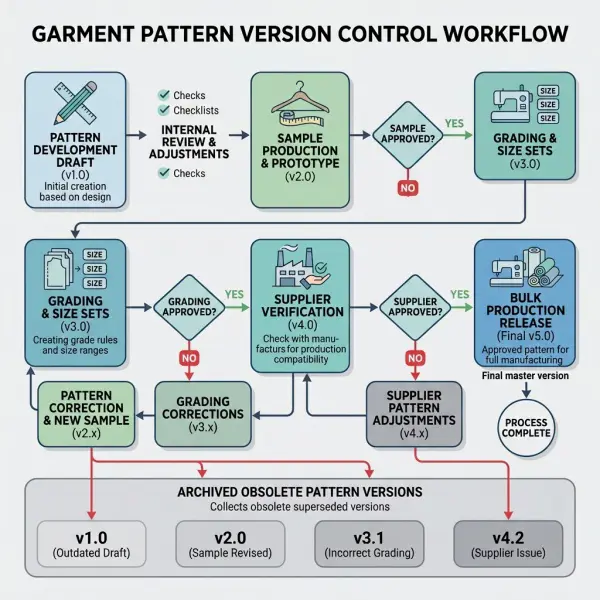
Revision control prevents teams from developing, approving, or cutting from the wrong pattern version.
A typical garment may pass through several files:
- first pattern;
- first-sample correction;
- second-sample revision;
- size-set pattern;
- pre-production correction;
- supplier-adapted version;
- approved bulk pattern;
- repeat-order update.
Without a controlled naming and approval system, a digital folder can become crowded with files such as “final,” “final2,” “new final,” or “correct final latest.” The ability to duplicate files quickly can increase version risk rather than reduce it.
Pattern software and connected data systems can support revision control through file metadata, model structures, linked measurement charts, shared storage, permission levels, or PLM integration. AccuMark’s current documentation describes integrations intended to connect markers and product-development information across teams and suppliers, but the exact capability depends on the selected software environment.
A reliable revision process should define:
- who may edit the master pattern;
- who approves corrections;
- how each version is numbered;
- where fit comments are recorded;
- which status permits sampling;
- which status permits bulk cutting;
- how obsolete files are restricted;
- how supplier-specific changes return to the master;
- how backups and recovery are managed.
The software provides a container for the process. Governance determines whether that container remains trustworthy.
How Does Software Reduce File-Transfer Errors?
Digital pattern files often move between brands, freelance patternmakers, sample rooms, vendors, factories, 3D teams, marker departments, and automated cutting systems.
Transfer can reduce shipping time, but it introduces interoperability risk. Different platforms or versions may interpret data differently.
Potential transfer errors include:
- millimetres interpreted as centimetres or inches;
- cut lines confused with sewing lines;
- internal lines omitted;
- curves converted into excessive points;
- notches changed or removed;
- piece names truncated;
- grade data missing;
- seam allowances excluded;
- mirror or fold instructions lost;
- unsupported attributes discarded.
Current AccuMark documentation notes continuing work on interoperability between AccuMark and Modaris, including the transfer of grading and matching information intended to reduce data loss. It also notes that older storage formats can become read-only as systems evolve, showing why long-term compatibility must be planned rather than assumed.
Modaris documentation also identifies conversion support for AccuMark, DXF-AAMA, and DXF-ASTM pattern files, but compatibility should always be verified with representative production files rather than accepted from format names alone.
A file that opens may still be wrong
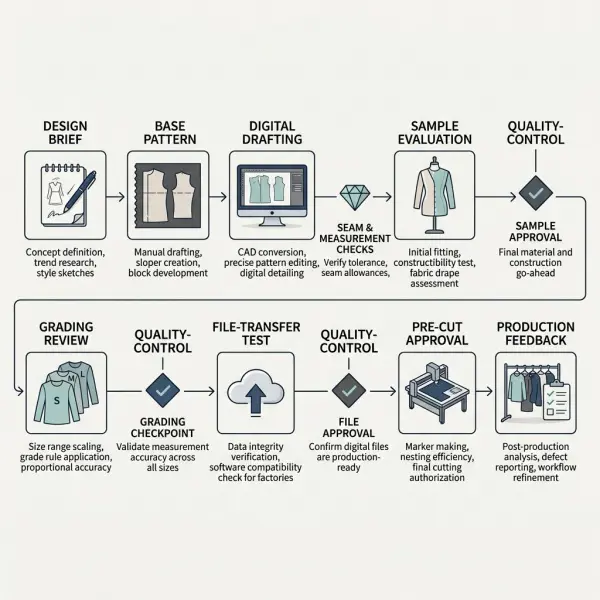
Visual inspection is not sufficient. After import, the receiving team should verify:
- overall dimensions;
- critical seam lengths;
- grainlines;
- notches and internal marks;
- piece quantities;
- size names;
- graded measurements;
- seam allowances;
- cut-versus-sewing-line conventions;
- annotation and material information.
For a critical style, the sender and receiver should compare a control measurement sheet or plotted reference. This creates a known benchmark instead of assuming that successful import equals successful transfer.
The operational differences between paper and digital handoffs are explored further in digital patterns versus manual patterns.
How Does Pattern Software Help Before Cutting?
The financial risk of a pattern mistake rises sharply once fabric is spread and cut. A problem identified on screen may require minutes of correction. The same problem discovered after cutting can affect every component in the lay.
Before production release, pattern software can support a structured pre-cut verification covering:
|
Verification area |
What the team should check |
|
Pattern completeness |
All shell, lining, interlining, support, pocket, and trim pieces are present |
|
Piece information |
Style, size, piece name, material, quantity, and cut instruction are correct |
|
Geometry |
Curves, corners, intersections, and internal lines are clean |
|
Seam relationships |
Sewing lines and intended ease relationships are verified |
|
Grading |
All required sizes are present and visually reviewed |
|
Allowances |
Widths and corner treatments match the construction method |
|
Placement marks |
Notches, drill points, pocket marks, folds, and balance points are present |
|
Grain and direction |
Grainlines, nap, one-way design, and mirror instructions are correct |
|
Measurement control |
Pattern measurements correspond with the approved specification |
|
File status |
The file is the approved production version |
|
Conversion |
Imported or exported data has been checked in the receiving system |
|
Cutting connection |
Cutter, plotter, or marker settings reflect the required production method |
AccuMark’s current documentation emphasizes that high-quality CAD data can be passed into cutting workflows and that embedded cut options may reduce downstream edits.
This does not remove cutting-room responsibility. Fabric width, shrinkage, relaxation, defects, nap, print matching, ply direction, spreading tension, and cutter settings remain production variables outside the pattern geometry itself.
What Errors Can Pattern Software Not Prevent?
Pattern software cannot prevent mistakes that require business judgment, material knowledge, or human interpretation beyond the defined data.
An unsuitable base block
A perfectly digitized block can still be wrong for the intended customer. Software does not independently know whether the brand’s target population has different body proportions, posture, or fit preferences.
An unclear design brief
If the designer has not defined the intended silhouette, length, volume, material, or construction, the patternmaker may create an accurate interpretation of an incomplete instruction.
Incorrect fabric assumptions
A pattern developed around one stretch, shrinkage, thickness, or drape profile may fail when the material changes. Generic digital fabric properties should not replace actual testing where performance matters.
Poor construction planning
Software may show that pieces fit geometrically while the chosen sewing sequence, machinery, finish, or tolerance remains impractical.
Weak fit evaluation
A virtual or physical sample may display a problem, but someone still needs to diagnose whether it comes from the pattern, posture, fabric, sewing, pressing, or design intent.
Incorrect commercial decisions
A technically correct pattern may create fabric consumption, labor complexity, or quality risk that does not fit the target price.
These limitations explain why error reduction should be managed across product development rather than assigned entirely to the CAD operator.
How Fashion Businesses Can Build an Error-Reduction Workflow
The strongest system combines software checks with clear human responsibilities.
1. Standardize the inputs
Before pattern development begins, define the design brief, target measurements, base size, material assumptions, construction direction, and required deliverables.
Incomplete inputs should be returned for clarification rather than silently interpreted.
2. Establish an approved block library
Blocks should be identified by product category, customer segment, fit type, material behavior, and approval date. Experimental or obsolete blocks must be separated from production foundations.
3. Create pattern-construction standards
The pattern room should define conventions for:
- point and line types;
- sewing and cut lines;
- notches;
- grainlines;
- seam allowances;
- internal marks;
- piece naming;
- size naming;
- grade rules;
- annotation;
- units.
Consistency makes automated and human checks more reliable.
4. Build mandatory digital checkpoints
A pattern should not proceed directly from drafting to sampling. The team can require checks at defined gates:
- geometry and cleanup;
- seam walking;
- measurement comparison;
- component completeness;
- allowance review;
- grading review;
- file-status approval;
- export verification.
The checklist should reflect product risk. A basic T-shirt does not require the same review depth as a tailored coat or performance garment.
5. Separate creation from approval where possible
The person who creates the pattern may overlook familiar assumptions. A second trained reviewer can identify missing pieces, unusual grading, incorrect annotations, or inconsistencies.
Small teams may use scheduled self-review after a time gap when independent checking is not possible.
6. Compare virtual predictions with physical outcomes
When 3D simulation is used, record which virtual indicators correspond with actual samples. Over time, the team can learn where the simulation is dependable and where material or construction behavior needs physical confirmation.
7. Verify supplier imports
The supplier should confirm measurements and production attributes after opening the file. For new partners, use a controlled test style before transferring a commercially critical collection.
8. Feed production corrections back into the master
A factory may adjust a notch, allowance, corner, shrinkage factor, or construction detail during pre-production. If the change remains only at factory level, the brand’s pattern library becomes outdated.
Approved corrections should return to the controlled master file.
Common Mistakes When Relying on Pattern Software
Assuming automated checks are complete checks
A seam-checking tool may verify length but not whether the seam should contain ease, whether the notches distribute it correctly, or whether the construction method is suitable.
Automated results should be interpreted rather than accepted without review.
Copying old patterns without checking their context
Pattern libraries make reuse easy. Teams may select an earlier block without verifying the material, fit, customer, construction, or grading assumptions behind it.
Reuse should begin with block qualification, not convenience.
Ignoring warnings because the simulation looks acceptable
A visually attractive 3D garment may hide incorrect production data. The two-dimensional pattern still needs valid seam allowances, notches, labels, grade rules, and cut instructions.
Allowing too many uncontrolled master files
When every user maintains a separate “master,” the company loses the benefit of digital traceability.
The organization needs one approved source of truth and a defined process for creating derivatives.
Skipping import checks with familiar suppliers
Long-term partners can also change software versions, export settings, operators, or internal procedures. Compatibility should be verified whenever systems or workflows change.
Measuring error reduction only by sample count
Fewer samples may look efficient, but the more important measures are whether the approved garment is accurate, whether bulk production matches it, and whether downstream rework decreases.
A company should monitor several indicators:
- number of pattern-related sample comments;
- seam or component mismatches found during sewing;
- grading corrections after size-set review;
- file-conversion discrepancies;
- pre-production pattern changes;
- cutting-room corrections;
- pattern-related quality defects;
- time spent resolving obsolete versions.
A reduction in these indicators provides stronger evidence than a general claim that the team is “more digital.”
Important Technical Caveats
Pattern software can reduce preventable errors, but its value is conditional.
First, software is deterministic. It applies the data, geometry, and rules entered by users. It does not guarantee that those inputs reflect the intended body, product, material, or customer.
Second, vendor performance claims should be interpreted within their implementation context. A provider may report faster adjustment or fewer errors for a specific tool or customer workflow, but those results should not be treated as universal benchmarks. Lectra currently describes features intended to error-proof pattern creation and reports potential adjustment-time savings for its advanced parametric system; actual outcomes will depend on product complexity, team proficiency, configuration, and baseline process.
Third, interoperability improves but remains imperfect. File conversion, software versions, proprietary attributes, and historical formats can affect what data is preserved.
Fourth, virtual validation should remain proportionate to product risk. Digital review may reduce some physical iterations, but it should not remove material, construction, fit, safety, or compliance testing where those checks are necessary.
The correct claim is therefore not that pattern software eliminates errors. It helps teams identify and control certain categories of error earlier, more consistently, and at a lower downstream cost.
Frequently Asked Questions
Can pattern software automatically find every pattern error?
No. It can identify certain measurable or rule-based problems, such as seam-length differences, missing grading, inconsistent allowances, or disconnected pattern data, depending on the application.
It cannot independently determine whether the style suits the target customer, whether the selected ease is commercially appropriate, or whether a material will behave exactly as intended. The software may also accept technically valid but incorrect input. Human patternmaking, fit, construction, and product knowledge remain necessary.
Does software prevent mismatched seams?
It can help patternmakers compare corresponding seam lines and identify unintended length differences before sampling. Some systems digitally walk pieces or highlight discrepancies between assigned sewing lines.
The patternmaker must still distinguish between errors and intentional relationships such as sleeve-cap ease, gathers, elastic reduction, or binding ratios. Curve shape, notch placement, and sewing direction also need review; matching total lengths alone does not guarantee an easy or correct assembly.
Can digital grading eliminate size-related fit problems?
No. Digital grading can apply rules consistently and make size nests easier to inspect, but the rules must still reflect the intended customer and product.
An unsuitable grade rule can be reproduced accurately across every size. Teams should check graded measurements, proportions, seam relationships, placements, and the smallest and largest sizes. Physical or virtual size review may also be needed for fitted or high-risk categories.





Comments 0
Leave a CommentSend Comment
Anda harus Login terlebih dahulu untuk dapat memberikan komentar.