

How ERP Connects Inventory, Production, Sales, and Finance
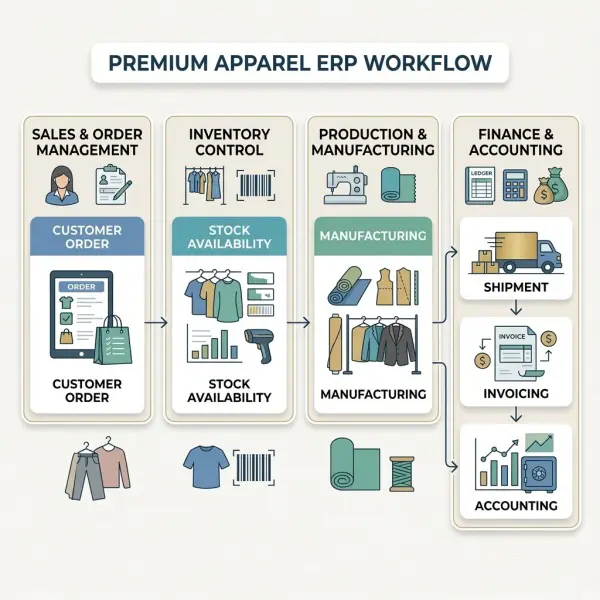
For an apparel business, inventory, production, sales, and finance are not really separate processes. A wholesale order can reserve finished garments. That demand may expose a stock shortage. Production may then require fabric and trims. Manufacturing consumes those materials and creates finished inventory. Shipment reduces stock, while invoicing and accounting record the financial consequences of the sale.
The departments may be separate. The transactions are not.
This is where enterprise resource planning (ERP) becomes operationally useful. Instead of asking each team to maintain an independent version of what has happened, ERP can connect transactions around common product, inventory, customer, supplier, production, and financial records.
The result is not simply a larger database. A properly configured ERP establishes relationships between business events: what was ordered, what was available, what was produced, what was shipped, what inventory value changed, and what eventually became revenue or cost.
For apparel companies dealing with large style-color-size assortments, seasonal demand, multiple warehouses, production partners, and several sales channels, those relationships can become more valuable than any individual ERP feature.
Quick Answer: How Does ERP Connect Inventory, Production, Sales, and Finance?
ERP connects inventory, production, sales, and finance by allowing operational transactions in one area to create or update related records elsewhere in the system.
A sales order, for example, can create demand and reserve available stock. If products must be manufactured, production transactions can consume raw materials and add completed garments to finished-goods inventory. When goods are shipped, inventory quantities decrease. Depending on the ERP configuration and accounting rules, the same transaction flow can also update inventory value, cost of goods sold, customer receivables, revenue, and other financial accounts.
For apparel businesses, these connections usually operate at SKU level, meaning that size, color, style, warehouse, and sometimes batch or other dimensions can affect what is available and what is transacted.
ERP therefore does not merely “share information between departments.” It creates a controlled transaction chain in which physical events—buying, receiving, producing, moving, selling, and shipping goods—can be connected with their commercial and financial consequences.
The precise workflow and accounting entries depend on the ERP, costing method, configuration, and business model.
The Core ERP Idea: One Business Event Can Affect Several Functions
A useful way to understand ERP is to stop thinking in departmental terms.
Consider a fashion brand receiving a wholesale order for 600 jackets.
Sales sees a customer order.
Inventory sees demand against specific jacket SKUs.
Warehouse operations see quantities that may need to be reserved, picked, and shipped.
Production may see a requirement for additional garments.
Procurement may see demand for fabric, zippers, lining, labels, or packaging.
Finance eventually sees inventory value, cost, receivables, revenue, tax, and payment transactions.
It is one commercial event viewed from several operational perspectives.
Modern ERP systems are designed around these relationships. Microsoft Dynamics 365, for example, documents inventory transactions originating from sales, procurement, production, and other processes, with inventory posting profiles controlling how those transactions feed financial accounts. Microsoft documentation on inventory and financial posting
Similarly, Oracle NetSuite describes an inventory workflow in which purchasing, receiving, manufacturing, selling, fulfillment, and replenishment operate against connected inventory records rather than as unrelated transactions. Oracle NetSuite inventory workflow
This transactional architecture is the foundation of ERP integration.
Sales Usually Creates the Demand Signal
Sales is one of the most visible starting points in an ERP transaction chain.
When a customer places an order, the ERP can record which products are required, in what quantities, at what price, for which customer, at which location, and by what requested delivery date.
For apparel, the product detail matters.
“500 polo shirts” is usually not enough information for execution. The actual sales order may contain different quantities across black, navy, and white, divided among S, M, L, and XL.
A simplified order might look like this:
|
SKU |
Variant |
Order Quantity |
|
POLO-01-BLK-S |
Black / S |
40 |
|
POLO-01-BLK-M |
Black / M |
90 |
|
POLO-01-BLK-L |
Black / L |
70 |
|
POLO-01-NVY-S |
Navy / S |
45 |
|
POLO-01-NVY-M |
Navy / M |
100 |
|
POLO-01-NVY-L |
Navy / L |
85 |
|
POLO-01-WHT-M |
White / M |
70 |
From the merchandising perspective, that may still be one polo style. Operationally, however, the company has seven distinct demand requirements.
A fashion-oriented ERP must preserve both views.
A sales order is not necessarily a shipment
This distinction is fundamental.
Recording customer demand does not always mean goods have physically left the warehouse.
Oracle NetSuite, for example, defines a sales order as a commitment to sell and distinguishes that transaction from fulfillment, when products are actually shipped. Its documentation explains that sales orders can track what was ordered, what must be taken from inventory, what has shipped, and what remains outstanding. Oracle documentation on sales orders
That separation allows ERP to represent several states:
- customer demand exists;
- stock may be available;
- stock may be committed or reserved;
- only part of the order may have shipped;
- remaining quantities may still be open or backordered.
For fashion businesses with wholesale preorders, partial shipments, seasonal allocations, or constrained sizes, those states are commercially important.

How Sales Connects to Inventory
Once an order exists, ERP can compare customer demand with inventory.
That sounds straightforward, but “inventory” can mean several different things.
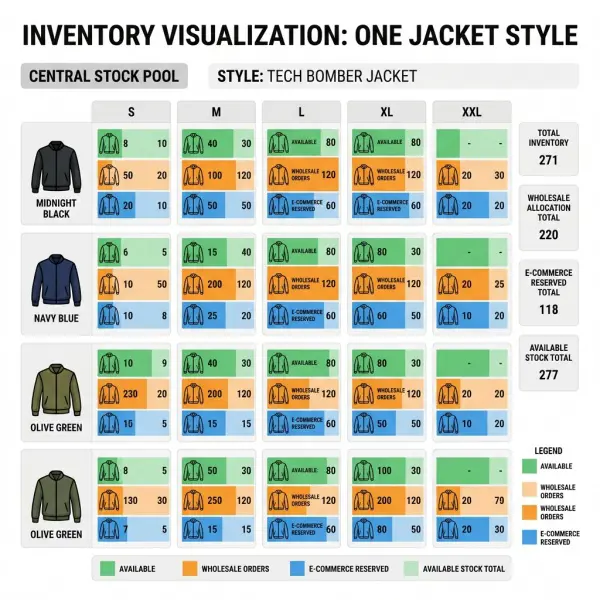
A warehouse might physically contain 1,000 units of a style. Some may already be reserved for wholesale accounts. Some may be allocated to stores. Some may be under quality hold. Some may be in transit between locations.
The quantity that can be promised to a new customer may therefore be lower than the physical quantity on hand.
ERP systems use different terminology and calculation rules, but businesses commonly need to distinguish concepts such as:
On hand: physical inventory recorded in the system.
Committed or reserved: quantities linked to existing demand.
Available: inventory that remains available according to the system's availability rules.
Backordered: demand that cannot currently be fulfilled from available inventory.
In transit: stock moving between defined locations.
Incoming supply: inventory expected from purchasing or production but not yet physically available.
Oracle's inventory documentation, for example, explains that sales transactions can commit available inventory to customers, increase committed quantity, and reduce quantity available; insufficient supply can instead increase backordered quantities. Oracle inventory sales and availability documentation
The important business implication is that sales no longer has to treat warehouse stock as a static number. The order itself changes the demand picture.
What Happens When Inventory Cannot Cover Sales Demand?
A shortage does not automatically mean ERP creates a production order. The response depends on the company's supply model and planning configuration.
A brand that purchases finished garments might create or recommend a purchase requirement.
A manufacturer might create planned production.
A business using contract manufacturing could issue a purchase or subcontracting order.
A company might decide not to replenish the product at all if it is seasonal and nearing end of life.
ERP supplies the data relationship. Business rules determine the action.
This is particularly important in fashion because not every stockout deserves replenishment.
If a permanent black basic tee is running low, replenishment may be reasonable. If a fashion-forward seasonal blouse has three weeks remaining in its selling window, ordering another large production run could simply convert a stockout problem into excess inventory.
ERP can reveal the shortage. It cannot decide whether market demand will still exist when replacement stock arrives.
How Production Connects to Raw-Material Inventory
For businesses that manufacture apparel, production creates another layer of inventory movement.
A production order for finished garments usually requires inputs such as:
- shell fabric;
- lining;
- interlining;
- sewing thread;
- zippers or buttons;
- labels;
- elastic;
- packaging;
- other style-specific components.
The required components are commonly described through a bill of materials (BOM) or similar product structure.
Suppose the ERP records an order to manufacture 1,000 overshirts. If each garment requires approximately 1.8 metres of shell fabric according to the production specification, the material requirement will be related to that planned quantity—subject to allowances, yield assumptions, sizes, wastage, and the actual production configuration.
The system can then compare requirements with raw-material inventory.
This creates a critical relationship:
finished-goods demand → production requirement → component requirement → raw-material availability
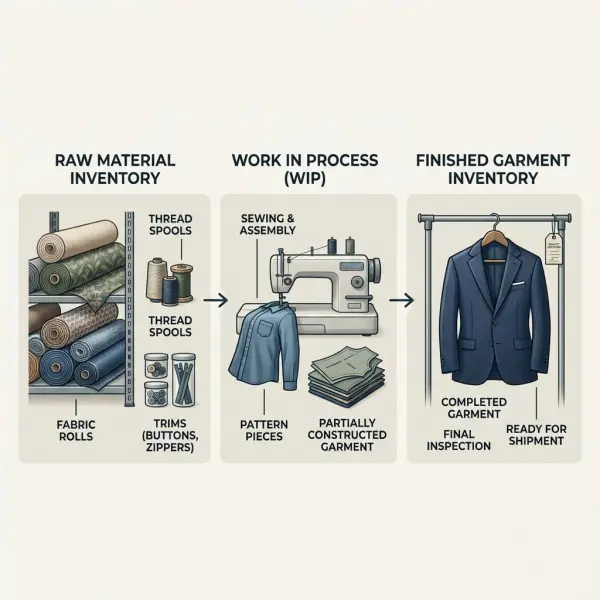
Production therefore consumes inventory before it creates new inventory.
Material issue reduces component stock
When raw materials are issued or reported as consumed for manufacturing, ERP can reduce the quantity of those components from available inventory.
Microsoft documents this production logic in Dynamics 365: posting material consumption against a production order creates inventory issue transactions that deduct on-hand inventory. Depending on configuration, the financial value can also move into work-in-process (WIP) accounts. Microsoft documentation on production order posting
For an apparel factory, that means a roll of fabric should not remain fully available in the system after it has already been issued to a production order.
The physical and system movements need to correspond closely enough for planning data to remain useful.
Work in process sits between raw material and finished stock
Manufacturing introduces an intermediate state that retailers purchasing finished goods may not need to manage in the same way: work in process.
Materials have left raw-material inventory, but the finished garments may not yet be available for sale.
Financially, production costs may accumulate in WIP depending on the costing and accounting setup. Operationally, the company needs to understand that these resources are committed to production but cannot yet be treated as sellable finished goods.
This distinction prevents a misleading impression of availability.
A cutting room may already have consumed fabric for 2,000 shirts, yet none of those shirts should appear as finished stock until the appropriate production transaction occurs.
How Completed Production Updates Finished-Goods Inventory
When production is completed, the ERP needs an event that tells the system the output is now finished.
Different platforms use different terminology. Microsoft Dynamics 365 uses a “report as finished” process, for example. Its documentation states that reporting production as finished updates the completed quantity into inventory; with WIP accounting enabled, related ledger transactions can reduce WIP and increase finished-goods inventory. Microsoft report-as-finished production documentation
This apparently simple event has several consequences.
Before completion:
- raw materials have been consumed or committed;
- production is underway;
- finished stock may still be unavailable.
After the completed quantity is correctly reported:
- finished-goods inventory increases;
- warehouse processes can receive or put away the garments;
- new supply may become available to customer demand;
- production costs can move toward finished-goods valuation according to the accounting configuration.
A production order does not always finish in one batch.
If 1,000 dresses are planned and only 400 have passed the required production stage, the ERP may allow those 400 to be reported first while the remaining quantity stays in process. Microsoft specifically documents support for reporting partial production quantities as finished.
For fashion businesses dealing with staggered sewing, washing, finishing, inspection, or subcontracting, partial completion can provide more realistic supply visibility than waiting until an entire production lot is closed.
The Inventory–Production Connection Is More Than Quantity
Production integration is not only about counting fabric and garments.
Costs move as well.
In manufacturing accounting, raw materials carry value. Labor and overhead may contribute to production costs. Work in process represents production value that has not yet become completed finished goods. Finished goods retain inventory value until they are sold, subject to the company's accounting method and configuration.
Microsoft's production-posting documentation provides a practical ERP example: material consumption can move value from material inventory into WIP, while reporting finished production can reduce WIP and increase finished-goods inventory. When the production order is ended, actual or configured production costs and variances can be finalized according to the costing model.
For fashion decision-makers, this means manufacturing activity eventually influences financial information.
If actual fabric consumption is substantially higher than planned, the issue is not confined to the cutting room. It can affect garment cost and margin.
If excess rework increases labor or subcontracting cost, financial performance can change even when the final shipment quantity remains unchanged.
This is one of ERP's most important connections: operational variance can become financial variance.
How Finished Inventory Flows Back to Sales
Once finished products enter inventory, ERP can make that supply visible to order management according to configured availability rules.
Suppose a wholesale account ordered:
- 120 black jackets in M;
- 100 black jackets in L;
- 80 black jackets in XL.
At order entry, only 180 of the required 300 jackets were available.
The remaining 120 may have been recorded as backordered or unfulfilled.
A production completion later adds exactly those missing variants.
The system can then support allocation, reservation, fulfillment, or other downstream processes depending on its configuration.
This creates a feedback loop:
Sales demand → shortage → supply requirement → production → finished inventory → order fulfillment
Without connected data, the company may need employees to communicate each transition manually.
That approach can work at small scale. As order volume and SKU count grow, however, manual coordination can become increasingly difficult to reconcile.
How Fulfillment Connects Sales to Inventory
An order tells the company what the customer wants.
Fulfillment records what actually leaves.
The distinction matters because a business can accept an order today and ship it several days later. A large wholesale order might also be shipped in several batches.
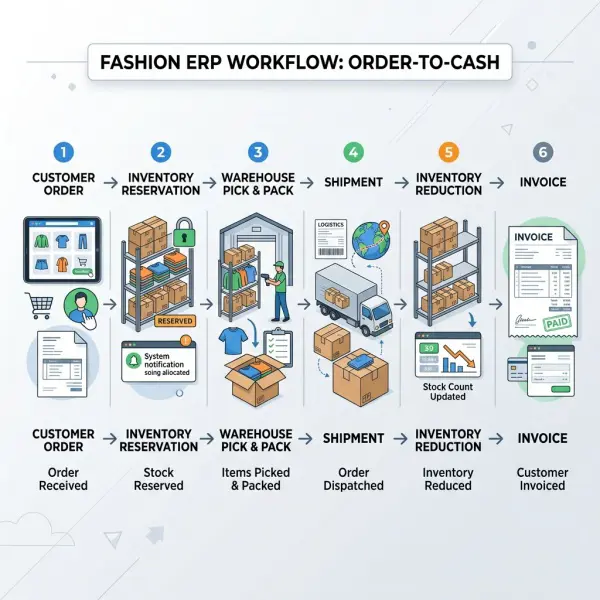
When fulfillment occurs, ERP can update the order status and reduce physical inventory.
Oracle's NetSuite documentation describes item fulfillment as the transaction recording that some or all ordered items have shipped. In its standard inventory workflow, fulfillment decreases quantity on hand and inventory asset value; invoicing may occur either together with fulfillment or separately depending on system configuration. Oracle NetSuite documentation on inventory fulfillment
That separation is operationally useful.
Imagine a retailer orders 1,000 garments, but the fashion supplier can ship only 700 this week.
A connected system can maintain:
Ordered: 1,000
Shipped: 700
Remaining: 300
Warehouse staff sees what moved physically. Sales sees what remains outstanding. Finance can follow the appropriate billing process.
Without that shared transaction chain, one team may consider the order completed while another still expects the missing 300 units.
Where Finance Enters the ERP Flow
Finance is not simply the final box at the end of an ERP diagram.
Financial effects can appear at several points in the operational sequence.
Purchasing may create liabilities once supplier invoices are recorded.
Inventory receipts can affect inventory assets and accruals according to accounting policy and configuration.
Production may transfer value between raw-material inventory, WIP, and finished goods.
Shipment may trigger inventory and cost-of-goods-sold effects.
Billing can recognize receivables and revenue.
Customer payment eventually reduces the receivable and increases the relevant cash or bank balance.
The exact posting timing depends on the ERP, jurisdiction, accounting standards, recognition rules, costing method, and company configuration. The business process should therefore not be reduced to a universal set of journal entries.
Still, the architectural principle is consistent: finance can consume the financial consequences of operational transactions rather than requiring users to recreate every event manually in a disconnected ledger.
Inventory has financial value
Physical stock is also an asset under ordinary inventory accounting until the relevant cost is recognized through the company's accounting treatment.
This is why inventory accuracy and accounting accuracy eventually intersect.
Microsoft Dynamics 365 documentation explains that inventory posting profiles connect inventory subledger transactions from processes including sales, procurement, and production with general-ledger accounts.
A discrepancy between physical stock and system stock can therefore become more than a warehouse problem.
If the system says 10,000 garments are held but only 9,400 physically exist, management may have both an operational discrepancy and a valuation issue to investigate.
Shipment can trigger cost recognition
When garments leave the business as part of a sale, their inventory cost may be transferred to cost of goods sold according to the system's accounting configuration.
SAP's documentation provides one example of this integrated logic. In its sales-from-distribution-center scenario, posting goods issue affects financial inventory accounts; billing then posts revenue to financial accounting, followed by customer payment processing. SAP sales and financial integration process
Oracle similarly documents that fulfilling inventory can reduce both on-hand quantity and inventory asset value.
The significant point is not the vendor-specific sequence. It is that the physical event of shipping merchandise can have a corresponding accounting consequence.
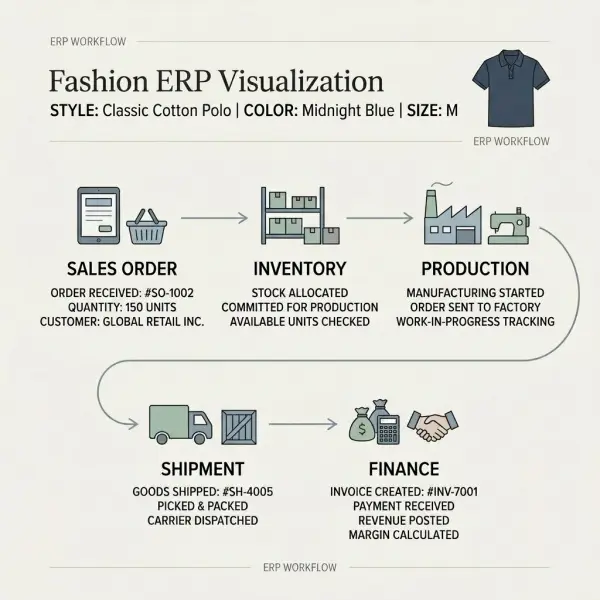
The Full ERP Transaction Chain in an Apparel Business
A simplified fashion manufacturing flow can now be seen end to end.
|
Business Event |
Inventory Effect |
Production Effect |
Sales Effect |
Possible Financial Effect* |
|
Customer order entered |
May reserve or commit finished stock |
May contribute to demand |
Creates open demand |
Usually limited until later events, depending on system |
|
Raw material purchased |
Incoming supply becomes visible |
Materials become expected for production |
— |
Purchasing liability/accrual may arise at configured stages |
|
Material received |
Raw-material inventory increases |
Materials become available |
— |
Inventory value may increase |
|
Material issued to production |
Raw-material inventory decreases |
WIP begins or increases |
— |
Material value may move toward WIP |
|
Garments completed |
Finished-goods inventory increases |
Production output recorded |
Supply becomes available |
WIP may move into finished-goods inventory |
|
Order allocated |
Available stock decreases logically |
— |
Demand assigned to stock |
Usually no direct physical inventory posting yet |
|
Garments shipped |
Finished stock decreases physically |
— |
Order becomes partly or fully fulfilled |
Inventory asset/COGS effects may occur |
|
Customer invoiced |
— |
— |
Commercial billing recorded |
Revenue and receivable effects may occur |
|
Customer pays |
— |
— |
Customer balance updated |
Receivable reduced; cash/bank balance updated |
*Exact accounting treatment and timing depend on ERP configuration, costing method, accounting policy, jurisdiction, and business process.
The table reveals why ERP integration is valuable.
One transaction does not need four departments to retype the same event differently.
Instead, the transaction can become the common operational reference.
Why Style, Color, and Size Make This Connection Harder in Fashion
Generic ERP diagrams usually show “Product A.”
Fashion rarely behaves so neatly.
Suppose a company has sufficient stock of one running-shoe style overall but sells disproportionately more sizes 39 and 40 than sizes 36 and 37.
At style level, inventory may look healthy.
At sellable-variant level, the business may already be losing orders.
This is why the fashion-specific product architecture discussed in Fashion ERP Systems Explained for Apparel Businesses matters to every downstream transaction.
Sales demand should identify the correct variant.
Inventory must hold the correct variant.
Production output must create the correct variant.
Shipment must deduct the correct variant.
Financial reporting may then aggregate costs and revenues from SKU level into style, collection, category, channel, or other reporting dimensions.
If the variant structure is wrong at the beginning, integration simply propagates the wrong identity through more processes.
How ERP Helps Create a Shared Operational Picture
The phrase “single source of truth” is often attached to ERP, but it should be interpreted carefully.
ERP can create a common transactional foundation. It does not guarantee that every piece of information across the company resides in one application or that every record is correct.
The more practical benefit is shared transaction context.
Sales can see whether demand is still open.
Warehouse teams can see what has been allocated and what must ship.
Production can see requirements and completed quantities.
Finance can trace operational transactions into financial postings.
Management can analyze those activities from related data rather than asking each department for an independently prepared spreadsheet.
When the system works well, discussions become more specific.
Instead of:
“Why are sales lower?”
the business can investigate:
“Orders exist, but 18% of the ordered units for this style are still unfulfilled because two core sizes were unavailable.”
Instead of:
“Production cost increased.”
the company can ask:
“Was the variance caused by material consumption, subcontracting, labor, overhead, or another production component?”
ERP does not supply management judgment. It can provide a stronger transaction trail for applying it.
What ERP Integration Means for Inventory Decisions
Connected data can change the quality of inventory discussions.
A standalone inventory report tells the company what stock exists.
A broader ERP view can potentially reveal:
- how much stock is already committed;
- what customer demand remains open;
- what purchase orders are expected;
- what production is underway;
- which materials constrain production;
- where stock is located;
- which products have shipped;
- what inventory value is recorded;
- which goods may need replenishment.
This context matters in fashion because inventory risk cuts both ways.
Too little stock can lead to missed sales or incomplete wholesale deliveries.
Too much stock can lock cash into products with declining seasonal relevance and eventually create markdown pressure.
ERP does not solve that trade-off automatically. It makes more of the evidence available in one operational framework.
What ERP Integration Means for Production Planning
Production teams should not plan in isolation from commercial demand or material availability.
If ERP connects these areas properly, planners can compare production requirements with inventory positions, customer orders, expected receipts, and finished-stock availability.
The difference becomes clear in a basic example.
A company receives demand for 3,000 shirts.
Finished inventory contains 1,200 usable units.
Another 400 are expected from a nearly completed production order.
The remaining requirement is therefore not necessarily 3,000.
Planners also need to consider reservations, safety stock, existing production commitments, delivery timing, cancellations, yield, and other company rules, but connected data prevents the most basic mistake: manufacturing without understanding existing supply.
Production planning as a discipline goes substantially deeper than ERP transaction integration. The system can support planning, but the quality of the plan still depends on lead times, capacities, BOM accuracy, material availability, supplier performance, manufacturing constraints, and commercial priorities.
What ERP Integration Means for Sales Teams
A sales team working from reliable ERP availability data can make customer commitments with better operational context.
That is particularly relevant in wholesale apparel, where buyers may place large orders well before delivery.
Sales may need to understand:
- stock available now;
- stock already committed elsewhere;
- future production;
- expected receipts;
- partial fulfillment possibilities;
- outstanding order quantities;
- warehouse location;
- requested versus realistic delivery timing.
The system does not eliminate negotiation.
It helps prevent promises that ignore supply.
For an apparel company, that can be commercially significant. Winning a wholesale order for 5,000 pieces creates little value if the operation cannot source, manufacture, and deliver the required size-color assortment in the agreed window.
What ERP Integration Means for Finance
Finance gains something particularly valuable from ERP integration: traceability from economic outcomes back to operational activity.
Gross margin, inventory value, receivables, purchasing liabilities, and production costs do not appear independently. They originate in transactions elsewhere in the company.
A finance team investigating margin deterioration may need to look beyond selling price.
The cause could involve:
- increased fabric or trim cost;
- excess material consumption;
- production variance;
- subcontracting cost;
- freight or landed-cost treatment;
- inventory adjustments;
- markdowns or discounts;
- changes in product mix.
Not all of those relationships are automatically available in every ERP report. Configuration and data structure determine what can actually be analyzed.
But the principle is important: integrated ERP makes it possible to connect financial outcomes more closely with the operational events that created them.
Common Mistakes When Connecting ERP Functions
The biggest problems often occur when a business assumes that installing modules automatically creates integration.
Mistake 1: Treating inventory as a number rather than a transaction history
An inventory balance is the result of many movements.
Purchases increase stock. Production consumes and creates stock. Transfers move it. Sales reserve it. Fulfillment reduces it. Returns can add it back. Adjustments correct discrepancies.
If users manually overwrite quantities without preserving appropriate transaction logic, the company may lose the audit trail required to understand why a balance changed.
A better approach is to define the business event that caused the movement and record the appropriate transaction.
Mistake 2: Allowing production to happen outside the system
A production plan may exist inside ERP while actual material consumption and completed quantities are recorded later—or not at all.
The system then shows a theoretical factory rather than the real one.
Raw materials appear available even though they have already been used. Finished garments appear unavailable despite sitting in the warehouse.
For manufacturing integration to work, operational reporting must be sufficiently timely and accurate.
Mistake 3: Confusing reservation with physical inventory movement
A customer order can reduce available stock logically without the goods leaving the warehouse.
Shipment is different.
If teams treat order allocation, picking, shipping, and invoicing as interchangeable events, order status and inventory visibility can become misleading.
Each state needs a clear operational meaning.
Mistake 4: Designing finance separately from operations
Finance should understand which operational transactions generate accounting consequences.
Production, purchasing, warehousing, and sales teams should also understand which actions matter financially.
Otherwise, apparently small operational workarounds can create difficult reconciliation problems later.
Mistake 5: Expecting ERP to fix bad master data
If the same navy fabric exists under three material codes or one size is represented as “Medium,” “M,” and “MD” across different records, integration cannot reliably infer that the records should be identical.
Shared transaction flows depend on shared definitions.
Before relying heavily on integration, companies need coherent master data for products, SKUs, materials, suppliers, customers, locations, units of measure, and related entities.
Practical Application: Map the Transaction, Not the Department
Apparel businesses trying to improve system integration should begin with a real commercial transaction.
Take one representative order and trace it.
For example:
Customer order → inventory check → allocation → production requirement → material availability → production completion → finished inventory → warehouse fulfillment → invoice → payment.
At each stage, ask four questions:
1. What business event occurred?
2. Which record should change?
3. Which system is authoritative for that record?
4. Which downstream function needs the information?
This exercise often reveals problems more clearly than evaluating software feature lists.
The company may discover that sales and ERP use different SKU codes.





Comments 0
Leave a CommentSend Comment
Anda harus Login terlebih dahulu untuk dapat memberikan komentar.