

Digital Patterns vs Manual Patterns: Key Differences for Fashion Teams
Quick Answer
Digital and manual patterns serve the same fundamental purpose: translating a garment design into accurate, flat pattern pieces that can be cut and assembled. The main difference is how those pieces are created, revised, graded, stored, duplicated, and shared.
Manual pattern making uses paper, rulers, curves, measuring tools, pencils, awls, scissors, and physical pattern manipulation. Digital pattern making uses computer-aided design software to construct and control points, lines, curves, measurements, notches, seam allowances, grade rules, and production information.
Neither method is automatically more accurate. A skilled patternmaker can produce excellent results manually or digitally, while weak measurements, unsuitable blocks, incorrect grading, or poor fit judgment will create problems in either format.
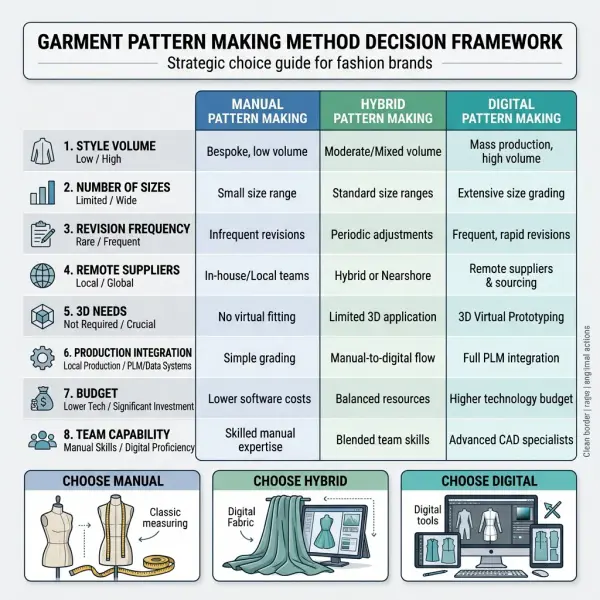
Digital patterns generally become more advantageous when fashion teams manage frequent revisions, multiple sizes, repeated styles, remote suppliers, large pattern libraries, marker planning, 3D visualization, or automated cutting. Manual patterns remain practical for learning, draping-led experimentation, low-volume development, quick physical alterations, and businesses without the infrastructure or production scale to justify a full CAD system.
For most established apparel operations, the practical choice is not purely digital versus purely manual. It is deciding which stages should remain physical and which should be converted into controlled digital data.

What Is the Difference Between Digital and Manual Pattern Making?
Manual pattern making creates and modifies garment patterns as physical objects, usually on pattern paper or card. Digital pattern making creates and modifies the same technical geometry as structured computer data within apparel CAD software.
The underlying patternmaking principles do not change. Both methods require the patternmaker to understand garment balance, body measurements, ease, shaping, dart manipulation, seam relationships, construction sequence, fabric behavior, and grading.
What changes is the working environment.
With a paper pattern, the patternmaker handles the piece directly. A line may be redrawn, a section slashed and spread, a dart closed, an extension taped into position, or an edge trimmed by hand. The result is visible at full physical scale.
With a digital pattern, similar changes are made by controlling points, lines, curves, rotations, measurements, and geometric relationships through software. Commercial apparel systems commonly include functions for pattern drafting, modification, grading, annotation, and preparation for markers or cutting. Gerber describes AccuMark as a system for pattern design, grading, marker making, and production planning, while Lectra describes Modaris as supporting pattern creation, modification, grading, industrialization, and 2D–3D workflows.
The distinction is therefore operational rather than conceptual. Digital pattern making does not represent a separate theory of garment construction. It is another way of applying patternmaking knowledge.
For a foundational explanation of the digital process itself, see digital pattern making for apparel production.
Digital Patterns vs Manual Patterns at a Glance
|
Comparison area |
Manual patterns |
Digital patterns |
|
Primary working medium |
Paper, card, pencils, rulers, curves, scissors, tape |
Apparel CAD software, computer hardware, digital storage |
|
Pattern construction |
Drafted, traced, cut, folded, slashed, spread, or taped physically |
Created and modified through digital geometry and pattern tools |
|
Measurement checking |
Measured directly with rulers and tapes |
Calculated or displayed within software |
|
Revision process |
Redraw, trace, cut, tape, or replace physical pieces |
Edit points, lines, curves, dimensions, and linked components |
|
Duplication |
Trace, photocopy, plot, or manually reproduce |
Copy or export files, subject to file control |
|
Grading |
Apply size increments manually at grade points |
Store and apply grade rules through software |
|
Storage |
Cabinets, envelopes, hanging racks, or physical archives |
Local drives, servers, cloud systems, or CAD databases |
|
Remote sharing |
Ship physical patterns or send plotted copies |
Transfer digital files electronically |
|
3D visualization |
Requires physical toile, sample, or draping |
May connect with virtual garment simulation |
|
Marker preparation |
Arrange physical pieces or use separate processes |
Can connect directly with digital marker-making systems |
|
Main investment |
Space, tools, paper, labor, and archive management |
Software, hardware, training, licenses, support, and data management |
|
Main operational risk |
Physical damage, loss, copying errors, archive congestion |
Version confusion, file incompatibility, data loss, access, or software dependence |
|
Best suited to |
Hands-on development, experimentation, education, small runs, simple workflows |
Repeated development, multi-size collections, remote teams, production integration, growing pattern libraries |
This comparison should not be read as a ranking. The suitability of each method depends on the company’s products, scale, staff capability, supplier network, capital, and production model.
Which Method Is More Accurate?
Neither method is inherently more accurate in terms of garment fit. Digital software can represent geometry and measurements consistently, but the quality of the finished pattern still depends on the decisions entered by the patternmaker.
A digital armhole can be measured to a precise numerical value. That does not confirm that its shape, depth, balance, or relationship with the sleeve is appropriate. A manually drafted armhole may fit extremely well when developed by an experienced patternmaker who understands the block, fabric, and intended silhouette.
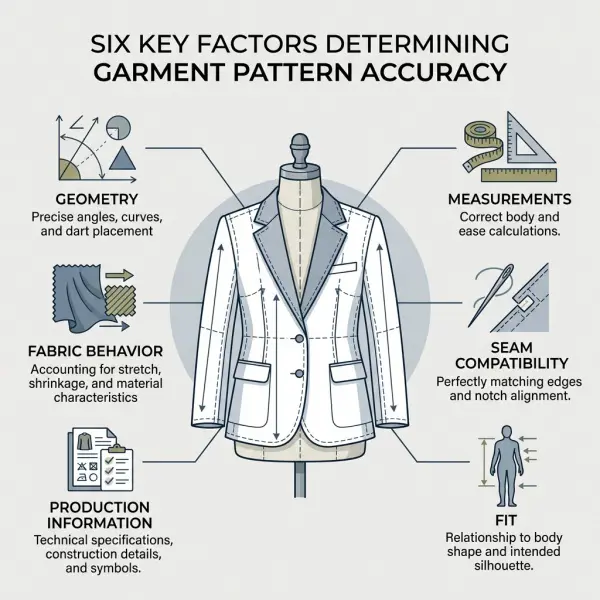
Pattern accuracy has several dimensions:
- Geometric accuracy: whether points, lines, angles, and curves are constructed as intended.
- Measurement accuracy: whether pattern and finished-garment measurements match the specification.
- Assembly accuracy: whether adjoining seams, notches, facings, linings, and components sew together correctly.
- Fit accuracy: whether the garment performs as intended on the target body.
- Production accuracy: whether the pattern includes the information needed for cutting and sewing.
- Commercial accuracy: whether the result matches the brand’s sizing, design intent, material, cost, and customer expectations.
Digital tools can strengthen the first three areas through measurable geometry, seam-checking functions, stored grade rules, and reusable information. They cannot independently guarantee fit or commercial suitability.
International measurement standards illustrate why this distinction matters. ISO 8559-1 provides standardized anthropometric definitions that can support physical and digital body-measurement databases, while ISO 8559-2 distinguishes body dimensions used for size designation from garment measurements determined by designers and manufacturers. The standard terminology can improve consistency, but it does not decide garment ease, silhouette, or brand fit.
Teams developing sizing systems can refer to ISO 8559-1 anthropometric measurement definitions, while recognizing that standardized measurement language is only one part of pattern development.

Digital precision can still reproduce a bad decision
One of the most common misconceptions is that a number displayed by software must be correct.
Suppose a trouser pattern has insufficient back-rise length. The CAD system may measure the line perfectly, save it without error, and reproduce it consistently across files. The pattern is digitally precise but technically unsuitable.
The same problem applies to grading. Software can apply an X and Y movement to each grade point with consistency. Gerber’s official grading documentation describes grade rules as recorded X and Y values assigned to rule numbers and applied to pattern pieces. The system reliably executes the rule; the patternmaker remains responsible for deciding whether the rule is appropriate.
Accuracy therefore comes from expertise supported by tools—not tools operating without expertise.
How Do the Workflows Differ?
The clearest differences appear during revision, duplication, grading, collaboration, and production preparation.
Manual pattern development is physically direct
In a manual workflow, the patternmaker can see and handle the complete piece. Changes are often made through practical manipulation:
- pivoting or transferring darts;
- cutting and spreading sections;
- folding out excess;
- opening pleats or gathers;
- adding paper to increase volume;
- trimming lines to remove volume;
- walking one physical seam against another;
- tracing a corrected version onto clean paper.
This physical relationship can be valuable when experimenting with shape. The patternmaker can place pieces next to one another, pin sections, fold darts, assess proportions at full scale, or move quickly between the table and dress form.
However, manual revisions can create additional tracing work. Once a major change is approved, connected pieces such as facings, linings, collars, pockets, interlinings, or underlayers may need to be redrawn individually.
Digital development makes geometry easier to reproduce
Digital workflows use software commands to perform many of the same operations. Points can be moved by defined distances, lines rotated, curves reshaped, sections copied, darts transferred, seam lengths compared, and pieces derived from existing geometry.
The patternmaker can preserve the original file before testing an alternative. A style may be developed into several controlled variations without cutting apart the master pattern.
This can make iteration more efficient, especially when changes are numerical or must be repeated across related pieces. The benefit decreases when the operator lacks software fluency or when the workflow requires constant conversion between incompatible systems.
Digitizing creates a bridge between both methods
Manual and digital methods are not isolated systems. Existing paper patterns can be entered into CAD through digitizing, scanning, tracing, camera-based capture, or manual coordinate construction, depending on the available technology.
Gerber’s official documentation describes digitizing a physical pattern by entering descriptive information and recording the grainline, piece perimeter, and internal details. The resulting data can then become an editable CAD pattern.
This hybrid process is common when a company has an established paper archive. The business does not need to discard proven manual blocks simply because it is adopting software.
The conversion must be checked. Digitized curves, dimensions, notches, grainlines, internal marks, and piece identification should be compared with the source pattern before the digital version is approved as the new master.
Which Method Handles Pattern Revisions Better?
Digital patterns generally provide stronger revision efficiency when changes are frequent, measurable, and connected across several pattern pieces.
Consider a fitted dress with princess seams, lining, facing, pockets, and several graded sizes. A change to the neckline may affect the front panel, side front, facing, lining, seam allowance, notch position, and possibly trim placement.
In a manual system, the patternmaker may need to alter and retrace several physical pieces. In a digital system, the relevant geometry can be copied, measured, or regenerated more quickly, depending on how the pattern was constructed.
This does not mean every digital revision is simple. A poorly organized CAD file may include excessive points, ambiguous lines, disconnected components, or incorrect piece relationships. Editing such a file can be slower than redrawing a clean manual pattern.
The real advantage is controlled repeatability
The strongest digital advantage is not that every edit takes fewer minutes. It is that approved geometry can be reproduced and reused with less manual reconstruction.
A reliable shirt block may support multiple collar, sleeve, placket, and body variations. A trouser foundation may support different leg shapes, waist treatments, pocket configurations, or lengths.
For this reuse to remain safe, the pattern library must distinguish between:
- approved blocks;
- experimental patterns;
- sample-stage patterns;
- corrected fit versions;
- supplier-specific adaptations;
- graded production masters;
- obsolete files.
Digital storage without status control can create more uncertainty, because teams can duplicate files almost instantly.
How Do Manual and Digital Grading Compare?
Manual grading applies size increments physically to selected pattern points. The patternmaker marks horizontal and vertical movements, redraws the graded perimeter, and produces the required size set.
Digital grading applies stored rules to defined grade points. The software can display the nested sizes, calculate point movement, and update the grade when the base pattern changes. Current CLO documentation, for example, shows grading tools that edit grade points and display multiple sizes on the 2D pattern.
The technical principle is the same: different areas of a garment change by controlled amounts between sizes.
|
Grading consideration |
Manual grading |
Digital grading |
|
Rule application |
Marked and drawn physically |
Entered or selected in software |
|
Repetition |
Must be reproduced across pieces |
Rules can be stored and reused |
|
Visualization |
Physical nested tracing or separate sizes |
Size nests can be displayed instantly |
|
Rule adjustment |
Requires redrawing affected areas |
Values can be edited and recalculated |
|
Risk |
Drawing inconsistency or transcription error |
Incorrect rule assignment or unnoticed automated distortion |
|
Best control |
Experienced manual checking |
Experienced digital grading plus visual and fit review |
Digital grading is usually more practical for teams producing several sizes and frequent collections. It can improve consistency, but it does not make an unsuitable grade rule appropriate.
A brand entering extended sizing, childrenswear, intimate apparel, workwear, or a new geographic market may need revised blocks and size logic rather than simply adding more digital sizes to an existing nest.
Which Method Is Faster?
Digital pattern making can be faster for repeated, complex, and revision-heavy work. Manual pattern making may be faster for a simple one-off pattern, an immediate table correction, or a patternmaker who has not yet developed strong CAD proficiency.
Speed should be evaluated across the complete product-development cycle, not just the initial draft.
A fashion team should measure:
- time to create the base pattern;
- time required for modifications;
- connected-piece updates;
- measurement checking;
- grading;
- file or pattern preparation;
- supplier communication;
- sample corrections;
- marker preparation;
- repeat-order retrieval.
A digital pattern may take longer to set up initially but become more efficient through later revisions, grading, and reuse. Conversely, a manually drafted pattern may be created quickly but require more work when the style expands into eight sizes, three lengths, two fabric variants, and several suppliers.
Software proficiency changes the calculation
A senior manual patternmaker may initially work more slowly in CAD because the person must translate established physical instincts into software operations.
This should not be mistaken for evidence that digital systems are inherently inefficient. It reflects a training and transition cost.
The reverse is also true. An operator who can use software commands quickly but lacks patternmaking knowledge may appear productive while creating patterns that require repeated sampling and correction.
For management, the relevant metric is not screen speed. It is the time required to reach an approved, production-ready pattern.
How Do the Methods Affect Collaboration?
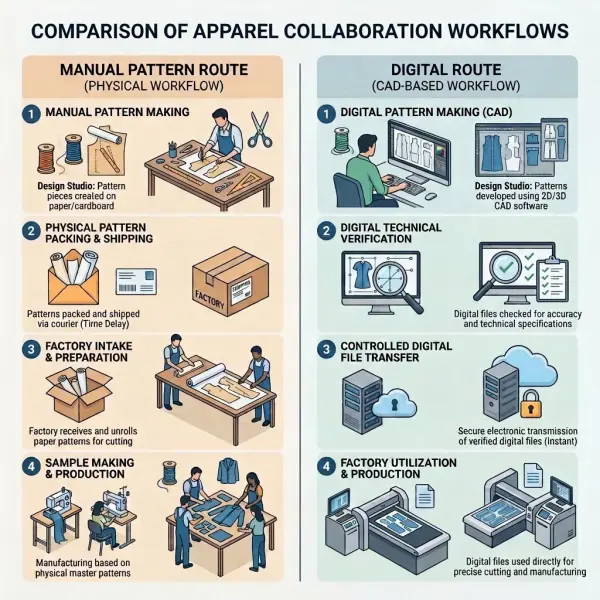
Digital patterns are usually easier to distribute across remote teams. A file can be sent to a technical designer, pattern office, supplier, 3D specialist, marker planner, or cutting room without shipping the physical master.
That advantage comes with a qualification: the receiving party must be able to open and correctly interpret the file.
Native CAD formats can differ between software providers. Exchange formats such as DXF-AAMA and DXF-ASTM are widely used to transfer 2D pattern data. CLO’s official import documentation, for example, lists DXF-AAMA and DXF-ASTM compatibility with several pattern CAD systems and includes settings for units, annotations, internal lines, and cutting-versus-sewing lines.
The historical ASTM D6673 specification was designed for 2D pattern-piece and grade-rule exchange, but it did not cover complete markers, cutter instructions, spreading data, or full product specifications. ASTM currently identifies the standard as withdrawn, which is an important caveat when companies use the term “ASTM DXF” operationally.
The ASTM D6673 pattern-data interchange description remains useful for understanding the historical scope of this format, but real compatibility should be confirmed through current software documentation and test files.
Opening a file is not the same as transferring it correctly
A supplier may successfully open a digital pattern while still receiving:
- incorrect measurement units;
- altered curve points;
- missing internal lines;
- changed notch types;
- lost piece names;
- missing grade-rule information;
- reversed cut and sewing lines;
- excluded seam allowances;
- incorrect size labels.
For this reason, the receiving patternmaker should measure critical lines and inspect the complete size range before sampling or cutting.
Manual patterns avoid software-conversion problems, but they introduce different risks. Physical patterns may be damaged in shipping, copied inaccurately, folded, distorted, mislabeled, or separated from supporting instructions.
How Do Storage and Version Control Differ?
Manual patterns require physical archive space. They may be stored in envelopes, drawers, flat cabinets, rolled sets, or hanging systems. The archive must protect patterns from moisture, dirt, tearing, fading, distortion, misfiling, and unauthorized removal.
A well-maintained physical archive can remain reliable for many years. Its weakness becomes more visible as the number of styles, revisions, suppliers, and size ranges increases.
Digital patterns require less physical space but create data-governance responsibilities. The company must manage:
- directory or database structure;
- file naming;
- access permissions;
- master-file ownership;
- revision status;
- backups;
- cybersecurity;
- software-version compatibility;
- license continuity;
- long-term retrieval.
Digital files can be copied without visible signs. A team member may create “final,” “final new,” “final corrected,” and “final approved” versions in several folders. Unless the company controls approval and naming, the digital archive may be less trustworthy than a carefully labeled paper pattern.
Digital storage is not automatically permanent
A paper pattern can be read without a subscription or software update. A digital file may depend on a particular application, version, operating system, server, login, or license.
Before adopting a system, the company should confirm whether it can:
- export files in usable formats;
- retain access after ending a subscription;
- open older files after updates;
- back up the complete pattern database;
- recover deleted or corrupted files;
- transfer data when changing vendors;
- provide controlled access to suppliers.
This is particularly important when pattern files represent years of fit development and brand-specific technical knowledge.
Which Method Supports Sampling and Fit Evaluation Better?
Neither method eliminates the need for fit judgment. Manual patterns connect naturally with physical toiles, draping, fittings, and table corrections. Digital patterns can connect with both physical samples and 3D garment simulation.
Manual workflows can be particularly intuitive during early creative development. A patternmaker may pin, fold, mark, cut, or add fabric while the garment is on a dress form or fit model, then transfer the corrections directly to paper.
Digital workflows can support earlier visualization by virtually arranging 2D pieces around an avatar. Gerber’s documentation describes 3D simulation as using 2D patterns on 3D forms for pattern validation, fit verification, and related review.
However, virtual results depend on:
- pattern accuracy;
- avatar dimensions and posture;
- fabric-property settings;
- seam definitions;
- layer settings;
- construction assumptions;
- simulation parameters;
- operator interpretation.
A convincing virtual garment does not prove that a factory can construct the product as intended or that the physical material will behave identically.
The most robust teams use 3D as an additional development tool, not as evidence that human fitting and production validation are no longer necessary.
How Do the Cost Structures Compare?
Manual pattern making usually has a lower technology-entry cost. The business needs suitable tables, paper, card, rulers, curves, measuring tools, cutting tools, storage, and skilled labor.
The ongoing costs may include:
- paper and card consumption;
- printing or copying;
- physical archive space;
- shipping patterns;
- manual duplication;
- labor for repeated revisions and grading;
- replacement of damaged or missing patterns.
Digital pattern making usually requires greater initial and recurring technology investment. Depending on the system, costs may include:
- software licenses or subscriptions;
- capable computers and monitors;
- plotters, digitizers, scanners, or peripherals;
- implementation and data migration;
- training;
- technical support;
- updates;
- network or cloud storage;
- cybersecurity and backups;
- integration with PLM, markers, or cutting equipment.
The lower-cost method depends on scale.
For a small made-to-order studio producing a limited number of styles, manual patterns may remain commercially sensible. For a manufacturer processing hundreds of styles, multiple size ranges, repeat orders, and international files, the labor and coordination costs of a paper-only system may exceed the cost of digital infrastructure.
Cost should be measured per approved style, not per tool
A low-cost manual process becomes expensive when it creates repeated tracing, shipping delays, archive searches, or inconsistent grading.
An expensive software installation also becomes poor value when only a fraction of its features are used, patternmakers are insufficiently trained, or suppliers cannot use the files.
A useful business case should estimate:
|
Cost category |
Questions to assess |
|
Development labor |
How much time is spent drafting, revising, checking, and duplicating patterns? |
|
Sampling |
How many pattern-related sample corrections occur? |
|
Grading |
How many styles and sizes are graded each season? |
|
Communication |
How often are patterns sent to external teams or factories? |
|
Storage |
What does the current archive require in space and administration? |
|
Production integration |
Are patterns used for markers, plotting, 3D, or automated cutting? |
|
Training |
How long will employees need to work competently in the new system? |
|
Business continuity |
What happens when software, hardware, or a key operator is unavailable? |
The objective is not to prove that one system is universally cheaper. It is to identify which method creates the lowest total cost for the company’s actual workflow.
How Do Digital and Manual Patterns Affect Creativity?
Manual pattern making often feels more tactile. Cutting, pivoting, folding, pinning, draping, and physically moving pattern sections can support spatial thinking. Some patternmakers find that direct contact with paper and fabric makes silhouette exploration more intuitive.
Digital systems offer a different type of experimentation. The patternmaker can duplicate a style, test several line positions, compare alternatives, preserve the original, and return to earlier versions without rebuilding the physical pattern.
Neither method owns creativity.
A digital operator can create unconventional volumes, complex panels, asymmetric shapes, or experimental construction. A manual patternmaker can develop highly systematic commercial products. The creative outcome depends more on the individual’s technical imagination than on the tool.
The risk appears when the tool begins to control the design. A digital patternmaker may favor operations that are easy in the software. A manual patternmaker may avoid variations that require extensive retracing. Strong teams recognize these biases and choose the method that serves the product rather than allowing convenience to define the product.
When Are Manual Patterns Still the Better Choice?
Manual patterns remain useful when physical interaction offers more value than data integration.
They may be appropriate for:
- early patternmaking education;
- draping-led or sculptural development;
- couture and highly individual work;
- simple made-to-measure projects;
- low style volumes;
- immediate corrections during a fitting;
- businesses with limited digital infrastructure;
- emergency work when hardware or software is unavailable;
- patternmakers who need to inspect a full-scale physical shape;
- suppliers that still operate primarily from paper patterns.
For students, manual construction can make pattern logic visible. Moving a dart physically or slashing and spreading a sleeve helps demonstrate how two-dimensional geometry creates three-dimensional volume.
Learning only software commands without understanding the pattern principles behind them can create dependency on the interface. The operator may know where to click but not why the resulting shape works.
Manual expertise therefore remains relevant even in highly digital companies.
When Are Digital Patterns the Stronger Choice?
Digital workflows become more compelling when the business needs scale, repeatability, collaboration, or connection with production systems.
They are particularly useful when a company manages:
- frequent pattern revisions;
- large seasonal collections;
- many graded sizes;
- repeated blocks and style families;
- several internal product-development teams;
- remote patternmakers or factories;
- 3D virtual sampling;
- integrated measurement charts;
- marker-making and material estimation;
- plotting or automated cutting;
- made-to-measure variation;
- a growing technical pattern library.
The value rises when approved pattern data is connected with other product information. Lectra describes integrations between Gerber AccuMark and YuniquePLM that can transfer pattern measurements, markers, fabric-use information, and related production data. These are vendor-specific capabilities rather than universal properties of every CAD system, but they illustrate how digital patterns can participate in a wider product-development infrastructure.
Why a Hybrid Workflow Often Makes the Most Sense
Many fashion companies use both methods because product development is not a single activity.
A patternmaker might:
- develop initial volume through draping;
- transfer the corrected shape to paper;
- digitize the approved pattern;
- refine measurements in CAD;
- create lining and facing pieces digitally;
- apply grading;
- evaluate the pattern through 3D simulation;
- plot a physical sample;
- correct the sample manually;
- enter the approved correction into the digital master.
This is not an incomplete digital transition. It is a deliberate use of each method where it performs well.
The hybrid model also provides resilience. Patternmakers retain the ability to work physically while the company gains controlled digital files for storage, grading, collaboration, and production.
The main requirement is synchronization. Any correction made on paper or fabric must be transferred back to the approved digital file. Otherwise, the physical sample and production master begin to diverge.
How Should Fashion Teams Decide?
A fashion business should choose its pattern workflow based on operational demand rather than industry pressure.
Review the product category
Simple accessories, loose garments, tailored jackets, bras, compression products, uniforms, knitwear, childrenswear, and made-to-measure clothing create very different pattern requirements.
A complex fitted category with several sizes may gain more from digital grading and revision control than a small collection of loose one-size garments.
Measure pattern volume and reuse
Teams should estimate how many new patterns, revisions, graded sizes, repeats, and supplier adaptations they manage each year.
The economic case for digital systems becomes stronger when pattern data is repeatedly reused.
Assess supplier capability
A brand should confirm which software and file formats its factories can accept. It should also determine whether the supplier expects production-ready files or prefers to recreate patterns within its own system.
Sending a digital file does not remove the need for technical communication.
Evaluate internal expertise
A company with experienced manual patternmakers should plan training that respects existing technical knowledge. The objective is to transfer expertise into a new working environment, not to treat skilled staff as beginners in garment construction.
A company without internal pattern expertise should not assume that purchasing software will create that capability.
Define the production connection
The value of CAD increases when the output supports grading, markers, costing, 3D review, plotting, or cutting. Teams should identify which connections are genuinely required and which are unlikely to be used.
Plan data ownership and continuity
Before adopting a subscription, cloud system, external pattern service, or factory-owned workflow, the brand should clarify:
- who owns the base blocks;
- who owns graded production patterns;
- which native files will be delivered;
- whether files remain accessible after a contract ends;
- how backups are created;
- who can edit the master;
- which export formats are available;
- how historical patterns will be migrated.
These questions protect the pattern library as a business asset.
Common Mistakes When Comparing Digital and Manual Patterns
Assuming digital automatically means better fit
Digital systems calculate and reproduce geometry. Fit still depends on the block, measurement strategy, ease, grading, fabric, construction, and evaluation process.
The better approach is to compare approved garment outcomes rather than the medium used to create them.
Comparing an expert manual patternmaker with a beginner CAD operator
The comparison is not balanced. A highly experienced patternmaker using familiar tools will usually outperform someone still learning software navigation.
Digital adoption should be assessed after appropriate training and practical experience.
Ignoring the cost of transition
Software purchase is only one cost. Migration, digitization, cleaning old files, training, supplier testing, naming standards, and temporary productivity loss must also be considered.
A phased implementation is generally easier to control than moving every product category at once.
Treating paper archives as worthless
Existing paper patterns may contain years of fit knowledge. They should be reviewed, prioritized, digitized where useful, and retained according to business needs rather than discarded indiscriminately.
Assuming all digital files are interchangeable
Different systems may interpret layers, lines, units, curves, annotations, seam allowances, and grading differently. Conversion must be checked.
The deeper mechanisms by which software can reduce—or sometimes introduce—development mistakes are covered in how pattern software helps reduce garment-development errors.
Removing physical checks too quickly
A company may introduce 3D software and immediately reduce physical sampling without validating the digital-to-physical relationship for its fabrics and product categories.
The better approach is to compare virtual evaluations with physical samples over several controlled styles before changing approval requirements.
Important Technical Caveats
The distinction between digital and manual patterns should not be simplified into modern versus outdated.
Manual methods can be technically rigorous, commercially effective, and creatively sophisticated. Digital systems can improve calculation, repetition, traceability, and integration, but they also introduce file, training, infrastructure, and governance risks.
Important limitations include:
- CAD precision does not confirm good fit.
- Automated grading does not validate the grade rule.
- A 3D simulation does not reproduce every material and construction behavior.
- File conversion can omit or reinterpret data.
- Cloud storage does not replace backup and access planning.
- Digital patterns do not automatically reduce samples or material waste.
- Manual patterns are not automatically inefficient at small scale.
- Software proficiency is different from patter





Comments 0
Leave a CommentSend Comment
Anda harus Login terlebih dahulu untuk dapat memberikan komentar.