

Digital Pattern Making Explained for Apparel Production
Quick Answer
Digital pattern making is the process of creating, editing, grading, storing, and preparing garment patterns througwing every pattern line on paper, patternmakers work with digital points, curves, measurements, seam allowances, notches, grainlines, and size rules that can be revised without rebuilding the pattern from the beginning.
For apparel businesses, the main value is not simply that the pattern appears on a screen. A well-managed digital workflow can make pattern revisions easier to track, improve consistency across size ranges, support faster communication with factories, and connect pattern data with 3D visualization, marker planning, plotting, or automated cutting systems.
However, software does not automatically produce a well-fitting or production-ready garment. Pattern accuracy still depends on the quality of the base block, body-measurement data, grading rules, fabric assumptions, construction knowledge, fit evaluation, and final production checks. Digital tools strengthen patternmaking expertise; they do not replace it.
The best results come when software is introduced as part of a controlled product-development system rather than treated as a standalone design application.
What Is Digital Pattern Making?
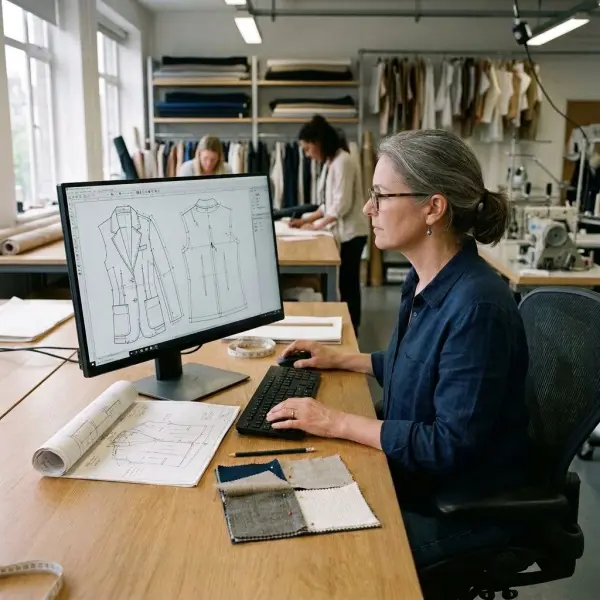
Digital pattern making is a computer-aided garment development process that converts pattern geometry, construction information, and sizing rules into editable digital data for product development and production.
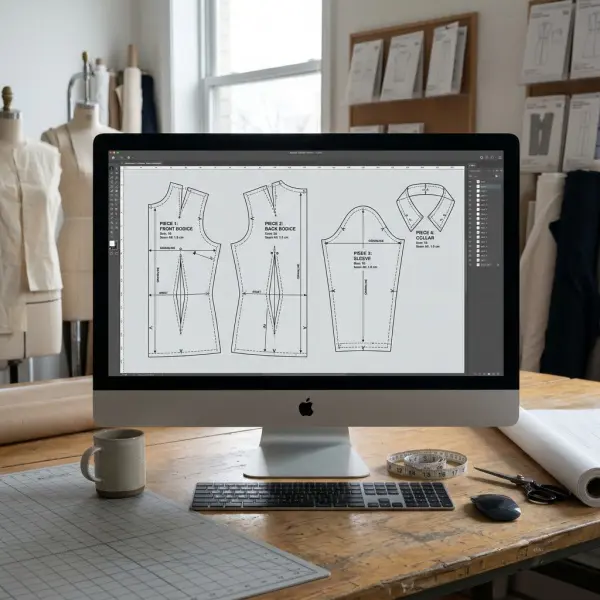
A digital pattern is not merely a scanned outline of a paper pattern. In a proper apparel CAD environment, each pattern piece contains structured information. The software can recognize points, curves, cut lines, internal construction lines, notches, grain direction, piece names, seam allowances, drill marks, grade points, and other production instructions.
This structure allows a patternmaker to adjust a neckline, move a dart, reshape an armhole, add fullness, change seam allowance, or create a style variation while keeping the pattern measurable and editable.
Commercial systems differ, but widely used apparel CAD platforms commonly support functions such as base-pattern development, pattern modification, grading, pattern industrialization, annotation, file exchange, and preparation for downstream production processes. Lectra describes Modaris as supporting pattern creation, modification, grading, industrialization, and 3D prototyping, while Gerber AccuMark documentation separates pattern design, grading, marker making, and production-planning functions within a connected system. eed a broader explanation of how patterns control garment shape, balance, and construction can first review pattern making for fashion and garment production.
Digital pattern making is still pattern making
The underlying technical responsibilities do not disappear when a team moves from paper to software. The patternmaker must still understand:
- body proportions and measurement relationships;
- garment ease and intended silhouette;
- dart manipulation and shaping;
- seam balance and assembly order;
- fabric direction, stretch, shrinkage, and stability;
- grading logic across the intended size range;
- production tolerances and construction methods.
Software changes how these decisions are created, calculated, stored, and communicated. It does not decide whether a shoulder slope is appropriate, whether a trouser rise suits the target customer, or whether a sleeve will sew smoothly into an armhole.
This distinction matters because businesses sometimes purchase advanced software expecting it to correct weak blocks or inconsistent fit standards. In practice, digitizing an inaccurate pattern simply produces an inaccurate digital pattern.
Why Does Digital Pattern Making Matter in Apparel Production?
Digital pattern making matters because apparel development involves repeated decisions, revisions, and data transfers. A single style may move through design, pattern development, sampling, fitting, grading, costing, marker planning, cutting, and factory execution. Each handoff creates an opportunity for information to be changed, misunderstood, or lost.
A controlled digital pattern becomes a shared technical asset. When revisions are properly named and approved, the pattern room can identify which version is current, which size range has been graded, which seam allowance has been applied, and which file should be used for sampling or bulk cutting.
The operational benefit is therefore larger than drawing speed. It concerns repeatability.
A blouse block developed for one collection may later support a sleeveless version, a longer body, a different collar, or a new sleeve shape. Digital pattern libraries allow teams to reuse proven foundations rather than reconstructing every style independently. That can shorten development work, although the new design must still be checked for balance, fit, material behavior, and construction feasibility.
It creates a more traceable development process
Paper patterns can be labeled and archived carefully, but physical systems become difficult to manage when a business carries hundreds of styles, multiple size ranges, seasonal revisions, and several production partners.
Digital file management can make revision histories easier to control. A team may store:
- the original base block;
- the first development pattern;
- corrected fit versions;
- approved sample patterns;
- graded production patterns;
- supplier-specific exports;
- archived or discontinued versions.
The software alone does not guarantee traceability. Teams still need naming conventions, approval responsibilities, access controls, backup procedures, and a clear definition of the master file.
Without those controls, a digital pattern room can become as disorganized as a cabinet filled with unidentified paper pieces.
It supports more consistent pattern modification
Digital tools allow patternmakers to manipulate defined geometry rather than repeatedly tracing and cutting paper. Measurements can be checked directly, related seams can be compared, and pattern pieces can often be walked digitally to assess whether corresponding sewing lines match.
For example, when a designer changes a jacket panel, the patternmaker can inspect the effect on the hem, waist position, seam length, pocket placement, grainline, facing, and lining. The revision remains a technical pattern-development task, but the consequences can be reviewed more systematically.
This is especially useful for style families that share components. A fashion company producing several shirts from one established block can maintain greater consistency across collar stands, armholes, cuffs, plackets, and sleeve relationships.
It connects pattern development with downstream operations
Digital pattern files may be used by plotting systems, marker-making software, digital printers, automated cutters, 3D garment applications, product lifecycle management systems, or enterprise resource planning workflows. The degree of integration depends on the software ecosystem, file formats, system configuration, and supplier capability.
This does not mean every pattern CAD file can move flawlessly between platforms. Interoperability must be tested, particularly when the sending and receiving teams use different software versions or proprietary formats.

What Information Does a Digital Garment Pattern Contain?
A production pattern carries more information than its outer shape. The exact data structure differs between platforms, but a usable digital pattern commonly contains the following elements.
|
Pattern element |
What it represents |
Why it matters in production |
|
Piece perimeter |
The geometry of the pattern piece |
Defines the shape to be cut or developed further |
|
Sewing line or finished line |
Intended stitched boundary |
Supports measurement and construction checks |
|
Cut line |
Outer cutting boundary |
May include seam allowance depending on the workflow |
|
Grainline |
Required orientation on the material |
Affects drape, stretch, stability, and marker placement |
|
Notches |
Alignment references between pieces |
Help operators match seams and construction points |
|
Internal lines |
Darts, pleats, folds, placement lines, or style details |
Communicate construction and positioning |
|
Drill or reference points |
Internal production locations |
May indicate pocket, dart, trim, or assembly positions |
|
Piece identification |
Style, piece name, size, quantity, material, or cut instruction |
Reduces ambiguity during plotting and cutting |
|
Grade points and rules |
Size-to-size movement of defined points |
Creates the required size range |
|
Seam allowance |
Additional width beyond the sewing line |
Must match construction method and factory practice |
|
Annotation |
Technical notes or instructions |
Supports communication with sampling and production teams |
The presence of this information does not guarantee that it will transfer intact when files are exported. A business should confirm which attributes are retained, converted, simplified, or omitted by the destination system.
Body measurements and garment measurements are not the same
Digital pattern workflows often use body-measurement tables, garment specifications, or both. These data sets should not be treated as interchangeable.
Body measurements describe the dimensions of the intended wearer. Garment measurements describe the finished product and include decisions about ease, layering, design volume, movement, construction, and material behavior.
ISO 8559-1 provides standardized anthropometric definitions that can support physical and digital body-measurement databases. ISO 8559-2 also clarifies that clothing size designation is based on body dimensions, while the manufacturer determines garment measurements and appropriate allowances for style and wear. ing measurement frameworks can consult the ISO 8559-1 body-measurement definitions. The standard does not provide a universal ready-made block for every brand; it helps establish consistent measurement terminology.
A patternmaker still needs to translate selected body data into a garment suited to the brand’s customer, fit policy, product category, fabric, and design direction.
How Does the Digital Pattern-Making Workflow Operate?
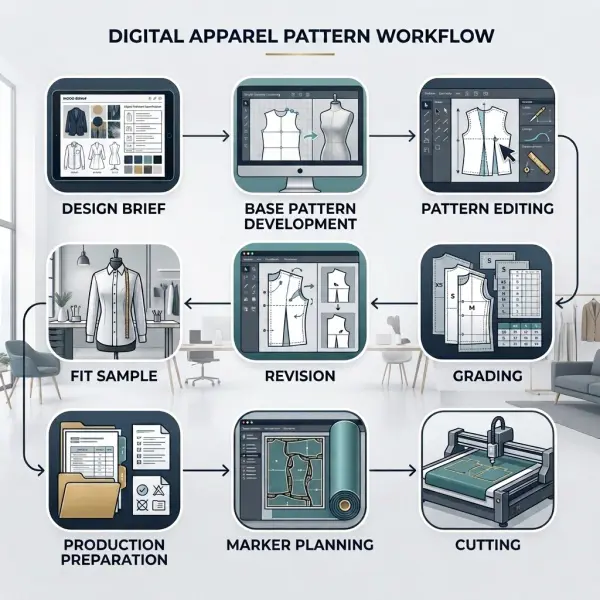
A realistic workflow usually begins before the patternmaker opens the software. The team first needs a design brief, size strategy, material assumptions, construction direction, and a reliable starting block.
The exact sequence varies by company, but the following stages are common.
1. Establish the design and technical requirements
The patternmaker reviews the sketch, reference sample, measurement specification, intended silhouette, material, trims, construction details, and target size.
At this stage, missing information creates later rework. A drawing may show a relaxed shirt, for example, but the team still needs to define body length, chest ease, shoulder position, sleeve volume, collar structure, placket width, hem shape, and intended fabric weight.
Pattern software cannot resolve an unclear product brief.
2. Select or create the base pattern
The patternmaker may begin from an approved block, an earlier style, a digitized paper pattern, a measurement-driven construction, or a new draft created in the CAD system.
A proven block is usually valuable because it carries fit knowledge from previous products. That does not mean every new style should be forced onto the same foundation. Product category, silhouette, stretch level, customer segment, and construction method may require a different starting point.
3. Develop the style pattern
The patternmaker changes the base geometry to create the intended garment. Typical work includes:
- adjusting length, width, and shaping;
- moving or converting darts;
- developing panels, yokes, collars, pockets, or facings;
- creating sleeves, waistbands, cuffs, linings, or support pieces;
- adding fullness, pleats, gathers, or flare;
- defining internal lines and match points;
- checking related seam lengths;
- establishing grainlines and piece quantities.
This is where patternmaking expertise is most visible. The software provides tools; the patternmaker determines how the garment should be engineered.
4. Add production information
Once the main geometry is established, the pattern must be industrialized for sampling or production. Industrialization may include seam allowances, notch types, drill points, piece labels, cut quantities, material categories, matching requirements, fold instructions, and other factory-specific information.
Lectra’s description of pattern industrialization explicitly includes adding notches, seam values, axes, and other information required for production. ust match the actual factory process. A seam allowance suitable for a five-thread safety stitch may not be appropriate for a French seam, bound seam, turned edge, taped seam, or specialized automated operation.
5. Produce and evaluate the first sample
The digital pattern is plotted, printed, projected, or sent to a cutting system, depending on the company’s setup. A physical sample is then sewn and evaluated for fit, balance, proportion, construction, movement, and appearance.
Some teams also simulate the pattern in 3D before or alongside physical sampling. In an integrated workflow, the 2D pattern pieces are virtually arranged and sewn around an avatar. Gerber’s official documentation describes 3D simulation as a sequential process requiring fabric information, stitching relationships, pattern preparation, placement, and simulation rather than a single automatic command. an help teams identify possible issues and communicate design intent, but its reliability depends on pattern accuracy, avatar selection, fabric-property settings, seam definitions, and operator skill. Physical validation remains important when fit, handfeel, construction behavior, or material response is commercially critical.
6. Revise and approve the pattern
Fit comments are converted into specific pattern actions. “The body feels too tight” is not yet a complete correction. The patternmaker must determine where the restriction occurs, whether additional ease is needed, whether the fabric is behaving differently from the original assumption, and which pattern pieces must change together.
Revisions should be recorded with clear version numbers and approval status. Related components—such as facings, linings, pockets, interlinings, and trim placements—must also be updated.
7. Grade the approved pattern
Grading creates the required size range by applying controlled movements to designated points. It is not simply a uniform enlargement of the complete garment.
Different areas may require different increments. Shoulder width, chest circumference, armhole depth, body length, neckline, rise, thigh width, sleeve length, and pocket placement may change according to separate rules.
Digital grading can apply and display these rules consistently. CLO’s current documentation, for example, describes grade-point editing and the application of grading rules to 2D patterns and corresponding 3D garments. base, and largest sizes should still be reviewed. A mathematically consistent grade can produce distorted proportions or unsuitable fit if the grade rules do not reflect the target population and product category.
A deeper discussion of the workflow and organizational differences is reserved for digital patterns versus manual patterns.
8. Prepare files for costing, markers, and cutting
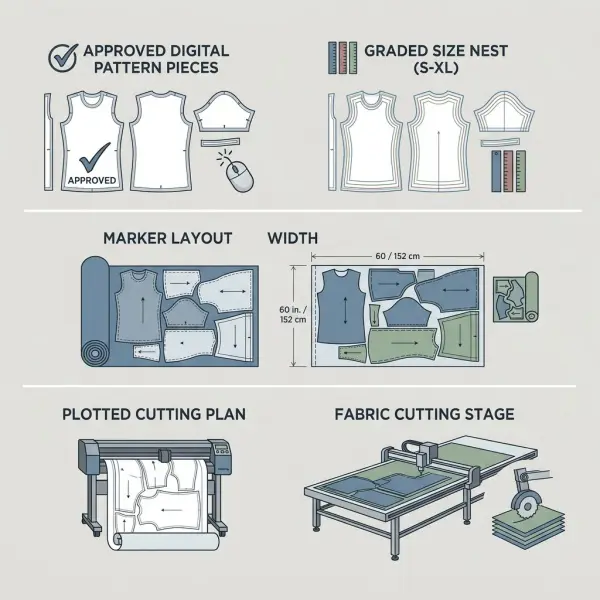
After approval and grading, pattern data may support fabric-consumption estimates, marker creation, plotting, or automated cutting.
Marker making arranges the required pattern pieces within a defined fabric width and production ratio. It is related to digital pattern making but should not be confused with pattern construction itself. Marker efficiency also depends on fabric width, size assortment, quantities, grain restrictions, nap direction, print matching, defects, splicing rules, and cutting-room requirements.
Some CAD suites connect pattern design with marker and production-planning functions. Gerber documentation, for example, describes marker generation using production quantities, fabric widths, materials, colors, and sizes.
What Is the Difference Between 2D Pattern CAD and 3D Garment Software?
Two-dimensional pattern CAD is primarily used to create and control the flat pattern geometry needed to manufacture a garment. Three-dimensional garment software uses those pattern pieces, sewing relationships, avatar data, and simulated fabric properties to visualize how the assembled garment may appear and behave.
The functions overlap in modern software, but they are not identical.
|
Area |
2D pattern CAD |
3D garment simulation |
|
Main working space |
Flat pattern pieces |
Garment assembled around an avatar |
|
Primary purpose |
Pattern engineering and production preparation |
Visual, fit, proportion, and design evaluation |
|
Core inputs |
Measurements, blocks, curves, grade rules, construction data |
2D patterns, seam relationships, avatar, fabric settings |
|
Typical outputs |
Production patterns, graded nests, plotted or exported files |
Virtual samples, fit views, tension displays, rendered presentations |
|
Main strength |
Precise control of manufacturable pattern geometry |
Faster visual review and communication before some physical samples |
|
Main limitation |
Flat geometry can be difficult for non-patternmakers to interpret |
Simulation quality depends heavily on accurate inputs and does not remove all physical validation |
A 3D garment that looks convincing is not necessarily production-ready. The underlying 2D pattern must still contain correct seam relationships, notches, allowances, construction information, and grading logic.
Likewise, a technically sound 2D pattern may not produce a realistic virtual sample if fabric properties or sewing relationships are configured poorly.
The most mature workflows treat 2D and 3D as connected views of the same product-development problem rather than competing methods.
How Digital Patterns Affect Different Fashion Teams
The effect of digital pattern making extends beyond the pattern room. Each function interacts with the data differently.
Designers gain faster visibility into proportion and construction
Designers can review pattern-derived silhouettes, style lines, and virtual samples earlier. This can improve communication when a sketch leaves construction details open to interpretation.
However, designers still need to provide a disciplined brief. Constant visual changes without clear fit or commercial priorities can create more revisions rather than fewer.
Technical teams gain better control over specifications
Technical designers and product developers can compare pattern measurements with garment specifications, track fit comments, and verify whether approved corrections have been incorporated.
The strongest workflow connects the pattern version to the relevant tech pack, bill of materials, sample comments, and approval stage. When these records are stored separately without clear identifiers, teams can still send conflicting information to suppliers.
Sourcing teams gain clearer supplier handoffs
A digital file can reduce the need to ship physical pattern sets, especially during early development. Suppliers can receive pattern pieces, grade rules, annotations, and supporting specifications electronically.
Before assuming compatibility, sourcing teams should ask:
- Which CAD platform and version does the factory use?
- Does the factory require a native file or an exchange format?
- Are all sizes included or only the base size and grade rule?
- Are seam allowances included?
- Which line types represent cut lines and sewing lines?
- Are units millimetres, centimetres, or inches?
- Can the receiving system retain notches, internal lines, labels, and grading?
- Who verifies the imported file before cutting?
These questions prevent a common failure: a file that opens successfully but does not contain all the expected production information.
Manufacturers gain more usable production data
Factories can use approved digital patterns for plotting, marker planning, spreading instructions, automated cutting, and production preparation, depending on their technology.
The value depends on file discipline. A factory should not cut bulk fabric merely because the file name contains the word “final.” Approval status, size range, shrinkage treatment, material width, and marker requirements must be confirmed.
Management gains a reusable technical asset library
For business leaders, digital patterns can become part of the company’s intellectual property and operational knowledge. Proven blocks, graded styles, fit histories, construction templates, and size standards can reduce dependence on individual memory.
This benefit requires data governance. Files must be backed up, access should be controlled, and the company should know whether pattern data is stored locally, on a network, in a vendor cloud, or with an external pattern service.
What Are the Main Business Benefits?
The value of digital pattern making varies by product complexity, production volume, team structure, and current process maturity. The following benefits are realistic when the system is implemented well.
Easier revisions and style development
Pattern pieces can be copied, modified, measured, and compared without repeatedly tracing paper. Proven blocks and components may be reused across related products.
This can be particularly useful for brands with recurring categories such as shirts, uniforms, trousers, sportswear, lingerie, or children’s basics. Reuse should remain controlled; an old pattern should not be selected simply because it is available.
More consistent grading
Stored grade rules can be applied systematically and updated when the base pattern changes. This reduces repetitive manual work, but the rules still need to be developed and validated for the intended customer.
Consistent grading is not the same as inclusive or accurate sizing. A brand needs relevant anthropometric evidence, fit testing, and commercial decisions about body shape, ease, and size intervals.
Faster pattern communication
Digital files can be transferred between brands, patternmakers, sample rooms, and factories without sending the original paper set. This can shorten handoff time, especially for international teams.
The gain may disappear if every supplier needs the file converted, reconstructed, or corrected. Interoperability testing should therefore occur before a critical production deadline.
Stronger production repeatability
When an approved file is protected and linked to the correct technical information, repeat orders can begin from the same controlled pattern. This helps reduce unplanned differences between production runs.
Material changes, factory changes, machine changes, and revised construction methods may still require pattern or allowance adjustments.
Better support for costing and material planning
Digital pattern geometry can support early fabric-consumption estimates and marker trials. These estimates help product teams assess whether a design is commercially viable before committing to bulk production.
They should not be treated as guaranteed consumption figures until fabric width, size ratio, quantities, matching rules, nap direction, shrinkage, defects, and cutting-room constraints are known.
For a broader costing perspective, see how fabric, labor, and overhead affect apparel costs.
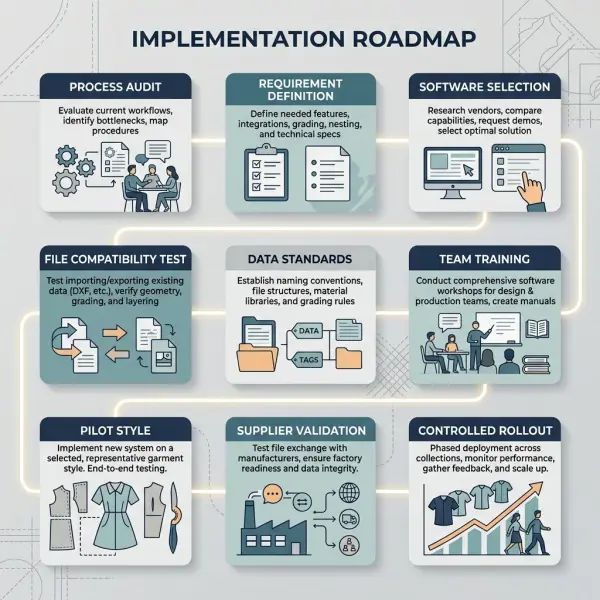
How Should a Fashion Business Implement Pattern Software?
Software selection should begin with the workflow the company needs to control, not with the longest feature list.
A small direct-to-consumer brand working with one freelance patternmaker has different requirements from a uniform manufacturer managing made-to-measure orders, or a multinational supplier operating several pattern rooms and automated cutting lines.
Map the current process before purchasing
Document how a style currently moves from design to bulk production. Identify where the team experiences repeated delays, incorrect files, lost revisions, inconsistent sizing, excessive sampling, or difficult supplier communication.
The map should show:
- who creates the first pattern;
- who approves fit;
- who applies grading;
- who owns the master pattern;
- how files reach the factory;
- how production changes are recorded;
- how repeated styles are retrieved.
This prevents the business from buying software that solves a problem it does not actually have.
Define essential capabilities
Most businesses should separate essential requirements from attractive extras.
Essential requirements may include:
- reliable 2D pattern drafting and editing;
- grading suited to the company’s product categories;
- measurement and seam-checking tools;
- pattern annotation and industrialization;
- compatible import and export formats;
- plotting or cutting-room compatibility;
- version and file-management controls;
- practical training and technical support.
Three-dimensional simulation, parametric pattern generation, made-to-measure automation, cloud collaboration, or advanced marker optimization may be valuable, but only when the surrounding workflow can use them.
Test file interoperability with real suppliers
Apparel CAD systems frequently exchange pattern data through DXF variants commonly described as DXF-AAMA or DXF-ASTM. CLO, for example, documents the import of 2D patterns from several pattern CAD systems through DXF-AAMA and DXF-ASTM. l ASTM D6673 specification explains a DXF-based method for transferring 2D sewn pattern-piece data and associated grade-rule information. Its stated scope does not include complete marker layouts, cutter instructions, spreading data, or full product specifications. ASTM D6673 pattern-data interchange page is useful for understanding the documented scope, but the listed standard is historical. Companies should rely on current vendor documentation and real exchange tests rather than assuming that the label “DXF” guarantees complete compatibility.
A proper test should include curved pieces, notches, internal lines, grainlines, piece names, seam allowances, and a graded size range. The receiving patternmaker should compare imported measurements with the source file.
Build pattern data standards
Before migration, establish rules for:
- style and file naming;
- size naming and base-size identification;
- piece naming;
- unit settings;
- line types and annotation;
- seam-allowance conventions;
- version numbering;
- approval status;
- archive and deletion policies;
- user access and backup.
These rules often deliver more operational value than an advanced feature that only one employee knows how to use.
Train patternmakers and adjacent teams
Patternmakers need practical software training, but designers, technical teams, merchandisers, sourcing staff, and factory coordinators also need to understand the new handoffs.
A designer does not need to become a CAD operator. The designer should, however, understand which decisions must be confirmed before pattern development begins and how late changes affect components, grading, costing, and samples.
Start with a controlled pilot
A pilot should use a product category the company understands well. It should be complex enough to expose workflow issues but not so commercially critical that the business cannot tolerate learning.
A useful pilot may compare:
- development time;
- number of revisions;
- file-transfer accuracy;
- pattern measurement consistency;
- grading review results;
- sample comments;
- marker or fabric estimates;
- user adoption;
- supplier feedback.
The objective is not to prove that software is automatically faster. It is to identify where the digital process improves control and where new procedures are required.
Common Mistakes When Adopting Digital Pattern Making
Buying software before fixing the development process
This happens when management sees technology as the solution to missed deadlines or excessive samples without identifying the source of the problem.
If design briefs are incomplete, fit comments are vague, approvals are delayed, or factories receive contradictory instructions, digital pattern software will not resolve the underlying governance problem. It may allow the same confusion to move faster.
A better approach is to map responsibilities and approval points before configuring the software.
Treating file conversion as lossless
A converted pattern may look visually correct while containing missing notches, changed curves, incorrect units, altered labels, lost grading data, or different interpretations of sewing and cutting lines.
The consequence can range from minor rework to incorrectly cut fabric. Imported files should be measured and technically checked, especially before bulk production.
Using unverified grade rules
Teams may apply an existing grade library to a new customer group or product category because the software makes it easy.
This can create a technically neat size nest that does not represent the intended wearer. Grading rules should be connected to the brand’s size strategy, fit history, product type, and measurement evidence.
Assuming 3D simulation replaces fitting
Virtual samples can reduce uncertainty and help teams evaluate design direction, but they do not automatically reproduce every physical property, sewing operation, support material, finish, or wearer response.
A brand that eliminates physical validation without understanding those limitations may approve attractive images rather than reliable garments.
Failing to protect the master pattern
Several users may create local copies, rename files inconsistently, or send supplier-specific versions without updating the approved master.
Eventually, the business cannot determine which pattern created the successful product. A controlled master file, change log, and approval procedure are essential.
Measuring success only by drafting speed
A patternmaker may complete individual edits faster while the total product-development cycle remains unchanged because approvals, sample shipping, material decisions, or supplier responses are still slow.
Success should be evaluated across the complete workflow: accuracy, revision control, sample quality, handoff clarity, grading consistency, and production readiness.
The relationship between software controls and development mistakes is examined more deeply in how pattern software helps reduce garment-development errors.
Important Technical Caveats
Digital pattern making should not be presented as automatic garment engineering.
First, software accuracy is mathematical rather than commercial. It can calculate a curve or measurement precisely, but it cannot confirm that the design is right for the customer.
Second, body data must be interpreted. Even standardized measurement definitions do not determine a brand’s fit, ease, silhouette, or size architecture.
Third, material behavior matters. A pattern developed for stable woven cotton may not perform the same way in a stretch woven, fluid viscose, coated fabric, loose knit, quilted construction, or fabric with substantial shrinkage.
Fourth, digital interchange remains conditional. Native files may contain information that exchange formats do not fully preserve. Software version, layer mapping, export settings, unit configuration, and receiving-system behavior should all be tested.
Finally, digital ownership should be addressed contractually. Brands working with external patternmakers or factories should clarify who owns the native files, graded patterns, blocks, fit corrections, and production exports, as well as what is delivered when the relationship ends.
Frequently Asked Questions
Is digital pattern making suitable for small fashion brands?
Yes, but the appropriate setup may be simpler than an enterprise CAD installation. A small brand may work effectively with a trained freelance digital patternmaker or pattern service rather than purchasing multiple licenses immediately.
The decision should depend on style volume, revision frequency, production partners, internal expertise, and how much control the brand needs over its pattern library. Before investing, the brand should confirm file ownership, export formats, supplier compatibility, software costs, training requirements, and ongoing support. A digital workflow is valuable when it improves repeatability and communication, not merely because the pattern is created on a computer.
Can a paper pattern be converted into a digital pattern?
Yes. A paper pattern may be digitized through a digitizing table, camera-based system, scanner, manual point entry, or tracing process supported by the selected software.
The converted outline should be checked against the physical original. Curves, notches, grainlines, internal marks, labels, seam allowances, and measurements may need to be reconstructed or verified. A scanned image alone is not necessarily a structured production pattern. The final digital file should contain editable geometry and the technical information needed for sampling, grading, and production.
Does digital pattern software automatically create all garment sizes?
Software can apply grading rules to generate size ranges, but it does not independently determine which rules are correct for a particular brand.
The team must define the base size, size intervals, grade movements, body assumptions, product-specific proportions, and placement changes. Generated sizes should be inspected, particularly at the smallest and largest ends of the range. For products with major body-shape variation—such as bras, tailored trousers, fitted dresses, childrenswear, or extended sizing—one continuous grade rule may not be sufficient.
Is 3D fashion software the same as digital pattern-making software?
Not exactly. Digital pattern-making software focuses on creating and controlling flat, manufacturable pattern pieces. Three-dimensional fashion software simulates those pieces around an avatar to support visual, fit, and design evaluation.
Some platforms combine both functions, while others connect separate 2D and 3D applications. A business should confirm whether the 3D system can edit production patterns, retain grading, exchange files with the factory’s CAD platform, and represent the required materials accurately. A strong render is useful, but production still depends on correct 2D pattern data.
What file format should a brand request from a patternmaker?
The brand should ideally retain the native editable file when licensing and ownership arrangements permit, plus a supplier-compatible exchange format and human-readable reference output.
Common deliverables may include the native CAD file, DXF-AAMA or DXF-ASTM export, grade-rule data where required, plotted PDF, measurement chart, and pattern-piece list. Requirements should be agreed before development begins. The receiving factory should test the files, because identical extensions do not guarantee identical data interpretation across software platforms.
Can digital patterns reduce fabric waste?
They can support better material planning, especially when connected to accurate markers, size ratios, production quantities, and cutting-room constraints. Pattern editing may also help teams investigate lower-consumption design alternatives.
The software does not guarantee waste reduction. Fabric utilization depends on pattern shapes, garment design, material width, grain direction, nap, print matching, defects, order quantities, marker strategy, cutting losses, and whether remnants are usable. Claims about waste reduction should therefore be based on measured markers or production records rather than the presence of digital software alone.
Does digital pattern making eliminate the need for physical samples?
Usually not. Digital patterns and 3D simulation may help teams identify issues earlier and reduce some exploratory samples, but physical samples remain important for validating actual fabric behavior, construction quality, movement, tactile properties, trims, finishing, and wearer response.
The required sampling level depends on the product. A basic repeat style in a familiar fabric may need fewer development rounds than structured tailoring, compression wear, lingerie, protective apparel, or a new material construction. The practical goal is not automatically zero samples; it is better-informed sampling.
What should a company verify before choosing pattern software?
The company should verify whether the software fits its products, patternmaking methods, size strategy, supplier network, hardware, and production systems.
A live test is more useful than a feature brochure. The team should create or import a representative style, edit it, add production details, grade it, export it, open it in the supplier’s system, and compare the result. Training quality, technical support, licensing conditions, file access, cloud dependence, update policy, and long-term data ownership should also influence the decision.





Comments 0
Leave a CommentSend Comment
Anda harus Login terlebih dahulu untuk dapat memberikan komentar.