
Seedance 3.0 and the Small Details That Make an Apron Video Work
The pocket is the part of this apron I would want someone to remember. Not the whole kitchen, not the flowers on the table: one generously sized pocket, divided just enough to keep a notebook away from a pencil. That small detail gives me a better starting point for a product video than a sweeping claim about craftsmanship.
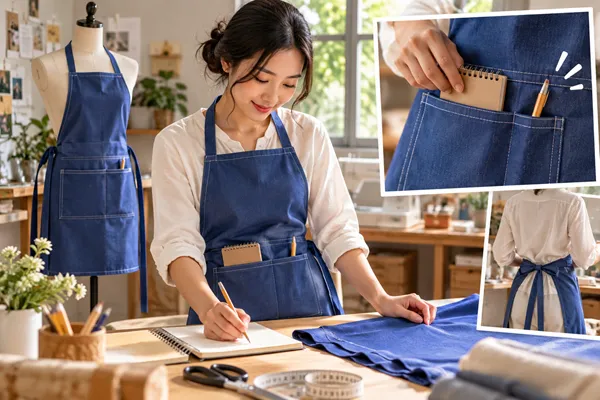
Imagine a maker preparing to introduce a new work apron. The sample is ready, there are several clear photographs, and a full location shoot feels excessive for the first short film. I would approach Seedance 3.0 as a way to explore the setting and movement around that sample. The finished edit would combine selected generated material with real views of the garment, keeping the construction details easy to recognise.
Put one apron at the centre of the story
My example would be a plain blue apron with contrasting stitching and long waist ties. I would choose a single colourway for the first video. Showing three colours in rapid succession might make a lively montage, but it would take attention away from the pocket and make inconsistencies between shots harder to spot.
Before thinking about movement, I would collect a front view, a close photograph of the pocket and a rear view showing how the ties attach. Each image would have a job. The front view establishes the silhouette, the close view records the actual stitching, and the rear view prevents me from inventing a fastening arrangement simply because it looks convenient on screen.
A photograph of the apron hanging naturally would be more useful than one spread perfectly flat. The folds would suggest where the fabric gathers and where the hem rests. I would keep the flat photograph available for checking shape, though. An attractive fold can hide a seam, and that seam may matter to someone considering the design.
A worktable without the usual clutter
For the setting, I would use a modest cutting table near a window. A notebook and a short pencil would be the only props. Scissors, fabric rolls and a sewing machine could all make sense in the room, but together they would compete with the item I am trying to introduce.
The first Seedance 3.0 shot would establish this space before the apron appears in detail. I would describe soft side light, a pale tabletop and a small area of blue fabric near the lower edge of the frame. A gentle camera move towards the fabric would bring the colour into prominence without suggesting that the whole room is the product.
I would keep the window outside the frame. Bright panes can become a visual magnet, especially in a small phone video. The light should help the stitching stand out, not become its own spectacle. In the reference photograph, I would place the notebook far enough behind the fabric that its outline remains recognisable without needing any readable text.
Let the real pocket do the explaining
The next cut would move to real footage of the sample. I would film a hand placing the notebook into the pocket, then pause before the pencil goes into its separate section. This is a small action, but separating it into two beats gives the viewer time to understand the division.
For this action, I would choose an actual recording rather than ask a generated shot to demonstrate pocket depth. The video would be making a factual point about a garment someone could buy. A real hand and the finished sample would show the opening, the stitching and the way the fabric responds without turning a concept into an untested product claim.
Seedance 3.0 would still have a place around that close view. A short establishing passage could lead into it, and a matching background shot could give the sequence a quieter ending. I would aim for those generated moments to support the product footage rather than draw attention to a completely different visual style.
Give the camera one modest instruction
For a reference-based shot of the apron on a plain dress form, my Seedance 3.0 brief would be specific: a blue work apron, the existing large divided pocket, soft daylight from the left and a slow camera move from a slightly wider view towards the waist. The neckline, pocket position and ties should remain unchanged. The form would stay still, with no wind or dramatic fabric movement.
I would use Seedance 3.0 to explore that restrained approach before deciding whether the shot belongs in the final edit. The reference gives the sequence a starting appearance; it does not remove the need to compare the result with the sample. I would watch the pocket corners, contrast stitching and side edges throughout the movement, not only in the opening frame.
Suppose the first result made the apron look glossy or allowed the waist ties to drift. My next brief would reduce the camera travel and describe a matte surface with stationary ties. If those details still changed, I would replace the shot with a slow crop across the real photograph in the editor. The story would lose very little, because its point is the garment's useful detail rather than a complicated camera trick.
Keep the colour consistent across the cuts
The blue in a generated room might look different from the blue in footage shot beside a real window. I would place the clips next to each other early, before spending time on music or titles. A sudden shift towards purple would make the apron appear to change colour halfway through the film.
For the Seedance 3.0 passages, I would revise the lighting description if the difference were large. For small mismatches, I would adjust the clips gently in the edit while keeping the real sample footage as the reference. I would avoid making the actual fabric more saturated simply to match a striking generated image.
The same approach would apply to texture. A close view of weave or topstitching should come from the actual product. I would not sharpen a generated surface until it suggests a different material. A short, honest close-up can carry more useful information than a beautiful but ambiguous sweep across the whole apron.
Build a rhythm around two everyday actions
I would arrange this Seedance 3.0 edit around placing the notebook in the pocket and tying the apron. The opening table shot sets the context, the pocket action explains the feature, and the fastening shot turns an object into something ready to wear. A final front view would let the viewer put those details back into the complete silhouette.
For the fastening, I would record the actual ties being crossed and secured, keeping the hands within the frame. I would cut after the knot settles. There is no need to show every second of the movement, but removing the moment when the ties meet would make the action feel oddly incomplete.
A light instrumental passage could sit underneath, provided I had permission to use it. I would keep a little of the real fabric sound in the pocket shot. The soft contact of notebook and cloth would connect the polished images to an ordinary task. Any titles would be added in the editor, with a short description such as “divided front pocket” rather than a string of unsupported superlatives.
Finish with something the maker can actually use
Before export, I would watch the film at roughly the size it will occupy on a phone. If the pocket division is difficult to see, I would extend that real close-up rather than add another caption. For a vertical version, I would reframe each shot deliberately so that the neckline and lower edge remain visible where they matter.
The final Seedance 3.0-assisted film would have a simple purpose: introduce one apron through its shape and two useful actions. I would save a clean version without music as well, so the maker could adapt the sound later without rebuilding the visuals. That small extra step would make the material easier to reuse across a product page and a social post.
Before making several alternative background passages, I would check Seedance 3.0 Pricing and set a small allowance for those variations. For this project, one useful establishing shot would be enough; producing a large collection of similar clips would not make the pocket demonstration clearer.
I would judge the result by whether someone can picture wearing the apron and reaching for that notebook. A memorable product video does not have to enlarge a modest design into a grand lifestyle promise. Sometimes the clearest story is a pocket, a pair of ties and enough time to see how they work.





Comments 0
Leave a CommentSend Comment
Anda harus Login terlebih dahulu untuk dapat memberikan komentar.