
Can AI Product Photos Work for a Small Clothing Shop? I Measured 28 Images Against My Own Garment
I run a small online shop with one other person. We sell linen dresses, a few tops and some accessories, and every new style needs the same set of pictures: a flat-lay, an on-model shot, every colourway, a plain white main image for the marketplaces, and a hang-tag close-up. A half-day studio shoot with a freelance model costs us more than the first production run of some styles, so this autumn I tested whether an image model could cover part of that list.
I checked each picture the way a customer complaint would: is the colour right, are the buttons and pocket where they are on the real garment, is the tag text correct. Everything below is measured, including the misses.
Setup and cost
I used the Nano Banana Pro API, which takes a text prompt plus up to 14 reference images and returns 1K, 2K or 4K output. The model ID that worked for me was gemini-3-pro-image-preview. Jobs are asynchronous: you submit, get a task ID and poll for the result. A typical edit request looked like this:
import requests, os
API_BASE = "https://api.apimart.ai"
headers = {"Authorization": f"Bearer {os.environ['APIMART_API_KEY']}"}
payload = {
"model": "gemini-3-pro-image-preview",
"prompt": "Recolour only the dress fabric and the belt to dark navy, "
"hex #1F2A44. Keep everything else identical: same layout, "
"same folds, same coconut-shell buttons, pocket, cream "
"contrast stitching, same grey background and lighting.",
"image_urls": ["data:image/jpeg;base64,..."], # my master flat-lay
"size": "3:4",
"resolution": "1K",
"n": 1
}
task = requests.post(f"{API_BASE}/v1/images/generations",
headers=headers, json=payload).json()["data"][0]["task_id"]
# then poll GET {API_BASE}/v1/tasks/{task} until status == "completed"
I made 28 images in total and none of the jobs failed. Each 1K or 2K image was billed $0.02 and the single 4K image $0.03, so the whole test cost $0.57. Median wall-clock time was 42 seconds per image, with a range from 23 seconds (text-heavy product shots) to 115 seconds (two background edits that sat in a queue while I ran seven jobs at once).
The garment is a fictional sage linen shirt-dress I described in the prompt: sage green #8A9A5B, exactly seven coconut-shell buttons, a patch pocket on the left chest, a self-tie belt and cream contrast top-stitching. The model in the on-model shots is invented too.
Test 1: the same prompt six times
I started with the obvious workflow: describe the garment and generate the flat-lay. Then I ran the same prompt five more times, including once at 2K and once at 4K.
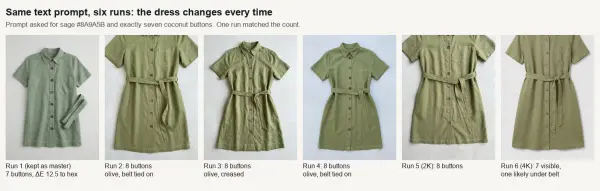
Same words, six different dresses. Only run 1 had the seven buttons I asked for.
Every run looked like a good catalogue photo, and none was the same product. Four had eight buttons, the 4K run showed seven with probably one more under the belt, and only the first had exactly seven. The colour moved too: runs 2 to 6 came out olive, 7 to 10 ΔE2000 away from the first run, which is a visible difference on screen.
That changed how I worked. I picked the run that matched the garment, called it the master, and from then on every image was an edit of that master rather than a new generation. If you regenerate from text for each listing, your product will quietly change between photos.
Even the master measured 12.5 ΔE from the hex I typed; it's a greyer sage than #8A9A5B. A hex code in a prompt is a hint, not a spec.
Test 2: from flat-lay to on-model
This is the shot I most wanted to replace. I sent the master flat-lay as a reference and asked for the same dress on a fictional model, twice at 1K and twice at 2K.
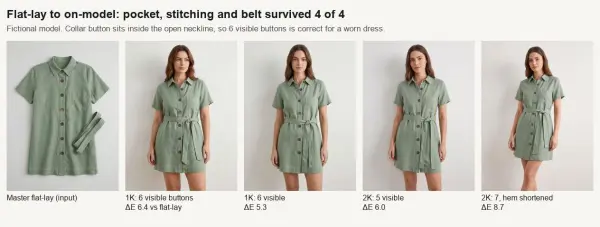
The pocket stayed on her left chest, the stitching stayed cream, the belt got tied. One run shortened the hem.
All four kept the patch pocket on the correct side, the cream hem stitching and the coconut buttons. Three showed six or five visible buttons, which is right for a worn dress with an open collar. The fourth showed all seven but had shortened the hem by several centimetres, which would be a returns problem for a dress sold by length. Colour moved 5.3 to 8.7 ΔE from the flat-lay, mostly because the studio light is different. I'd use three of the four. 2K cost the same $0.02 as 1K, so I'd always ask for 2K here.
Test 3: colourways from one master
We usually sell a dress in three or four colours but sample only one. I asked for terracotta #C0603A, navy #1F2A44, butter yellow #F3DE8A and dusty pink #D8A7A7.
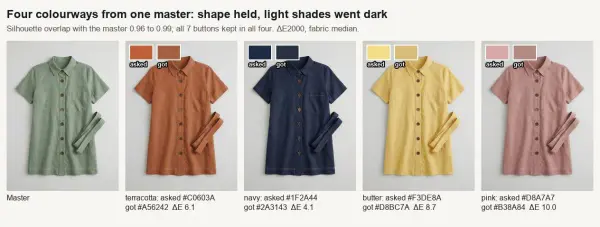
The shape barely moved. The pale shades came back darker than asked.
Structure was the strong point. I masked the garment in each image and compared it with the master: the silhouettes overlapped by 0.96 to 0.99, and all four kept seven buttons, the pocket and the stitching. Colour was mixed. Navy landed within 4.1 ΔE and terracotta 6.1, but butter yellow (8.7) and dusty pink (10.0) both came back darker and muddier than the target. I'll use the dark colourways as they are and correct the pale ones by hand against a photo of the real fabric.
Test 4: white backgrounds for marketplaces
The marketplaces we sell on want the main image on pure white. I measured every background pixel outside the garment.
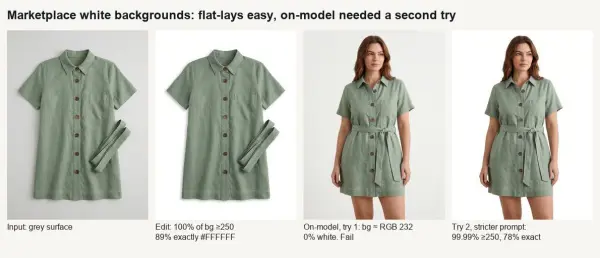
Flat-lays went white on the first try. The on-model shot needed a stricter prompt.
On the three flat-lay edits, 99 to 100% of background pixels were 250 or brighter in all three channels, and up to 89% were exactly #FFFFFF. Under 5% of garment pixels changed noticeably. The on-model edit failed the first time: the wall only lightened to about RGB 232, which a marketplace check would reject. A second prompt that said "cut the model out" and "no grey, no gradient" got 99.99% of the edge pixels to 250 or above. Lesson: measure the background, don't judge it by eye on a bright screen.
Test 5: can it count stripes?
Breton tops sell on details, so I asked for a cream top with exactly 12 navy stripes on the body. I counted the stripes along three vertical lines through each image.
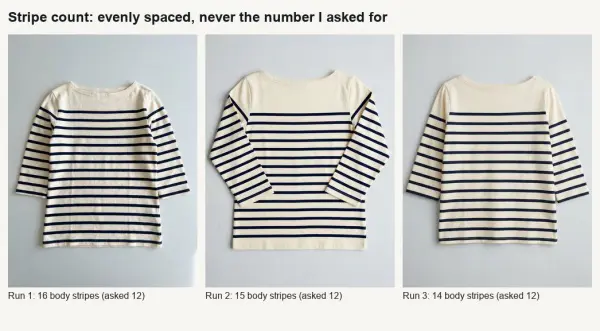
Tidy, evenly spaced stripes. Never twelve of them.
I got 16, 15 and 14. Spacing was very regular (within a few pixels across the body), so the images look right, they just don't match the product. Fine for a mood image, not for a listing. For countable patterns, start from a photo of the real garment.
Test 6: hang tags, price cards and size guides
I asked for a kraft hang tag with four lines ("SAGE LINEN SHIRT-DRESS", "SIZE M - UK 12 - EU 40", "£48.00", "100% LINEN") and a "NEW IN / £48" card, four times, plus a size-guide card with a three-row table, twice at 2K. I checked them with text recognition and by eye.
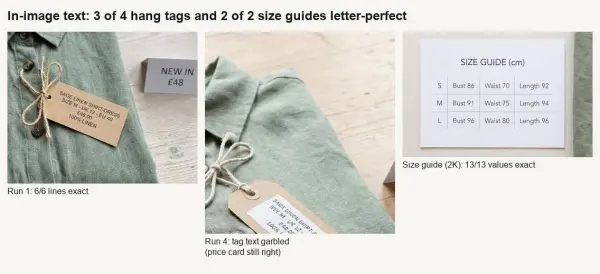
Three of four tags and both size guides were letter-perfect.
Three of the four tags were exact on all six lines, pound sign included. The fourth rendered the tag small and at an angle, and the text turned into mirrored nonsense, though its price card was still correct. Both size guides got all 13 values right. No image added a brand name I didn't ask for. These were also the fastest jobs at about 24 seconds each.
Resolution: is 4K worth it?
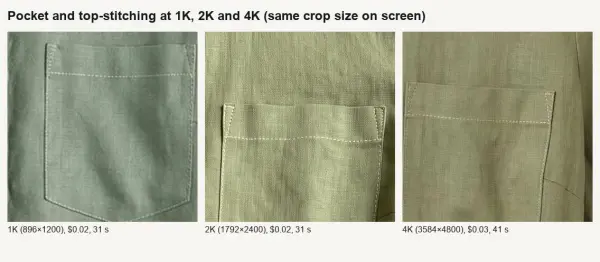
The linen slub and stitch holes only really show up at 2K and above.
At 1K the linen looks smooth and slightly painted. At 2K you see slub in the weave and individual stitches, which is what sells linen on a zoomable product page. 4K (3584×4800) added a little more for $0.03 instead of $0.02 and 41 seconds instead of 31. I'd use 2K.
What I'll actually use it for
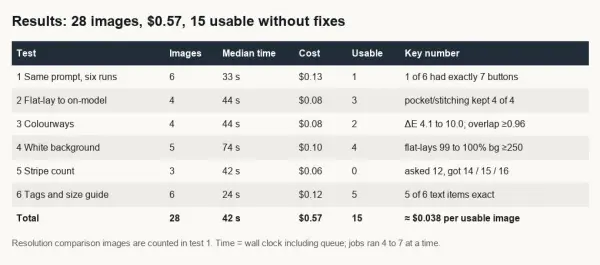
15 of 28 images were usable without fixes, about $0.038 per usable image.
- Edit from one approved master, never regenerate the product from text for each photo.
- On-model shots and dark colourways are listable after checking length, buttons and pocket. Pale colours drift darker.
- Measure white backgrounds. One of two on-model attempts looked white and wasn't.
- Don't trust counts of stripes or buttons in generated garments.
One more practical point: every file carried embedded Content Credentials (C2PA) marking it as AI-generated, along with a note that an invisible watermark had been applied. Re-saving can strip that metadata, so we label it in the listing text instead. We now write "model image is AI-generated, garment colour shown from a real sample" under those photos.
For 57 cents I got a usable on-model set, two colourways, white-background versions and tag shots. It doesn't replace photographing the real garment, but it replaces most of the shoot that comes after.





Comments 0
Leave a CommentSend Comment
Anda harus Login terlebih dahulu untuk dapat memberikan komentar.