
How Fashion Designers Use Pinterest Mood Boards in Production
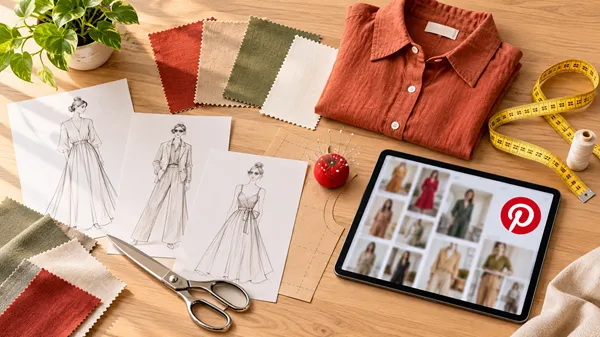
Plenty of designers have a Pinterest account with a few hundred pins in it and very little built from them. The boards get opened when a new collection needs a mood, and then the real decisions happen somewhere else: in a sketchbook, in a chat thread with the tailor, in a photo of a garment someone already owns.
Most of the time the gap comes from how the board is set up. A board organized around one garment can carry real production information. Below is a workflow that fits a small label or a garment workshop.
One board per garment
Boards named "Inspo" or "Summer" collect everything and decide nothing. A board named "Linen shirt dress, relaxed shoulder, tonal buttons" tells anyone who opens it what is being made.
Keep one board for each garment, and use board sections for the questions a pattern maker will ask: silhouette, fabric, collar and cuffs, trims, finishing. When a board passes thirty or forty pins, check whether you are still looking for ideas or have already decided. If you have decided, keep the five or six pins that settle the design and move the rest to an archive board you rarely open.
A narrow board also gets better suggestions. Pinterest shows more ideas below a board based on what is in it, so a board with one tight subject returns much closer matches than a board of mixed saves.
Video shows what a photo cannot
A still photo freezes one moment under one light. Cloth does not behave like that. Whether a crepe falls straight or clings, how a pleat opens when someone walks, how a lining sits when a jacket is turned inside out: all of it shows up in motion, and a short clip says more than a dozen stills.
Pinterest has plenty of this material now, such as draping on a dress form, how a French seam is finished, or a close look at an invisible zipper going in. These are the clips you want to replay with the fabric in your hands. A copy saved to a workshop tablet with a pinterest video downloader stays playable when the signal drops or the creator removes the pin.
When you save a clip, add a note on the pin about the moment that matters, for example "watch the collar stand at 0:40".
Check demand before you commit to a silhouette
Pinterest Trends is a free tool inside a Pinterest business account, and the account itself costs nothing to set up. It shows up to two years of search interest, and you can put up to four keywords on one graph. Choose the region where your customers live, because the results follow the region you select.
It answers narrow questions well. Is "modest wedding guest dress" growing or flat compared with last year? Does interest in terracotta start climbing in July or in September? Which of two necklines are people searching for more?
Two limits matter. The graph does not show search counts: each line is scaled so its own highest point is 100, so it tells you about direction and timing, not size. And what people search for is not always what they buy, so set the chart next to your own order history before you cut fabric for a full run.
Colors: from pins to swatches
Color is where boards most often fall apart in production. A shade that looks right on a phone can turn muddy once it is dyed onto cotton poplin, and matching one dye lot to the next is harder than it looks.
Take four or five pins that share a mood and write down, in words, the two or three colors they have in common: "dusty terracotta, warm sand, off-white with a yellow undertone". Take that description to your fabric supplier and ask for physical swatches. Look at them in daylight, and again under the lighting of your shop or showroom, before you approve anything.
Keep the swatches beside a screenshot of the board. Together they give a dyer or supplier something they can actually match.
Sharing the board with your tailor
A board can be made secret and shared with collaborators, so a tailor, pattern maker or factory contact sees it without it being public. Pinterest also lets you add private notes to individual pins, visible only to you and the board's collaborators. If the option does not show up on mobile, use a desktop browser.
Notes work best when they say something a photo cannot: "collar stand like this, but narrower", "button covered in the same fabric", "hem hits just below the knee on a 160 cm model". Put a short brief in the board description as well: the garment, the target price, the fabric range and the date the sample is due. A few lines like these remove a good part of the back and forth that fills a sampling round.
Some workshops still work from paper on the cutting table. For them, take a screenshot of the board, print it and clip it to the first sample.
Where boards go wrong
Copying a pin is the first mistake. If the finished garment is close to something already online, customers and the original designer will both notice. Use a pin for a proportion, a detail or a feeling, then draw your own version.
The second is forgetting how fabric behaves. A drapey crepe and a stiff twill can look alike in a photograph and behave nothing alike once cut. Before committing to a design from a pin, ask what cloth made it look that way, and whether you can get it.
The third is saving without ever coming back. A board that has not helped a decision in a month is clutter, so archive it.
A reference folder that outlives the board
Boards change. Pins get removed, accounts close, you reorganize. The part of a project that should stay put is a folder on your own drive, one per garment, holding a screenshot of the final board, photos of the swatches with the supplier's reference numbers, the tailor's notes and any saved clips.
References also come from outside Pinterest: a runway clip, a fabric test, a tutorial. Those can sit in the same folder as files saved with an online video downloader. Name every file by garment and detail, such as "linen-shirt-dress_collar-stand", so it can still be found two seasons later.
Twenty minutes a week
Once a week, spend twenty minutes on the newest saves. Move the useful ones into the right board and section, delete what you no longer like, and write one line at the top of each active board describing what it should produce. Once a month, check one or two Trends searches against your order notes.


Comments 0
Leave a CommentSend Comment
Anda harus Login terlebih dahulu untuk dapat memberikan komentar.