

How Stock Display, Staff Workflow, and Replenishment Affect Sales
Quick Answer
Stock display, staff workflow, and replenishment affect fashion retail sales by determining whether customers can discover the right product, evaluate it easily, find their size or color, receive timely help, and complete a purchase before interest fades. Display creates visibility and choice clarity. Staff workflow turns that visual promise into service and execution. Replenishment keeps sellable variants available on the floor and across relevant digital channels.
These elements work as one operating system. An attractive rail cannot convert demand if popular sizes remain in the stockroom. A fast replenishment process cannot recover sales if garments are crowded, poorly signed, or arranged in a way customers cannot navigate. Strong associates may still spend too much time searching for products when stock locations and task priorities are unclear.
The goal is not maximum product density or constant staff activity. It is selling readiness: the right product, in a usable presentation, with accurate availability and enough staff capacity to support the customer. The commercial effect depends on store format, assortment, traffic, service model, and data quality, so retailers should test changes against conversion, variant availability, labor effort, and margin—not sales alone.

Why Do These Three Activities Need to Work Together?
Display, workflow, and replenishment influence different stages of the same sales journey. Display helps the shopper notice and understand the offer. Workflow determines whether staff can maintain presentation, serve customers, manage fitting rooms, locate stock, and complete transactions without avoidable delay. Replenishment moves units from the backroom, warehouse, or another location to the place where demand can be fulfilled.
The relationship is easiest to see when one part fails. A customer notices a linen shirt in the window, finds the coordinating display, and wants a medium. The hanger is empty. The inventory system shows two units, but the associate is covering checkout and cannot search immediately. One unit is in a fitting room; the other was returned and has not been inspected. The business technically owns stock, yet neither unit is ready to sell at that moment.
This is why fashion retail operations for store and online teams should distinguish on-hand stock from selling-ready stock. Sales depend less on the abstract quantity owned than on whether a suitable variant is visible, locatable, serviceable, and available during the customer’s decision window.
The commercial chain from stock to sale
|
Operational condition |
What the customer experiences |
Possible sales effect |
|
Product is visible and understandable |
The shopper notices the item, sees how it relates to other products, and can identify price or purpose |
Greater opportunity for consideration, depending on traffic and product relevance |
|
Sizes and colors are represented |
The shopper can find a suitable variant without assuming the product is unavailable |
Fewer preventable walkaways caused by incomplete floor availability |
|
Staff can respond without abandoning critical tasks |
Questions, fitting requests, alternatives, and checkout are handled with less delay |
Better chance of completing an intended purchase |
|
Replenishment reacts to real gaps |
Sold, moved, or tried-on units are replaced according to priority |
The display remains commercially useful through the trading period |
|
Records match physical reality |
Staff and digital channels make more dependable availability promises |
Lower risk of wasted search, cancellation, and customer disappointment |
None of these conditions guarantees a sale. Price, product appeal, fit, traffic quality, promotion, weather, and local demand still matter. The operating value lies in removing obstacles that prevent existing demand from converting.
How Does Stock Display Influence Fashion Sales?
Stock display affects sales by shaping product discovery, perceived choice, comparison, and access. In fashion, customers often need to understand not only what an item is, but how it can be worn, which colors are available, where sizes are located, and whether the product fits the store’s wider style proposition.
Visual merchandising research commonly examines relationships among layout, presentation, satisfaction, purchase intention, and shopping behavior. A 2025 fashion-retail study found associations between visual-merchandising and store-layout factors and customer shopping decisions, but it was based on respondents in one Romanian region and should not be treated as a universal sales formula. The study remains useful as evidence that display decisions deserve structured testing rather than being treated as decoration. Readers can review the open-access study on fashion visual merchandising and store layout.
Visibility is not the same as availability
A product can be physically present but commercially invisible. It may sit behind another garment, appear only in an unpopular size, lack clear pricing, be separated from the story promoted in the window, or remain folded in a way customers hesitate to disturb. Conversely, a single display sample can create interest even when sellable units are held nearby, provided staff can retrieve them quickly and availability is clear.
Fashion retailers should define what “represented on the floor” means for each category. A footwear wall may need visible samples with organized pairs in back stock. Denim may need a clear fit-and-wash structure. Accessories can require security measures that still allow inspection. A luxury boutique may present few units and rely on assisted selling, while a value retailer may prioritize self-service access and size abundance. Display standards should follow the service model rather than copying another retailer’s density.

Choice needs structure
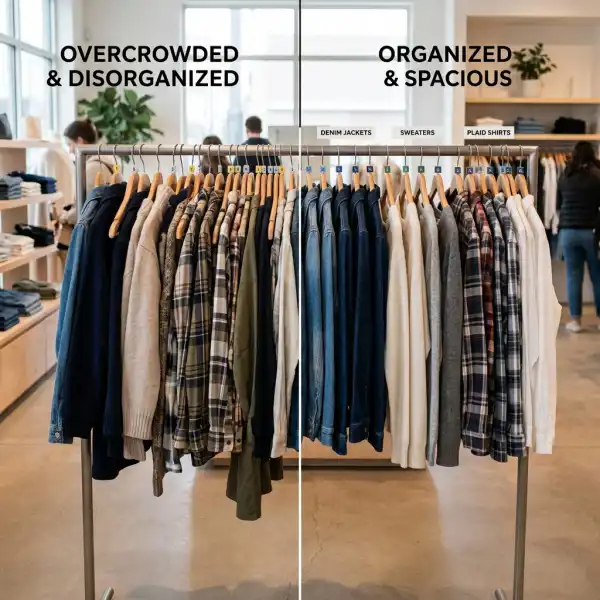
More visible stock does not always make shopping easier. A tightly packed rail can communicate abundance but make fabrics, silhouettes, and sizes difficult to inspect. Too little stock can look controlled yet hide the depth customers expect. The useful question is whether the display helps the intended shopper make the next decision.
Practical structures may include:
- organizing by category, outfit, collection, color story, fit, activity, or customer mission;
- sequencing sizes consistently and maintaining directional hangers;
- showing enough color or wash variation to communicate choice;
- placing complementary products together when the relationship is genuine;
- keeping prices, promotions, and exclusions readable and current; and
- preserving space for customers and staff to browse, refold, retrieve, and return garments safely.
The most suitable structure depends on how customers shop the category. Someone replacing black work trousers may value fit and size navigation more than an editorial color story. A customer browsing a seasonal capsule may respond better to coordinated outfits. Retailers should use observation, questions, fitting-room activity, and transaction data to judge whether the display supports the mission.
Display capacity should be operationally maintainable
Every fixture has a practical capacity. Overfilling makes products hard to browse and increases refolding, re-hanging, and damage risk. Underfilling can expose gaps too visibly or fail to communicate assortment breadth. The correct level is not a universal percentage; it depends on garment volume, fixture type, replenishment frequency, traffic, theft controls, and brand presentation.
The display plan also needs maintenance rules. Teams should know what replaces a sold feature item, how incomplete size runs are handled, when a low-stock style moves to another position, and who updates a promotional message. A launch display that works at opening may become misleading after several hours unless those decisions are built into the trading-day workflow.
How Does Staff Workflow Affect Conversion and Basket Building?
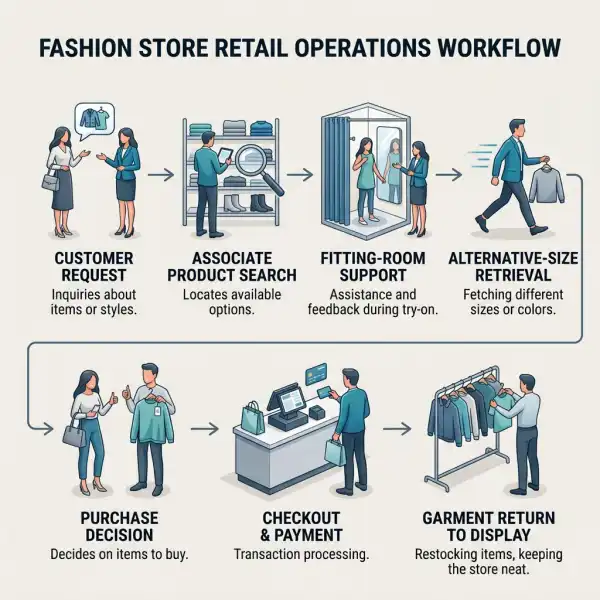
Staff workflow affects sales by allocating limited attention among customer service, display maintenance, stock movement, fitting rooms, checkout, online orders, and exception handling. Workflow is not simply a task list. It defines priority, sequence, ownership, timing, and what happens when demand interrupts planned work.
Fashion stores are interruption-heavy environments. An associate replenishing denim may be asked for another size, called to checkout, then receive a click-and-collect request. If the workflow does not preserve task status and handoff, the denim remains in transit, the stock record may be updated before the unit reaches the floor, and another employee may repeat the search. Activity is high, but selling readiness falls.
Customer-facing time must be protected deliberately
The right amount of customer interaction varies. Some customers want styling support; others prefer self-service until they ask. Staffing should therefore respond to observed demand rather than impose constant engagement. The common operating requirement is that customers can identify who can help and receive a timely response.
Managers can protect service capacity by separating work that must happen during trading hours from work that can be scheduled before opening, after closing, or during lower traffic. Deliveries, ticket changes, deep recovery, content capture, order picking, and cycle counts compete with service if every task is released at once. Priority rules should reflect customer impact and deadlines.
Fitting rooms are a sales and inventory junction
Fitting rooms generate valuable evidence about size, fit, styling combinations, and abandoned choices. They also create rapid stock movement. Garments leave the floor, collect in rooms or return rails, and may need inspection, re-hanging, folding, security-tag checks, or steaming before becoming selling-ready again.
A clear fitting-room workflow covers item limits where used, room readiness, customer assistance, go-back sorting, damaged-product handling, and the return path to each fixture. Delayed go-backs can look like stockouts on the floor even when inventory is nearby. Rushing every item back without inspection can damage presentation or return a faulty product to sale.
Handoffs should leave a visible state
When an associate pauses a task, the next person should be able to tell what has been completed and what remains. That may require a simple marked rail, a zoned trolley, a digital task status, or a physical exception label. The method can be lightweight; the state must be unambiguous.
Useful workflow states might include:
- ready to replenish;
- awaiting price or security check;
- customer hold until a defined time;
- online order allocated—do not sell;
- return awaiting inspection;
- damaged or quarantined; and
- ready for floor recovery.
These labels prevent the same unit from being treated simultaneously as available, reserved, and unsellable. They also make workload visible to managers before a backlog becomes a customer-facing problem.
What Is Replenishment in Fashion Retail?
Replenishment is the process of monitoring stock positions and triggering product movement or ordering so that the required inventory is available at a selling location. Oracle’s retail merchandising documentation defines replenishment as a process that monitors stock levels and creates transactions intended to maintain appropriate stock in stores and warehouses.
In a fashion store, replenishment may mean moving a missing size from the backroom to the floor, replacing a sold display sample, transferring a slow-moving variant between stores, or requesting stock from a distribution center. For ecommerce, it can mean making inbound stock available, reallocating units to a fulfillment location, or adjusting channel inventory rules. The trigger can be manual, scheduled, threshold-based, demand-informed, or generated by a system.
Floor replenishment is different from buying more inventory
Retailers sometimes use “replenishment” for several distinct decisions. Moving a size M blouse from the backroom to its rail is in-store replenishment. Transferring it from another branch is inter-location movement. Ordering more from a supplier extends the stock position at network level. Each has a different lead time, cost, and risk.
The first question should be where the missing selling-ready unit already exists. Ordering more stock will not fix a floor gap caused by poor go-back handling, an incorrect location, or a delayed receipt. Equally, frequent backroom-to-floor movement cannot solve a network shortage once all suitable units are committed.
Replenishment should prioritize lost-sales risk, not just empty space
An empty fixture is visible, but the highest-priority gap may be less obvious: a hero product missing its core size, a promoted look without the featured skirt, or a high-converting shoe missing its sample. Retailers can combine floor observations with sales velocity, current stock, open orders, launch priority, and expected traffic. The formula should stay understandable enough for staff to trust and execute.
Oracle’s store-operations documentation describes approaches that use floor capacity and backroom positions to generate pick lists, as well as gap scanning and display-stock methods. Its in-store replenishment guidance is product documentation rather than an independent benchmark, but it illustrates how different store formats require different triggers.
A basic replenishment loop
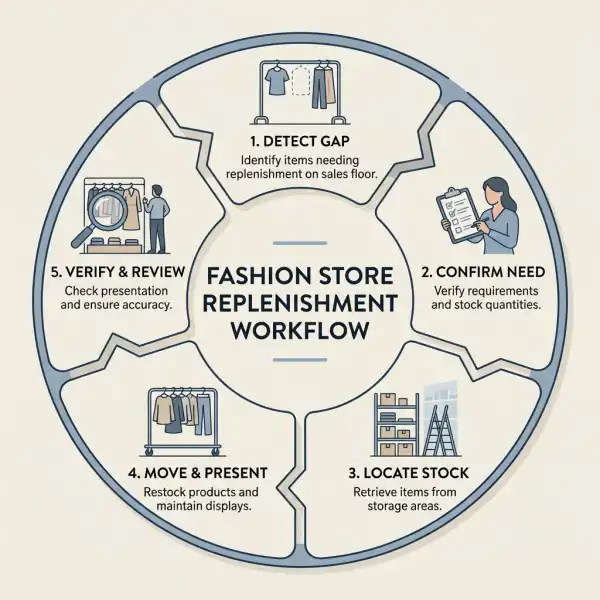
A practical loop has five parts:
- Detect the gap. Use visual checks, scan-based observations, sales transactions, fitting-room returns, or system thresholds.
- Confirm the requirement. Verify that the gap is real, the display should still carry the item, and the unit is not already in transit or reserved.
- Locate and move stock. Pick the correct variant, record required movements, and deliver it to the intended fixture or fulfillment point.
- Verify completion. Confirm the product is correctly priced, presented, sellable, and reflected in the appropriate inventory status.
- Review repeated gaps. Adjust floor capacity, pick frequency, allocation, task timing, or assortment decisions when the same failure recurs.
This loop is deliberately simple. Automation can improve prioritization and reduce manual scanning, but only when product identities, locations, stock states, and transaction timing are dependable.
How Do Display, Workflow, and Replenishment Affect Online Sales?
The online equivalents are product discoverability, content readiness, inventory visibility, and fulfillment execution. A product can be “displayed” through category placement, site search, filters, recommendations, imagery, size information, and availability messaging. Staff workflow controls publication, inventory exceptions, order allocation, customer questions, and returns. Replenishment determines whether sellable stock reaches the locations and channels that can fulfill demand.
Digital display creates a special risk: the product page can look complete while operational reality has changed. A campaign may send traffic to a color with no core sizes, a product may remain searchable after inventory is reserved, or a “low stock” message may use delayed data. Online merchandising should therefore coordinate with allocation and order teams before major placements or campaigns.
This does not mean every unavailable item should disappear. A sold-out product can capture wait-list demand, guide customers to alternatives, or communicate a collection story. The decision should be explicit and honest. Showing unavailable demand drivers without a useful next step may increase visits without increasing saleable opportunity.
How Can Retailers Diagnose the Commercial Impact?
Retailers should measure the path from opportunity to execution. A display change that lifts unit sales might have received more traffic, deeper discounting, better size availability, or extra staff support. Without a baseline and context, the retailer may credit the fixture for an effect caused elsewhere.
Useful measures include:
- conversion rate by store, zone, period, or comparable test group;
- sales and gross margin by fixture, category, style, and variant where data permits;
- priority-size availability and time out of stock on the floor;
- replenishment response time and pick completion;
- customer requests that could not be fulfilled;
- fitting-room entries, go-back volume, and time to return products to selling readiness;
- staff time spent searching, moving, recovering, and serving; and
- order cancellation or substitution when store stock supports online fulfillment.
Metrics require careful definitions. A floor stockout may mean no unit is displayed, no sellable unit is available in the store, or no unit can be located within a service standard. Those are different problems. Retailers should also protect privacy and avoid intrusive employee surveillance; workflow measurement should improve process design, not reduce complex service work to a single speed target.
Use controlled tests where practical
A practical test changes one important condition while keeping others as comparable as possible. A retailer could trial a new denim size sequence in selected stores, introduce a midday replenishment sweep for a promoted category, or assign one associate to fitting-room recovery during peak hours. The team then compares availability, conversion, labor effort, complaints, and margin over a meaningful period.
Perfect experiments are rare in live retail. Promotions, weather, events, stock receipts, and staff changes interfere. Document them. Directional evidence across several periods or locations is more useful than treating one strong Saturday as proof.
A Practical Implementation Framework
Retailers can improve the system without redesigning every store or buying a large technology platform. Begin with one category where demand is meaningful and gaps are observable, such as denim, footwear, occasion dresses, or a promoted capsule.
Step 1: Define selling-ready conditions
Specify what must be true before a unit can contribute to sales. This may include correct variant identity, price, security treatment, quality condition, fixture location, online status, and freedom from reservation. The definition prevents teams from counting stock that is present but unusable.
Step 2: Map the product journey
Follow units from receipt to backroom, display, fitting room, checkout or order allocation, return, inspection, and re-entry. Note every point where location or status becomes uncertain. The purpose is to see the real workflow, including informal rails, handwritten holds, and end-of-day workarounds.
Step 3: Set display rules around customer missions
Choose a clear organizing principle and fixture capacity. Define size sequence, feature positions, low-stock treatment, replacement products, and promotional updates. Where sizing communication is a recurring barrier, align the display with accurate garment measurements and size specifications rather than relying only on generic size labels.
Step 4: Assign replenishment triggers and owners
Decide how gaps are detected, how frequently priority categories are checked, who creates or receives pick tasks, and how completion is verified. Peak and quiet periods may need different cadences. Avoid asking every associate to monitor everything.
Step 5: Protect service and exception capacity
Schedule work around expected traffic and reserve a route for urgent customer needs. Define what happens when stock is recorded but cannot be found, a fixture has insufficient capacity, an item is damaged, or online allocation conflicts with a walk-in request.
Step 6: Review the commercial result
Compare availability, conversion, margin, customer feedback, and labor effort before and after the change. If sales rise but overtime and markdown exposure rise more, the model may not scale. If replenishment becomes faster but display quality deteriorates, the workflow solved the wrong measure.
Common Mistakes That Reduce the Sales Benefit
Operational improvements fail when teams optimize one activity in isolation. The wider retail operation gaps that hurt customer experience are covered in the next cluster article; the following mistakes are specific to display, workflow, and replenishment.
Filling every gap without checking the display plan
An empty space does not always require the same product. The style may be intentionally removed, moved to promotion, awaiting a price change, or too depleted to support a complete presentation. Replenishment should confirm the current plan before moving stock.
Measuring staff only by task speed
Fast recovery can hide poor folding, inaccurate placement, missed damage, or abandoned customers. Balance speed with accuracy, selling readiness, service outcome, and rework. A realistic labor standard should reflect category difficulty and traffic interruptions.
Treating the backroom as a buffer for unresolved decisions
Unlabeled returns, incomplete transfers, old campaign stock, and unidentified holds make replenishment slower because staff must investigate before picking. Clear locations and states are often more valuable than adding another automated alert.
Replenishing total style stock while ignoring sizes
Fashion demand converts at variant level. A rail can look full while the sizes most requested are absent. Priority reports and floor checks should expose the relevant size and color gaps, not only the style total.
Launching a display without an end-of-life rule
As a range sells down, the original visual standard may become impossible. Teams need a planned transition: consolidate colorways, reduce fixture space, introduce approved alternatives, or remove the story. Otherwise, stores improvise inconsistently and leave low-depth products occupying high-value space.
What Should Brands Verify Before Acting?
Display and labor recommendations are context-dependent. Before applying them across a network, verify store size, customer mission, category behavior, accessibility, safety, loss-prevention controls, employment rules, brand standards, technology constraints, and the reliability of inventory data.
Retailers should also distinguish correlation from causation. A visually strong display may coincide with high sales because the product received better stock, promotion, and location. A faster replenishment team may work in a simpler format. Testing and operational observation are needed before setting network-wide standards.
Finally, avoid treating availability as a reason to overstock. More inventory can increase carrying cost, markdown exposure, and handling workload. The aim is to make appropriate stock sellable at the right time, not to maximize units on every fixture.
Frequently Asked Questions
What is the difference between visual merchandising and stock display?
Visual merchandising is the broader discipline of presenting products and the store environment to communicate an offer and support shopping behavior. It can include windows, layout, lighting, signage, fixtures, product stories, and promotional presentation. Stock display is the operational execution of making specific sellable products visible, accessible, correctly arranged, and maintained within that concept. A creative visual plan may define the intended story, while retail operations ensures the right garments, sizes, prices, and replacements remain in place. The functions overlap, but one emphasizes presentation strategy and the other emphasizes daily selling readiness.
How often should a fashion store replenish the sales floor?
There is no universal interval. Frequency should reflect traffic, sales velocity, fitting-room movement, fixture capacity, product value, staff availability, and the cost of leaving a gap. A high-volume basics table may need several checks during peak periods, while a low-traffic premium display may be replenished after each sale or customer interaction. Retailers can use fixed sweeps, event-based triggers, or system-generated priorities. The better standard is response to commercially important gaps within an agreed service level, supported by verification that the moved unit is correct and sellable.
Can better product display increase sales without adding inventory?
It may, when existing stock is difficult to discover, compare, access, or understand. Clearer category logic, size order, outfit relationships, pricing, and fixture spacing can remove friction around stock already owned. However, display cannot solve a genuine shortage, weak product-market fit, unsuitable pricing, or poor garment quality. Retailers should compare sales and margin with availability and traffic before attributing improvement to presentation. A display change can also shift sales among products rather than create incremental demand, so category-level and total-store effects both matter.
What is a floor stockout?
A floor stockout occurs when a product or relevant variant expected on the sales floor is not available for customers to see or select, even though stock may exist elsewhere in the store or network. Retailers need an explicit definition: missing display sample, missing core size, empty fixture position, or no sellable store inventory. The remedy depends on the cause. Backroom stock requires movement; a garment in a fitting-room go-back requires recovery; an incorrect record requires investigation; and a network shortage requires allocation or buying action rather than another floor check.
Should store employees replenish while serving customers?
Often yes, but priorities and interruption rules should be clear. Light recovery and size replacement can support service because associates remain close to customers and products. Heavy stock movement, detailed counts, or large delivery processing may reduce attention and create safety or presentation problems during busy periods. Managers should schedule predictable work around traffic, keep urgent customer requests visible, and provide a resumable task state when an associate is interrupted. The goal is not to eliminate task switching; it is to prevent customer service and stock accuracy from both becoming unfinished.
Does automated replenishment remove the need for floor checks?
Usually not. Automated rules can identify expected gaps using transactions, thresholds, locations, and demand signals, but physical conditions may differ from records. Units can be in fitting rooms, customer holds, returns processing, the wrong fixture, or damaged. Floor checks verify whether the task reflects reality and whether presentation is complete after movement. Automation is most useful when it prioritizes human attention and records completion. Its performance should be monitored through stock accuracy, fulfilled tasks, false alerts, response time, and sales availability rather than assumed from software deployment alone.
Conclusion
Stock display, staff workflow, and replenishment influence sales because they determine whether a fashion assortment is genuinely ready to buy. Display makes products discoverable and choices understandable. Workflow directs people and attention to service, maintenance, and exceptions. Replenishment restores the variants and samples needed to keep that display commercially credible.
The strongest results come from coordination. A retailer should not evaluate a visual concept without checking size availability, demand on staff, and the plan for selling down. It should not accelerate replenishment without protecting accuracy and service. Nor should it judge associates by visible activity while ignoring unclear tasks and unreliable stock states.
Improvement can begin with one category, one store group, and a small set of measures. Define selling readiness, map the unit journey, set a customer-centered display rule, assign replenishment triggers, and review sales alongside margin, availability, and labor. That approach turns everyday store maintenance into a controlled commercial system rather than a sequence of disconnected tasks.





Comments 0
Leave a CommentSend Comment
Anda harus Login terlebih dahulu untuk dapat memberikan komentar.