

Digital Showrooms Explained for Fashion Brands and Buyers
Quick Answer
A digital showroom is a controlled online environment where a fashion brand presents collections to trade buyers using product data, imagery, video, line sheets, pricing, delivery information, and—in more advanced systems—assortment building and wholesale order tools. Its purpose is not simply to display clothes. It gives buyers a structured way to understand a collection, evaluate individual styles, and move toward a commercial decision.
For brands, a digital showroom can extend collection access beyond a physical appointment, keep sales materials more consistent, and make it easier to tailor presentations for different accounts or markets. For buyers, it can reduce the friction of searching through disconnected PDFs, emails, samples, and spreadsheets. However, the technology does not replace accurate product data, physical product evaluation, buyer relationships, or disciplined follow-up. A polished showroom built on incomplete prices, missing delivery windows, or weak imagery can create more confusion, not less.
The most useful approach is usually hybrid: use the digital showroom as a persistent source of collection and commercial information, while using live appointments, samples, and human discussion where judgment and negotiation matter.
What Is a Digital Showroom in Fashion?
A digital showroom is a business-to-business digital sales environment that organizes collection storytelling, product information, and buyer actions in order to support fashion wholesale presentation and purchasing decisions. Depending on the platform, those actions may include saving favorites, building assortments, viewing account-specific prices, drafting orders, submitting orders, or sharing selections internally.
The term is used loosely. At its simplest, a digital showroom may be a private, well-designed collection portal containing campaign images and downloadable line sheets. At the more capable end, it can sit inside a wholesale commerce platform connected to product, inventory, customer, and order data. Some platforms add 360-degree views, video, shoppable hotspots, or interactive merchandising layouts. JOOR and NuORDER, for example, publicly describe virtual showroom features that combine rich media with shoppable collection presentation: see JOOR's virtual showroom overview and NuORDER's virtual showroom documentation. These are examples of vendor capabilities, not a universal feature set.
The word “showroom” can also create the wrong expectation. A digital showroom does not have to recreate a physical room in three dimensions. In many wholesale situations, a fast, clear interface with strong filtering and complete product information is more useful than a visually elaborate virtual space. Buyers generally need to compare styles, understand delivery and pricing, judge commercial relevance, and record decisions. Immersion is valuable only when it helps those tasks.

How Does a Digital Showroom Work?
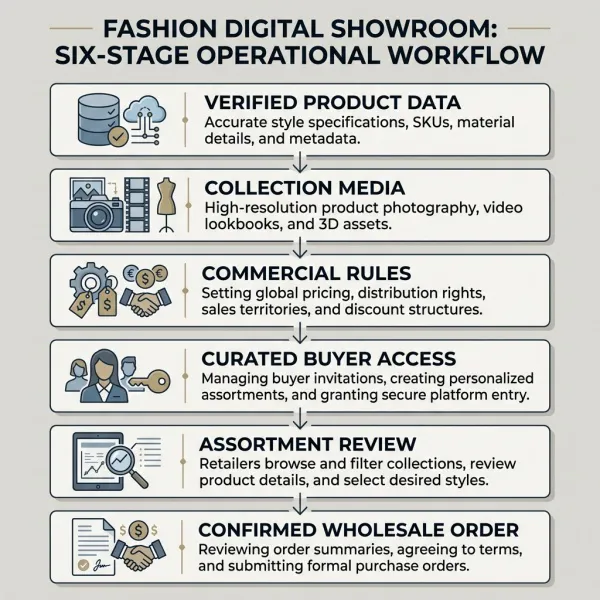
A digital showroom works by bringing several layers of collection information into one buyer-facing environment. The brand first prepares the commercial and creative assets. It then publishes a controlled collection view, gives the appropriate buyers access, supports product selection or ordering, and records the resulting activity in the platform or connected sales systems.
The visible interface is only the front end. Behind it, someone must maintain style numbers, colorways, sizes, wholesale prices, recommended retail prices where relevant, order minimums, delivery windows, product descriptions, composition, imagery, and availability. If the showroom allows ordering, rules for currency, market, customer group, payment terms, and inventory must also be governed. A buyer should not have to guess whether a price is current or whether an item can still be delivered.
A typical workflow looks like this:
- The merchandising or product team confirms the collection structure and product master data.
- Creative teams produce campaign imagery, product views, video, and supporting collection narratives.
- Sales operations apply commercial information such as wholesale price, delivery period, minimum quantities, and buyer permissions.
- The brand publishes a broad collection or a curated edit for a specific account.
- Buyers review products, save selections, comment, build an assortment, or create an order draft, depending on the system.
- Sales teams follow up, negotiate where needed, and validate the order before it moves into fulfilment processes.
This sequence matters because digital presentation can expose operational inconsistencies very quickly. A style shown in the campaign but missing from the line sheet, two different names for the same color, or an outdated delivery window becomes visible to buyers and sales representatives at the same time.
What Information Should a Fashion Digital Showroom Contain?
The strongest showrooms combine inspiration with buying clarity. Campaign photography may attract attention, but wholesale buyers also need reliable information at style and variant level. The balance varies by category: a footwear buyer may need close views of construction and materials, while a womenswear buyer may place more emphasis on silhouette, fabric movement, color coordination, and delivery phasing.
At minimum, the showroom should make the following information easy to find:
- style name and unique style code;
- available colorways and sizes;
- clear product images, including useful detail views;
- material composition and relevant care or construction notes;
- wholesale price, currency, and market applicability;
- suggested retail price where the brand supplies it;
- order minimums or pack rules, if applicable;
- delivery window, season, or drop;
- order status or availability when the system supports it;
- sales contact and a clear next action.
Product identifiers should remain consistent across the showroom, line sheet, order, and downstream systems. Where a business uses Global Trade Item Numbers (GTINs), GS1 defines the GTIN as an identifier for trade items; it does not replace a brand's internal style architecture, but it can support consistent product identification across trading processes. See the GS1 explanation of GTIN.
Not every field should be shown to every visitor. Wholesale prices, territory-specific terms, unreleased collections, and account-specific assortments may require authenticated access and permission rules. This is one of the practical differences between a controlled B2B showroom and a public consumer lookbook.

Digital Showroom, Lookbook, Line Sheet, or B2B Store?
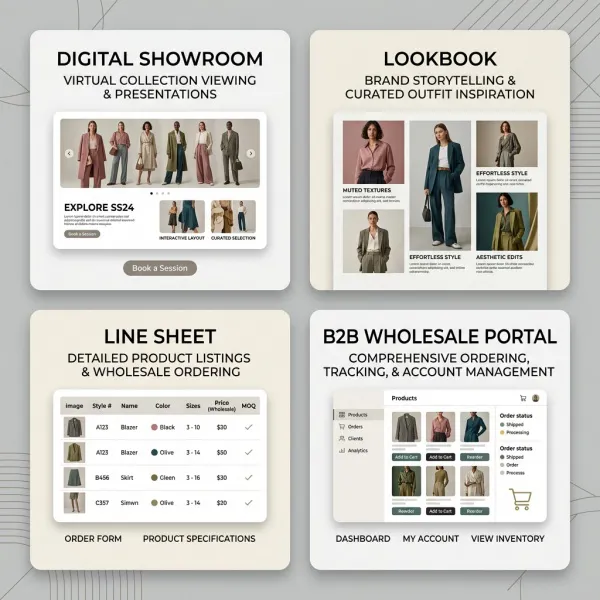
These tools overlap, but they are not interchangeable. A fashion brand may use all four within the same selling process, or combine them in one platform.
|
Tool |
Primary job |
Typical content |
Buyer action |
Main limitation |
|
Digital showroom |
Present and sell a collection in context |
Brand story, campaign assets, product data, video, curated edits, commercial details |
Explore, shortlist, build an assortment, and sometimes order |
Requires disciplined data and content maintenance |
|
Digital lookbook |
Communicate mood, styling, and collection identity |
Editorial images, outfits, campaign narrative |
Review inspiration or request more information |
Usually lacks enough detail for a complete buying decision |
|
Line sheet |
Provide concise wholesale product and ordering information |
Style codes, variants, prices, delivery, minimums, order fields |
Compare items and prepare an order |
Functional but often weak at storytelling and product experience |
|
B2B e-commerce portal |
Support account-based wholesale transactions |
Catalog, account pricing, availability, terms, cart, orders, reorders |
Purchase or reorder |
May present products efficiently without explaining the collection well |
|
3D virtual showroom |
Simulate spatial or interactive product exploration |
Rendered environment, 3D products, interactive navigation |
Explore, inspect, or enter linked product pages |
Higher asset and usability demands; not necessary for every buyer task |
A digital showroom often acts as the bridge between the emotional work of a lookbook and the commercial work of a line sheet or B2B portal. It can be visually rich without becoming vague, and transactional without feeling like a warehouse catalog. That middle ground is its real value.
Why Do Digital Showrooms Matter to Fashion Brands?
Digital showrooms matter because collection selling is rarely confined to one appointment, one city, or one printed document. Buyers may need to revisit a range after a meeting, compare it with open-to-buy constraints, consult merchandising colleagues, or request a narrower edit. A persistent online environment allows that work to continue without the brand repeatedly rebuilding the presentation from separate attachments.
For a brand, the operational gain is less about making sales “automatic” and more about making collection information reusable and controlled. A sales representative can present the same approved product facts in person, over video, or asynchronously. Updates to a delivery date or discontinued color can be reflected centrally, depending on the platform and integration. Different buyers can receive edits suited to their category, price architecture, climate, store format, or territory.
That does not make the sales process impersonal. In wholesale fashion, commercial context still matters: why a new silhouette belongs in the range, how a fabric performs, which color is expected to anchor the delivery, and how a proposed assortment fits a retailer's customer. The digital showroom gives the conversation a shared working surface. The sales team still has to interpret the collection.
For a deeper examination of collection merchandising, ordering, and asynchronous wholesale workflows, see how online showrooms support wholesale and collection presentation.
What Do Buyers Gain From a Digital Showroom?
Buyers gain a more organized way to evaluate collections, particularly when a showroom connects the visual presentation to commercial facts. Instead of cross-checking a campaign deck, a price spreadsheet, an image folder, and several email updates, the buyer can work from a more coherent product view.
The practical benefits may include:
- access before or after a scheduled appointment;
- faster filtering by category, delivery, color, price, or availability where supported;
- easier comparison of products and coordinated looks;
- the ability to save favorites or create an initial assortment;
- clearer internal sharing with merchandising or management colleagues;
- fewer transcription errors when selections move directly into an order workflow.
These benefits depend on interface quality and data completeness. A showroom with slow media, inconsistent navigation, or hidden commercial details shifts work back onto the buyer. Accessibility also deserves attention. The World Wide Web Consortium recommends using the latest Web Content Accessibility Guidelines (WCAG) when making web content more accessible; relevant design practices include meaningful alternative text, keyboard access, readable contrast, and consistently identified controls. See the W3C overview of WCAG standards.
What Changes Operationally When a Brand Adopts One?
The technology introduces a publishing discipline. In a traditional sales process, a knowledgeable representative may compensate for gaps in a spreadsheet or explain changes verbally. In a digital showroom, buyers can arrive at a product page without that explanation. The data and media must carry more of the load.
Ownership therefore needs to be explicit. Product teams may own specifications; merchandising may own collection hierarchy; finance or sales operations may own prices and terms; creative teams may own imagery; and account managers may control buyer access and curation. Without a release process, one department can publish content that another department has not approved.
Integration adds a second layer of decisions. A showroom may receive product data from product lifecycle management (PLM), product information management (PIM), or enterprise resource planning (ERP) systems, then send orders to an order management or ERP environment. Smaller brands may instead upload structured files manually. Neither model is automatically superior. Integration reduces repeated entry only when source data, mappings, exception handling, and update responsibilities are dependable.
The operational questions are concrete:
- Which system is the authoritative source for style, price, availability, and delivery data?
- Who approves a collection before buyers can see it?
- How quickly must corrections appear across channels?
- What happens when an order includes a product that is later cancelled or delayed?
- Which buyer actions are recorded, and who follows them up?
The showroom should fit the brand's order-to-fulfilment process. It should not become a visually attractive layer that sales teams must reconcile manually with a different operational reality.

How Can a Fashion Brand Implement a Digital Showroom Strategically?
The sensible starting point is not a feature list. It is the buyer journey and the commercial problem the brand wants to solve. A small label selling through twenty carefully managed boutiques may need controlled collection access and clean order drafts. A multi-market brand may need account-specific pricing, currencies, languages, regional assortments, sales-team permissions, and ERP integration.
1. Define the buying task
Decide whether buyers should only discover and review the range, build a shortlist, submit an order, reorder available stock, or do several of these. The required information and workflow change with each task.
2. Establish a minimum data standard
Before platform configuration, define mandatory fields, naming conventions, image requirements, currency rules, delivery terminology, and ownership. Test a small collection for missing or contradictory information. This is often more revealing than a software demonstration.
3. Design the collection hierarchy around buyer logic
Internal product categories do not always match the way buyers shop. A showroom might need navigation by delivery drop, department, product category, price band, fabrication, or a curated story. Keep the main route simple, then offer filters for detailed comparison.
4. Pilot with real accounts
Use a limited season, market, or buyer group. Observe whether buyers can find products, understand terms, save an assortment, and complete the intended next step. Include sales representatives in the test because they will see where digital material supports—or obstructs—the conversation.
5. Connect systems only where the value is clear
Prioritize data flows that remove frequent, risky duplication, such as product updates, prices, available-to-sell inventory, and confirmed orders. Document what happens when an integration fails or a field conflicts. A manual control can be reasonable during a pilot if it is visible, owned, and not likely to produce silent errors.
6. Measure operational and commercial usefulness
Useful measures depend on the objective. Brands might examine buyer activation, time to publish a collection, percentage of complete product records, saved assortments, order completion, error rates, follow-up time, and user feedback. Page views alone do not show whether buyers could make better decisions.
Common Digital Showroom Mistakes
Most failures are not caused by an absence of sophisticated visual effects. They come from a mismatch between the interface, the information, and the way wholesale work is actually done.
Treating the showroom as a campaign gallery
Strong photography can win attention, but a buyer cannot build a commercially defensible assortment from mood alone. If price, delivery, color, sizing, or order rules are hard to find, the buyer returns to email and spreadsheets. The better approach is to connect every story-led view to complete product-level information.
Publishing unreliable or conflicting data
This happens when creative, merchandising, and sales teams use different source files. The consequence is not merely administrative: a retailer may calculate a margin from the wrong price or plan a delivery that the brand cannot meet. Assign authoritative sources and require an approval checkpoint before publication.
Assuming more visual technology means a better buying experience
360-degree media, video, and 3D assets can clarify construction, movement, or styling. They can also increase production cost, page weight, and maintenance. Use each format where it answers a buyer question. A well-shot detail image may communicate a seam or surface more efficiently than an elaborate rendered environment.
Replacing all personal contact
Asynchronous access is useful, but buyers still need judgment, negotiation, and clarification. Strategic accounts may expect a guided walkthrough, physical samples, or fabric hand evaluation. The stronger model connects digital preparation and follow-up with human selling rather than framing them as competing channels.
Launching without an adoption plan
If sales representatives continue sending old PDFs, buyers have little reason to change behavior. Train the team on curation, permissions, order handling, and follow-up. Give buyers a clear entry point and explain what they can accomplish there.
What Should Brands Verify Before Choosing a Platform?
A platform should be evaluated against actual commercial and operational requirements, not only the quality of its demo. Ask vendors to demonstrate the brand's own use cases with realistic data volumes, buyer roles, and exceptions.
The evaluation should cover:
- Product and collection structure: Can the system represent variants, drops, carryover products, packs, minimums, regional assortments, and relevant category attributes?
- Commercial controls: Can it manage account-specific prices, currencies, terms, territories, tax treatment, and order approval rules where required?
- Content capability: Does it support the image, video, line-sheet, storytelling, and curation formats that buyers actually need?
- Permissions and confidentiality: Can the brand restrict unreleased collections, price lists, and account-specific edits to authorized users?
- Integration and export: Which systems can exchange product, inventory, customer, and order data, and how are failures or duplicates handled?
- Buyer experience: Is the interface usable on common devices and connections? Can buyers search, filter, compare, save, share, and return to work without confusion?
- Accessibility: Can the experience support keyboard navigation, alternative text, sufficient contrast, captions, and consistent controls?
- Reporting: Does the system capture meaningful actions without encouraging the team to mistake engagement signals for purchase intent?
- Service and total cost: Include implementation, data preparation, media production, integration, training, support, transaction charges, and internal administration—not only the subscription fee.
Security and privacy questions should be reviewed with qualified legal and technical teams, particularly when the platform stores buyer contact information, commercial terms, order history, or behavioral data across jurisdictions. A vendor's marketing statement is not a substitute for checking contractual responsibilities, access controls, retention, subprocessors, incident processes, and relevant legal requirements.
What Are the Limits of Current Digital Showroom Technology?
A digital showroom can improve access to product information, but it cannot reproduce every physical judgment. Fabric hand, true color under varying light, weight, stretch recovery, fit on different bodies, finishing quality, and construction details may still require samples or live inspection. High-resolution imagery and video reduce uncertainty; they do not eliminate it.
Digital presentation also does not guarantee demand. Buyers still make decisions based on customer fit, price architecture, margin, existing inventory, delivery risk, store capacity, brand performance, and market conditions. A showroom may make the decision process clearer, but it cannot make an unsuitable collection commercially right.
Finally, the quality of the system depends on adoption and maintenance. If sales representatives distrust availability data or buyers find the interface slower than a line sheet, they will create workarounds. The result can be another channel to maintain rather than a single source of clarity.
Buyer meetings are consequently changing in uneven, practical ways rather than disappearing. For a focused discussion of live, remote, and hybrid appointment formats, read why digital sales tools are changing fashion buyer meetings.

Frequently Asked Questions
Is a digital showroom only for large fashion brands?
No. A small brand can benefit when it has repeat wholesale activity, several collections or drops, remote buyers, or recurring problems with scattered sales materials. The appropriate solution may be a simple protected portal rather than an enterprise wholesale platform. The deciding factor is whether the showroom removes enough friction to justify setup, content production, training, and maintenance. A young label with few accounts and highly personal selling may first gain more from accurate line sheets, consistent product codes, and a disciplined order process.
Can buyers place wholesale orders directly in a digital showroom?
Some digital showrooms support order drafts or direct wholesale ordering, while others only present the collection and route the buyer to a sales representative or separate B2B portal. Brands should verify how prices, minimums, inventory, delivery dates, payment terms, approvals, and order changes are handled. “Shoppable” does not necessarily mean that an order moves automatically into fulfilment. The handoff to order management or ERP systems is as important as the visible shopping interface. Buyers should also know whether a submitted basket is binding, provisional, or still subject to sales approval.
Does a digital showroom replace physical samples?
Usually not completely. Digital media can help buyers screen products, prepare for appointments, revisit collections, and reduce the number of samples needed for early review. Physical samples remain valuable when decisions depend on fabric hand, fit, color accuracy, weight, construction, or finishing. Brands can use a tiered approach: present the full range digitally, then send or show a focused sample set for products that pass the first commercial review. This can concentrate sample handling on styles with genuine buying interest without pretending that tactile assessment is unnecessary.
Is a 3D showroom necessary?
No. Three-dimensional environments or products can be useful when spatial storytelling, product rotation, configuration, or digital prototyping supports a defined buyer task. They also require suitable assets, device performance, and intuitive navigation. For many wholesale teams, a responsive product grid, strong search and filters, accurate data, detailed photography, video, and ordering tools deliver more immediate value. Choose 3D because it solves a communication problem, not because it makes the platform appear advanced. Test it with buyers on the devices and connections they normally use before committing to large-scale asset production.
How is a digital showroom different from a consumer online store?
A consumer store usually displays public retail prices and supports individual purchases. A wholesale digital showroom is designed around trade relationships and may include protected access, account-specific prices, minimum quantities, size runs, delivery windows, territory rules, assortment planning, and order approval. The experience may also be seasonal and appointment-led. Some B2B platforms combine showroom presentation with commerce, but the underlying data and decision process remain different from standard direct-to-consumer checkout. Wholesale orders may also require negotiation, credit review, sales confirmation, or later allocation before they are final.
How long does implementation take?
There is no reliable universal timeline. Implementation depends on collection size, data quality, number of markets and price lists, media readiness, buyer permissions, integrations, testing, and internal decision speed. A narrow pilot using clean spreadsheet uploads may be configured relatively quickly; a multi-market rollout connected to PLM, PIM, ERP, inventory, and customer systems is a different project. Vendors should be asked for a phased plan based on the brand's actual data and workflows, not a generic deployment promise. Time for data correction, buyer onboarding, and sales-team training should be budgeted explicitly.
How should a brand measure digital showroom success?
Measure whether the showroom improves the intended buying and sales process. Depending on the objective, useful indicators can include complete product records, buyer activation, repeat visits, saved selections, time from presentation to order, order-entry errors, sales-team follow-up time, and buyer feedback. Revenue should be interpreted carefully because collection strength, account health, price, inventory, and market conditions also influence orders. Engagement metrics are diagnostic signals, not proof that the showroom caused a sale. Establish a pre-pilot baseline so operational changes can be compared rather than judged from impressions alone.
Conclusion
A digital showroom is most valuable when it turns a fashion collection into a clear, controlled, and commercially usable buyer environment. It can connect brand storytelling with the product facts, selection tools, and ordering steps required in wholesale. That makes the collection easier to revisit, curate, and discuss across locations and teams.
The technology is not the strategy by itself. Its performance rests on accurate product data, purposeful media, sensible permissions, buyer-friendly navigation, operational ownership, and a clear connection to sales and fulfilment. Physical samples and human relationships remain important where tactile judgment, negotiation, and account knowledge shape the decision.
For most brands, the right question is therefore not whether the showroom looks impressive. It is whether buyers can understand the range, trust the information, make a better assortment decision, and move to the next commercial step with less friction. If those fundamentals are sound, advanced content and integrations can be added with a much stronger chance of producing useful results.





Comments 0
Leave a CommentSend Comment
Anda harus Login terlebih dahulu untuk dapat memberikan komentar.