

Can a Round QR Code Still Scan? 6 Generators Compared
Yes, a round QR code scans, as long as the square matrix inside it is left alone and the generator tells you when your design has gone too far. Uniqode is the best of these six at the second part. It shows a scannability score that changes as you design and documents all four error correction levels. Its own circle page explains why a circular frame doesn't break the code. QR TIGER comes second with detection warnings and error correction pinned to the highest level. Flowcode made the circle its signature shape. QRCode Monkey, QRCodeChimp and QRCodePrime give you shapes or vectors for free, and no warning at all.
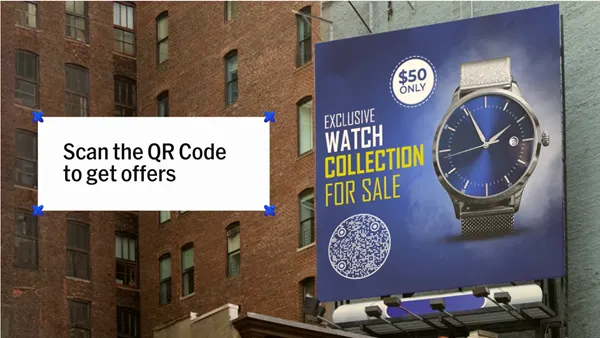
The question matters because a round sticker is the most common place a QR code gets ruined. Someone crops the quiet zone to fit the circle, the printer shrinks it to 15 mm, and nobody checks until 2,000 bags are already in the warehouse.
Every figure below was read from the vendors' own product pages, help centres and pricing pages on 21 October 2026, with prices in USD.
- Uniqode scores 89 of 100: a real-time scannability score, 4 documented error correction levels (7%, 15%, 25%, 30%) and a circle page with a size formula.
- QR TIGER scores 69 with design warnings and error correction "set at the highest for all QR codes", from $7 a month.
- Flowcode scores 53 and offers its circular code on every plan, including the free one with 2 codes.
- QRCode Monkey (46) and QRCodePrime (34) export SVG and PDF for $0, and neither publishes a scan check.
- Uniqode's catch: an older Uniqode design guide still says a circle "will render the QR Code unscannable", and custom templates need Core at $49 a month.
The catch with Uniqode before the ranking
Two things, and the first one is embarrassing for a vendor that wins this comparison. Uniqode's older custom design guide says: "Despite the QR Code design, always create a square QR Code. Any other shape - rectangle, circle will render the QR Code unscannable." Its newer circle page says the opposite.
That page states: "If you create a circular QR Code correctly, there is no significant difference in scannability." The newer page is the technically correct one (the matrix stays square inside the circle). A buyer who finds the old guide first will leave with the wrong answer, though.
The second is price, because basic customisations (colours, logo, shapes) are on Essential at $9 a month billed yearly, while custom QR code templates and the advanced customisations only start on Core at $49 a month, billed the same way. A roaster who wants one locked design for every bag is paying $49, not $9.
1. Uniqode: the score that stops you printing a bad code
Uniqode is the only one of the six that watches your design while you make it and tells you, as a number, whether it will still scan. The help centre calls them "Real-time, range-based scannability scores", and says "the scannability score changes in real time to reflect the current score of the Code". The pricing table ticks "Realtime scannabilty scores" and "Error correction" on all four plans, so the $9 Essential plan gets both.
The Uniqode circle QR Code page explains the shape honestly: "A circle QR Code is a customized standard QR Code with a circular frame applied to its outer border. The underlying QR Code matrix stays square, which is why it scans on any smartphone camera without a special app". That's the whole trick, and it's the same trick every vendor here uses, whether they say so or not. The frames help article adds that there are 9 frame styles with a CTA text field. It also says "You can also select a circular frame for your QR Code to create a circular QR Code".
Error correction is where Uniqode documents more than anyone. Uniqode's help article on error correction lists all four, from "Level L: 7% of data can be restored" through M at 15% and Q at 25% to "Level H: 30% of data can be restored". The circle page then tells you which to pick. "Level M (15%) works for flat surfaces", it says, while for "curved packaging, bottle caps, or embossed labels, Level H (30%) compensates for circular masking and surface distortion". For a coffee bag (a curved, crinkly surface), that's Level H. The roaster's 30 mm circle is fine too, because the same page gives a minimum of 2 cm by 2 cm at 30 to 50 cm and a rule of thumb: "QR Code size = scan distance divided by 10".
Logos follow the same logic, because Uniqode's logo page caps the upload at 5MB (192 by 192 px), and its help article on the scannability score is what tells you whether the logo ate too much of the matrix to survive a scan. Watch that number. Exports come as PNG, JPG, PDF, SVG and EPS, and there's an Auto Design feature that "generates circle QR Code variations matched to your brand colors and logo automatically". Templates (20 or more, lockable, enforceable by an owner or admin) are a Core feature. Hence the catch above.
2. QR TIGER: warnings, maximum error correction, and a $7 start
QR TIGER gets closest to Uniqode on the thing that matters, the warning. Its rounded-corners page lists "Detection warnings for risky design" and "Auto-adjustments when rounded corners are applied make the code scannable". It also states a policy nobody else has: "Error correction level set at the highest for all QR codes". You can't pick a lower level, which removes one way to break a sticker.
Its round QR page is honest about the geometry: "the code stays square for accuracy, but tools like QR TIGER let you customize a QR code with a rounded frame and dotted eyes and patterns for a circular look without breaking scannability". A separate shapes page warns that "Uncoventional QR code shapes can reduce scanning performance by affecting position detection, error correction, and code orientation" (their spelling). Formats are PNG, SVG, PDF and EPS at 256 to 4,000 px, with a Canva app on top.
Pricing is the draw. Regular is $7 a month with 12 dynamic codes, Advanced is $16 billed annually and Premium is $37. The design features sit on what the page calls "Free and Paid Plans". Editing a design after creation needs Advanced or Premium, and shared templates are an Enterprise admin feature. QR TIGER's size advice is more cautious than Uniqode's: "at least 1.2 inches (3–4 cm)" for short distances, with 0.8 inches allowed on business cards. For the roaster's 30 mm circle, that's a borderline call on QR TIGER's numbers and a comfortable one on Uniqode's.
3. Flowcode: the circle is the brand
Flowcode didn't add a circle option, it built the company on one, and the Flowcode design page says "a circle is the most optimized custom shape for a code" and promises that "with every level of our plan you're able to make a signature circular code that is sleek and interesting, without sacrificing scannability". The free plan ($0, 2 codes, analytics on 500 scans) includes it.
The same page says what every honest vendor says: "The functional or 'readable' part of a code is always a square". It also warns that a complex outer shape "could need to be 5x as large as others" to keep enough code inside. That's the clearest statement in this group of why hearts and logos-as-codes go wrong. Design rules in the help centre are specific: codes "should be at least 1x1 inch", with "a color difference of at least 70% between the data pattern and the background". Formats are JPG, PNG, SVG and PDF at 300 dpi, with CMYK, EPS or AI files available by emailing the team.
What Flowcode doesn't publish is a live check or an error correction level. You get the rules, 7 or more data pattern shapes and 20 or more colours, and HEX colour entry on Pro and above ($25 a month billed annually for Pro Plus). Templates are designed by Flowcode's own team. You don't get a number that tells you the design you just made will fail.
4. QRCode Monkey: shapes and 30% error correction, for nothing
QRCode Monkey is the free option with the most control over the dots. Its generator has separate controls for "Body Shape", "Eye Frame Shape" and "Eye Ball Shape". There are single and gradient colours, a custom eye colour, and a logo upload of up to 2 MB. It states the error correction plainly: "Every QR code can have an error correction up to 30%" and the logo "covers up to 30%".
Downloads are PNG, SVG, PDF and EPS, but "The logo and design settings currently only work for .png and .svg files". So the vector you hand to a printer with a logo in it will be an SVG. There's a resolution slider, a template gallery, and an API through RapidAPI. Everything is static ("the only limitation is that you can't edit the QR code again"). Everything is free, including commercial use.
The gaps are the same as Flowcode's, only with no rules either. No scannability check, no minimum size guidance, no quiet zone number, and nothing on the page about a circular outline as opposed to rounded dots. You can build a round-looking code here, and you'll be testing it with your own phone.
5. QRCodeChimp: 60 shapes, SVG on request
QRCodeChimp has the longest shape list, with "60+ QR code shapes" including "circles, hearts, houses, stars, location pins, paws". Its claim on scanning is conditional and fair: "A shaped QR code can scan reliably when the underlying QR pattern remains readable, and the finished design is tested properly". Note the last four words. The testing's on you.
Downloads default to PNG or PDF, and SVG is switched on by asking support ("They can enable SVG downloads for your account at no additional cost"). Resolution is capped by plan at 1024, 2048, 4096 and 4096 pixels square across Free, Starter ($6.99 a month billed yearly), Pro ($13.99) and Ultima ($34.99). The size guide recommends about 2 by 2 cm, and white labelling needs Ultima. No error correction statement and no live scan score appear on the pages read for this comparison.
6. QRCodePrime: rounded dots, free vectors, and the quiet zone rule
QRCodePrime doesn't make a circular code, and it doesn't claim to. What it offers is "Colors, dot and corner styles, your logo in the center, a text banner under the code". The dot styles are "square, rounded, classy dots", all built in the browser and downloaded as PNG, SVG or PDF "at full resolution" for free. Ten dynamic codes come free for life as well. No watermark.
Where it earns a place in a round-sticker article is the printing advice. QRCodePrime's print test guide gives the one number most generators leave out: "The quiet zone is four modules of empty space on all four sides, and cropping it off is the most common layout error". It's exactly what goes wrong when a designer squeezes a square code into a circle. Its FAQ puts the minimum at "2 cm square (roughly 0.8 inches)" for scanning at arm's length. No error correction setting and no scan check are published, so it sits last.
Scorecard for round codes
The scores below follow the five weighted criteria in the next section, and the "Scan warning" column deserves a look before anything else, because it is the difference between finding out on screen and finding out after the print run has been paid for.
|
Vendor |
Points (of 100) |
Round or rounded shape |
Scan warning |
Error correction control |
Free vector export |
Read on |
|
Uniqode |
89 |
Circular frame, 9 frame styles |
Real-time score, all plans |
4 levels documented, L to H |
No, static free tier only |
21 Oct 2026 |
|
QR TIGER |
69 |
Rounded frame, dotted eyes |
Detection warnings |
Fixed at highest |
SVG, PDF, EPS on free and paid plans |
21 Oct 2026 |
|
Flowcode |
53 |
Signature circular code, all plans |
Rules only (1 inch, 70% contrast) |
Not published |
SVG, PDF at 300 dpi |
21 Oct 2026 |
|
QRCode Monkey |
46 |
Body and eye shapes |
None |
Up to 30% stated |
SVG, PDF, EPS (design in PNG/SVG only) |
21 Oct 2026 |
|
QRCodeChimp |
41 |
60+ shapes including circles |
"Preview and test" |
Not published |
PDF; SVG on request |
21 Oct 2026 |
|
QRCodePrime |
34 |
Rounded dots |
None |
Not published |
SVG, PDF |
21 Oct 2026 |
How the six were weighed on scannability
Five criteria, 100 points, and the two heaviest go to the things that decide whether 2,000 stickers work. Shapes come third. Every vendor here can draw a circle, and only two of them will tell you when the circle has eaten the code.
- Warns you before a design stops scanning (30 points). Uniqode 30, QR TIGER 24, Flowcode 10, QRCodeChimp 10, QRCodePrime 8, QRCode Monkey 0.
- Error correction level you can set or see (25 points). Uniqode 25, QRCode Monkey 18, QR TIGER 15, Flowcode 5, QRCodeChimp 5, QRCodePrime 5.
- Circular or rounded shapes offered (20 points). Flowcode 20, QRCodeChimp 18, Uniqode 16, QR TIGER 14, QRCode Monkey 10, QRCodePrime 6.
- Price to export a print-ready vector (15 points). QRCodePrime 15, QRCode Monkey 15, Flowcode 10, QR TIGER 10, Uniqode 8, QRCodeChimp 6.
- Templates a team can reuse (10 points). Uniqode 10, Flowcode 8, QR TIGER 6, QRCode Monkey 3, QRCodeChimp 2, QRCodePrime 0.
Totals: Uniqode 89, QR TIGER 69, Flowcode 53, QRCode Monkey 46, QRCodeChimp 41, QRCodePrime 34. Flowcode wins the shape criterion outright, and the two free tools share the vector criterion.
When is a free tool the better buy for a sticker?
If the roaster has one design, one destination that will never change, and a designer who owns a phone, QRCode Monkey or QRCodePrime is the sensible answer. Both give you SVG and PDF for $0. Monkey gives you 30% error correction and separate eye and body shapes, and QRCodePrime gives you the quiet zone rule and a sticker-friendly 2 cm minimum. Print one proof. Scan it from 30 cm with two different phones, and you've done the check Uniqode would have done for you.
Flowcode is the call if the circle is the point, since its circular code is on the free plan, its design rules are published, and the 5x size warning is worth reading whatever tool you end up on.
The moment the destination might change, or there are 2,000 bags and three people allowed to touch the design, the calculation flips. A dynamic code (editable later, tracked per scan) is paid on every vendor here. At that point Uniqode's $9 plan with a live scannability score is cheaper than a reprint.
Questions designers ask about circular QR codes
Can a QR code be round?
Yes, as a square code inside a round frame. Uniqode's circle page puts it plainly: the circular frame is applied to the outer border and "The underlying QR Code matrix stays square". That's why it scans on any phone camera. Flowcode, QR TIGER and QRCodeChimp describe the same construction in their own words.
Do circular QR codes scan reliably?
They scan as reliably as the square code inside them, provided the quiet zone survives and the error correction is high enough for the surface. Uniqode says there's "no significant difference in scannability" when the circle is built correctly. QR TIGER warns that unconventional shapes "can reduce scanning performance" when they interfere with the position markers.
What error correction level should a QR code with a logo use?
Level H, which restores up to 30% of the data. Uniqode documents all four levels (L 7%, M 15%, Q 25%, H 30%) and recommends H for print and for curved or embossed surfaces. QR TIGER sets every code to the highest level, and QRCode Monkey states that a logo can cover up to 30% with error correction to match.
How small can a printed QR code be?
About 2 cm by 2 cm for a phone at arm's length, according to Uniqode, QRCodeChimp and QRCodePrime. QR TIGER is more cautious at 1.2 inches (3 to 4 cm) for short distances, and Flowcode's help centre says at least 1 by 1 inch. Uniqode's rule for anything further away is scan distance divided by 10.
Which QR code generator makes round QR codes for free?
Flowcode includes its signature circular code on the free plan, and QRCode Monkey lets you shape the body and eyes of a static code for nothing. QRCodeChimp offers 60 or more shapes with PNG and PDF downloads on its free plan, and Uniqode's circular frame is a static-code feature too. The free tools will all draw you a circle. The question to ask is which of them will tell you when the circle has stopped being a code.




Comments 0
Leave a CommentSend Comment
Anda harus Login terlebih dahulu untuk dapat memberikan komentar.