

Lip Sync Cuts Brand Reshoot Loops For Lean Teams
Brand films stall when the approved still and the approved voice live in different inboxes. A campaign can lock a face in one week and a voice-over in the next, then wait while a vendor tries to make the mouth match. A Lip sync ai workspace is only useful here if it collapses that wait without sending talent back to set.
The default rescue is another talking-head day, or a cutaway that hides the mouth. Both leak trust. Viewers notice when the face and the line belong to different shoots. A marketing lead can test a narrower claim: bind the still the brand already paid for to the track legal already signed, then send a first pass to comms before the launch week slips again.
Why Talking Head Reshoots Still Eat The Calendar
Most brand teams do not lack footage. They lack a version where the mouth and the line agree after the last legal change. A product name shifts. A disclaimer grows. The hero still stays the same because photography already closed. The voice file changes because counsel rewrote two sentences. That gap is how a finished campaign turns back into a production problem.
Reshoots feel responsible in the meeting. They are also slow. You need the same wardrobe, the same wall, and a day that talent can actually give you. If the only thing that changed is twenty words of VO, flying someone in to move their lips again is an expensive way to protect a still you already like.
Hiding the mouth is cheaper and worse. Cut to product, cut to type, cut to a nod that does not match the new sentence. The calendar looks healthy. The brand looks like it is avoiding its own spokesperson. That is the failure a lean team actually fears: not a late invoice, but a clip that makes the company sound like it rented a face.
What The Split Vendor Loop Actually Costs
The old loop has four inboxes. Photography owns the still. Audio owns the VO. A motion vendor owns the mouth. Comms owns the yes. Each handoff adds a day, and none of those days show up as a line item called delay. They show up as a launch that slides from Thursday to the following Tuesday because someone is waiting on a relink.
Money is the smaller leak. The larger one is version drift. The still in the brand folder is last month’s haircut. The VO in the legal folder is this morning’s script. The vendor renders from whichever files arrived first. When those two sources disagree, the lead does not get a clear reject. They get a polite preview that looks fine until someone opens the approved still beside it and sees a different person.
That is why a tool only helps if it sits where the two source files already live. A new login that asks the team to rebuild the brief from scratch is another vendor. A workspace that accepts the still and the track the team already signed can take a week of relinks off the calendar. The arithmetic is ugly in a familiar way: three vendor emails to change two sentences is how a small brand burns a launch window.
- Lock the still in the brand folder and refuse a substitute face.
- Lock the VO after legal, not after the first pleasant read.
- Render the mouth against those two files only.
- Reject the preview if it cannot sit next to the approved still.
If a process cannot do those four things in one place, it will keep sending the team back to set. The rest of this piece is about a workspace that can, and about the moments it still should not.
How One Workspace Binds Face To Track
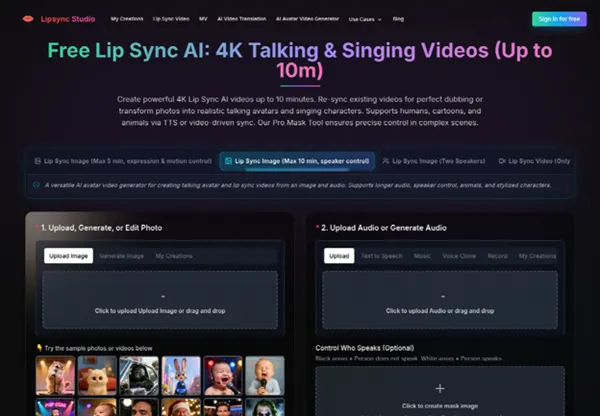
Lipsync Studio puts the still and the audio on one bench. The home path is built for a talking or singing portrait: upload or generate a photo, then upload or generate audio, then render. For a brand lead, the useful version is stricter. Use the approved headshot. Use the approved VO. Do not generate a new face because the tool can. The point is to keep identity, not to invent a spokesperson.
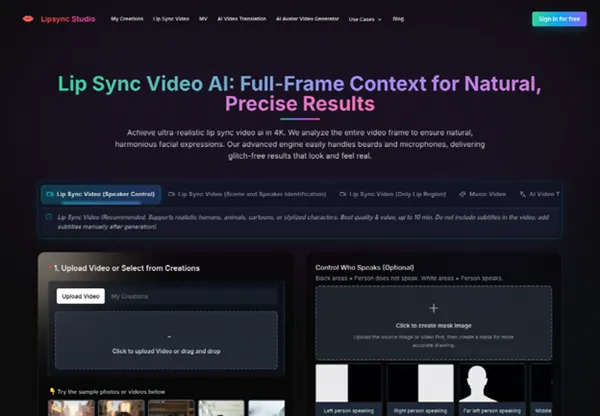
The public ceiling is easy to check. The product advertises 4K talking and singing videos up to ten minutes, which is enough for an explainer or a founder note and not a place to hide a half-hour keynote. Lip Sync Video reads the full frame, not only a mouth crop, and the page calls out beards and microphones as cases the engine is meant to handle. That matters on real brand stills, where a headset or a founder’s beard is not a styling error. It is the person legal already approved.

Upload The Approved Still And Voice
Start with Lip Sync Image when you have a still, or Lip Sync Video when you have an existing talking clip that needs new speech. Upload the source first. Then add the audio. If several people share the frame and only one should talk, speaker control can mask the intended face after the file is in. Do not turn that into a creative exercise. The mask is there so a silent colleague does not start mouthing the CEO’s line.
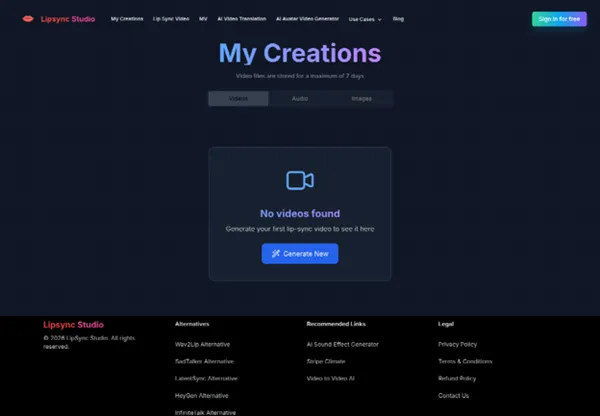
Login unlocks daily credits, and a task can keep running if someone closes the tab. Do not submit the same job twice. Finished files land in My Creations, and video files are stored for a maximum of seven days. That window is long enough for a comms review and short enough that a lead should download the keeper the same week. Treat the cloud copy as a review tray, not an archive.
Keep Subtitles Off The Source File
Lip Sync Video is explicit about one hygiene rule that brand teams skip. Do not include subtitles in the video you upload. Add them after generation. Burned-in captions become part of the picture the engine will try to honor, and a legal tweak to one line then forces another render. Keep type in the caption tool your channel already uses.
The same rule helps when a clip will later move into another language. AI Video Translation can take a source video, a target language, and either Fast Lip Sync or Advanced Lip Sync. Dynamic Duration can stretch or shorten the speech when the new language needs more or fewer words. Those controls are for a localization pass after the English mouth already matches. They are not a shortcut around the first approval.
|
Work item |
Split vendors |
One workspace |
|
Approved still |
Lives in the photo folder |
Uploaded once as the face |
|
Approved voice |
Lives in the audio folder |
Uploaded once as the track |
|
Mouth match |
Waits on a motion vendor |
Renders against those two files |
|
Comms review |
Relinks after every script tweak |
Re-renders inside a seven-day tray |
Read the table as a calendar, not a feature list. If your team already owns the still and the VO, the middle column is the waste. If you do not own either file yet, you are not ready for this tool. You are still in photography.
When A Multi Shot Treatment Beats Another Reshoot
A single talking portrait is enough when the campaign is a founder note or a support clip. It is not enough when the channel expects a cut. That is the second door, and it should stay closed until the mouth on the hero still is honest. Opening it early is how teams spend a week decorating a line legal is about to change.
Once the talking pass holds, an AI music video generator can take the same track, add a short brief, and plan more than one shot. The page is built as one workflow: upload a music track, add visual references, plan each shot, then render. For a brand team the track may be a bed under VO rather than a single. The useful part is the same. The song or bed becomes the timeline, and the shots have to answer it.
Brief The Track Before Shot Planning
The planner asks for a project title, a prompt, and optional image references. You can upload up to five references for characters, props, scenes, wardrobe, or visual style. That is the right place to pin the approved still, the product, and the wall color. It is the wrong place to upload five exploratory moods and hope the brand look survives.
Write the prompt like a treatment, not a slogan. The workspace wants the artist or spokesperson, the story arc, the visual language, the edit rhythm, the lighting, and the audience platform. Name the verse, chorus, or spoken sections you care about. If the film has no chorus, name the claim, the proof, and the close. Leave camera poetry out until those beats are assigned.
Export The Ratio The Channel Already Uses
Default settings on the planner show 16:9, 720p, and Fast. That is a draft lane. After shots exist, you can review timing, prompts, storyboard frames, and versions, then compose the approved shots into one piece. Delivery lists six aspect ratios at 720p, 1080p, or 4K. Pick the ratio the channel already sold, not the one that looks cinematic in a browser.
Performance-led, narrative, conceptual, and hybrid treatments are all on the page. A lean brand team should pick one. A founder talking to camera with two cutaways is a hybrid, not a fashion editorial. If the brief starts collecting every style the tool can name, you are back in vendor-land, only faster.
How Marketing Leads Should Judge The First Pass
Judge the file the way you judge a vendor. Open the approved still and the new clip in the same folder. If the person changed, reject it. If a second face in the frame started talking, reject it. If burned-in captions made a legal line uneditable, reject it. None of those calls require a taste debate about cinematic quality.
Then listen. The VO should be the file counsel signed, not a regenerated read that sounds friendlier. If someone used Text to Speech or Voice Clone because the approved track was late, mark that as a draft and keep the legal audio in the same card for the next render. Daily credits are enough to try the bind. They are not a reason to replace the signed voice.
Paid access starts on a Basic plan at $29.99, or $24.99 a month on the yearly toggle, which is enough to run a pilot week without turning this into a credit-pack meeting. Ignore the larger one-time ladders until a first pass has already survived comms. Price should follow a keeper, not the other way around. Lipsync Studio only earns that spend if the still and the track you already own come back as one file.
Send the keeper to comms with two notes: which still was used, and which audio hash or filename was used. If those two references are missing, the preview is decoration. A lead who cannot point at the sources will approve a stranger.
Where This Workflow Still Needs Human Cuts
The workspace will not replace a legal read, a colorist, or a day with the real person on set. Soft stills stay soft. Ten minutes in 4K covers an explainer and not a keynote. If the campaign needs union rules, a live audience, or a product that must be handled on camera, treat the render as a first pass and keep the human cut.
A Narrower Buy For Teams That Own Stills
This is for marketing leads who already hold an approved face and an approved track, and who are tired of paying a vendor to remarry them after every script tweak. It is not for teams that are still hunting a spokesperson, and it is not a substitute for a shoot you have not done.
Use the talking pass to protect the still. Use the multi-shot planner only after that pass holds. Download anything you might need inside the seven-day tray. Lipsync Studio is a fit when the calendar is being eaten by relinks, not when the brand still lacks a face. If those two source files are already in your folders, bind them once and stop booking a set for twenty new words.
That is the whole buy. Keep the vendor list short, keep the sources named, and let the mouth follow the line you already signed.





Comments 0
Leave a CommentSend Comment
Anda harus Login terlebih dahulu untuk dapat memberikan komentar.