
How to Create Character Designs from Simple Ideas
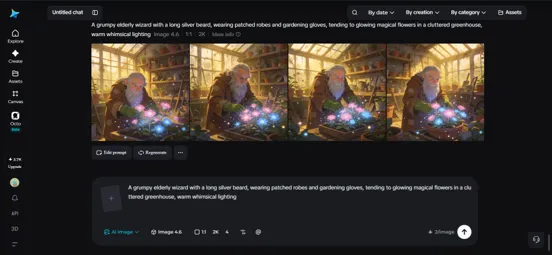
"A grumpy old wizard who secretly loves gardening." "A rebellious teenage mechanic on a spaceship." Ideas like these often exist as nothing more than a single sentence in a notes app, far from anything visual. Turning that spark into an actual character design used to require real illustration skill. Now, an AI image generator can take that one-line concept and turn it into a fully realized character in a matter of minutes.
Dreamina, running on its most advanced image generation model, Seedream 5.0 Pro, is particularly good at reading the personality behind a simple idea and translating it into visual choices — posture, expression, wardrobe, even color palette. Let’s walk through how to actually design a character from scratch.
Every great character starts as a one-liner
Professional character designers rarely start with a fully detailed brief. Most begin with a short, punchy description — a role, a personality trait, and maybe a twist. "A grumpy wizard who loves gardening" already tells you more than it seems: the wardrobe (robes, but worn and practical), the setting (somewhere green and cluttered), and the expression (probably a scowl, softened slightly). Learning to unpack a simple idea like this is the real starting point, before you even open Dreamina.
Breaking a concept into visual building blocks
Once you have your one-liner, it helps to translate it into concrete visual categories rather than jumping straight to a prompt:
- Personality — how does this trait show in posture or expression?
- Role or occupation — what would they realistically wear or carry?
- Setting — where would this character naturally exist?
- A visual contradiction or twist — what makes them memorable?
That last point matters more than people expect. A "grumpy wizard" is fine, but a grumpy wizard covered in dirt from tending flowers is instantly more interesting and specific.
Your 3-step character reveal with Dreamina
With your concept broken down, here’s exactly how to bring it to life.
Step 1: Write a text prompt and/or add a reference image
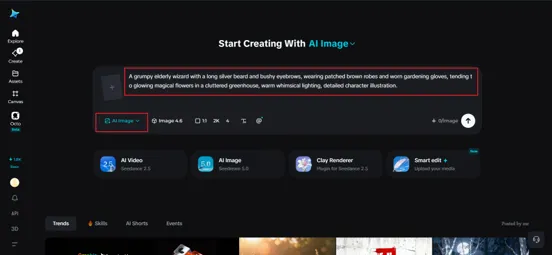
Navigate to Dreamina and write a detailed text prompt describing your character dressed appropriately for their role, incorporating the personality traits and setting you’ve mapped out. If you have a rough sketch or a reference image capturing part of the look you’re imagining, upload it to guide the generation further.

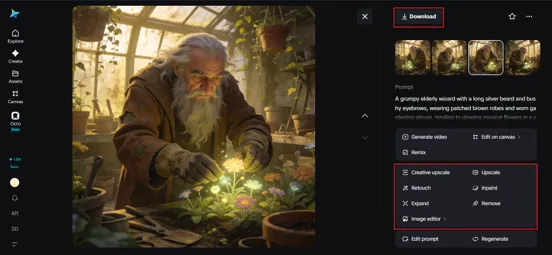
A strong sample prompt might read: A grumpy elderly wizard with a long silver beard and bushy eyebrows, wearing patched brown robes and worn gardening gloves, tending to glowing magical flowers in a cluttered greenhouse, warm whimsical lighting, detailed character illustration.
Notice how personality, wardrobe, and setting are all woven together in one description.
Step 2: Adjust parameters and generate
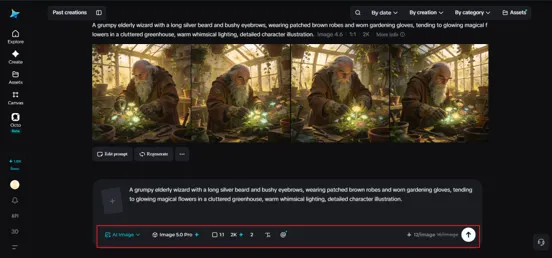
Before generating, set your parameters. Choose Image 5.0 Pro, powered by Seedream 5.0 Pro, as your model, then select your aspect ratio, image size, and resolution, going with 1K while exploring different concept directions or 2K once you’ve settled on a design worth refining further. Click Dreamina’s generate icon to bring your character concept to life.
Step 3: Customize and download
Once your character appears, refine the design using Dreamina’s AI customization tools — inpaint to adjust specific features like an expression or accessory, expand to reveal more of the setting around them, remove to eliminate anything that doesn’t fit, and retouch to sharpen final details. When the design feels complete, click the Download icon to save your finished character.
Letting wardrobe do the storytelling
Clothing is one of the fastest ways to communicate who a character is before they’ve done anything. A worn, patched robe suggests age and practicality over vanity. A crisp uniform suggests discipline or authority. Specifying fabric condition, fit, and small details like stains, patches, or accessories in your prompt adds narrative depth that a generic "wizard robes" description simply won’t capture.
Why Seedream 5.0 Pro is well-suited to character work
Character design benefits enormously from a model that actually reasons through intent rather than just pattern-matching keywords, and that’s exactly where Seedream 5.0 Pro shines. Its deep reasoning generation analyzes your prompt’s personality cues and visual relationships before creating the image, which helps translate abstract traits like "grumpy" or "rebellious" into believable posture and expression.
The pinpoint precision editing tools, with point selection, lasso, sketch guidance, and regional controls, make it easy to adjust a single feature, like an expression or hand gesture, without redoing the whole character. Multi-layer visual control also separates the character from their background and effects, so you can experiment with different settings while keeping your design locked in place. And with 2K output, fine details like fabric texture and facial expression come through with real clarity.
Iterating on personality, not just appearance
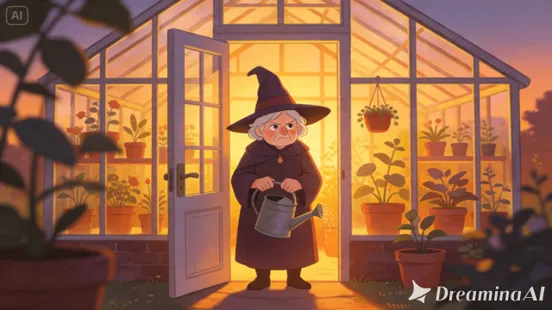
It’s tempting to treat character iteration as purely visual — tweaking hair color or outfit details. But some of the most useful revisions are personality-driven: does the pose feel grumpy enough? Does the expression read as reluctant kindness or pure irritation? Reviewing your generation against the original personality trait, not just its visual accuracy, tends to produce a much more memorable final design.
From concept art to a usable character
A strong character design should hold up beyond a single image. Once you’re happy with the base design, it’s worth testing whether it translates well into:
- Different poses and expressions
- Varied settings or lighting conditions
- Close-up portraits versus full-body shots
If the character still feels recognizable and consistent across these variations, you know the design is solid enough to build a project around.
Final thoughts
A single sentence is genuinely enough to start designing a real character, as long as you have the right AI image generator to help unpack it.
With Dreamina and its advanced Seedream 5.0 Pro model, that one-line idea about a grumpy gardening wizard, or whatever concept you’re working with, can become a fully realized, detailed character ready for a story, a game, or a project of its own.
Start with the personality, build outward, and let Dreamina fill in the rest!




Comments 0
Leave a CommentSend Comment
Anda harus Login terlebih dahulu untuk dapat memberikan komentar.