
How Fashion Brands Can Turn One Photo Shoot Into a Full Visual Content System
Fashion content used to be planned around a few major shoots each season. A brand would capture lookbook images, product photos, campaign shots, and a small set of social assets, then stretch those files across every channel. That approach still matters, but the pressure on fashion teams has changed. Online stores need clearer product visuals, social feeds need constant motion, and paid campaigns need fast testing without waiting for another full shoot.
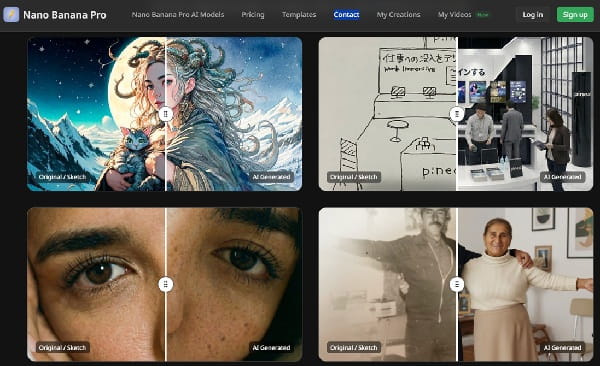
The practical answer is not to replace photography or design direction. It is to build a better content system around the assets a brand already has. One strong product image, styling shot, sketch, or campaign frame can become a wider set of still images, short clips, ad variations, and editorial visuals when the workflow is planned carefully.
Start With a Visual Map, Not a Tool
Before opening any creative tool, define what the content has to do. A fashion brand typically needs several visual roles from the same collection: a clean product image for the product page, a lifestyle frame for social proof, a campaign image for seasonal storytelling, close-up details for fabric or construction, and motion assets for short-form platforms.
This map keeps the workflow focused. Without it, teams often produce attractive images that do not fit a product page, or short videos that look interesting but do not show the garment clearly. A good visual map answers three questions:
- What must remain accurate, such as silhouette, color, print placement, material texture, or logo position?
- What can be stylized, such as background, lighting, camera angle, mood, or supporting props?
- Where will each asset be used, such as e-commerce, Instagram, email, marketplace listings, or paid ads?
Use AI Image Generation for Controlled Still Variations
Still images remain the foundation of fashion content. They are easier to review, easier to compare, and often more important for product trust than motion content. For brands that need campaign concepts, product mockups, outfit ideas, or editorial-style visuals, tools such as Nano Banana Pro can help turn prompts and reference images into high-resolution creative visuals with control over text, aspect ratio, composition, and styling direction.
The strongest use case is not random image generation. It is controlled variation. A designer might start with a reference image of a jacket, then test different editorial backgrounds. A social media manager might adapt one campaign concept into vertical, square, and banner-friendly compositions. A small e-commerce brand might explore seasonal visual ideas before committing to a full production setup.
For fashion teams, control matters more than novelty. If a tool changes the garment too much, invents details, or misrepresents fit, the image may look polished but still be unusable. The review process should therefore be strict: compare the output with the original garment, check text and logo placement, inspect hands and body proportions, and confirm that the final image does not imply a feature the product does not have.

Turn Key Stills Into Short Motion Assets
Once a brand has a reliable still image, motion can extend its usefulness. A short clip can add camera movement to a product shot, create a soft reveal for a campaign frame, or make a static lifestyle image feel more suitable for Reels, Shorts, TikTok, and paid social placements. This is where an AI image to video generator fits naturally into the production process: the team starts from an existing image, guides the camera motion and atmosphere with a prompt, then reviews whether the result preserves the original composition and product identity.
Short fashion clips work best when the motion supports the product rather than distracting from it. A dress may benefit from a gentle fabric movement rather than an exaggerated scene change. A sneaker may suit a slow product turn or light sweep. A beauty or accessory brand might use a subtle push-in, reflection, or background shift to make the asset feel more considered without obscuring the item.
Decide Which Asset Type Fits Each Channel
Not every channel needs the same type of creative. Product pages typically need clarity, consistency, and trust—clean stills, accurate details, and predictable framing. Social channels can carry more atmosphere and experimentation, but the first few seconds still need to show the product or concept clearly. Paid ads need variations that can be tested quickly, so the workflow should produce several versions without changing the core product message.
A simple channel plan can prevent wasted content production:
- Product pages: use accurate still images, detail crops, and consistent aspect ratios.
- Social posts: use editorial variations, outfit concepts, and short motion loops.
- Email campaigns: use seasonal hero images and simple animated product reveals.
- Paid ads: test multiple backgrounds, hooks, and crop formats while keeping the product recognizable.
- Wholesale or pitch decks: use polished collection visuals that support the brand story without overstating product features.
Build a Review Checklist for Brand Safety
AI-assisted fashion content should go through the same level of brand review as photography, copywriting, and packaging. The risk is not only visual mistakes; it is also customer confusion. If an image changes fabric weight, adds embroidery, alters a neckline, or makes a garment look more structured than it is, the brand may create expectations the real product cannot meet.
A practical review checklist should cover product accuracy, model representation, body proportions, cultural sensitivity, logo placement, text readability, and usage rights for source images. Teams should also decide when to disclose AI-assisted visuals, particularly in campaign contexts where transparency matters to the audience.
A Practical Workflow for Small Fashion Teams
Small teams can start with a lightweight process rather than a complex production system. First, collect the strongest source assets from a shoot, sketch, or catalog. Second, group them by purpose: product clarity, editorial story, social motion, and ad testing. Third, create still variations before creating video, because video quality depends heavily on the strength of the starting frame. Fourth, review outputs against the physical product and brand guidelines. Finally, publish assets in batches and track which formats drive engagement, saves, clicks, or sales.
This approach keeps AI tools in the role where they are most useful: expanding a creative direction that the brand already controls. It also helps fashion teams avoid the common mistake of producing more content without producing more usable content.
Conclusion
Fashion brands do not need to choose between traditional creative production and AI-assisted workflows. The most effective approach combines both. Photography, styling, and product knowledge establish the source of truth; AI tools help turn that source into more formats, more tests, and more channel-specific assets. When the process starts with a visual map and ends with careful review, one photo shoot can support a full content system without compromising product trust.




Comments 0
Leave a CommentSend Comment
Anda harus Login terlebih dahulu untuk dapat memberikan komentar.